Releases: AdguardTeam/AdguardForiOS
4.5.14

“Dear developers, can we get a bugfix pronto?” Of course you can! Right after the release, we serve you a hotfix with a resolved problem and fine-tuned operation.
How to install AdGuard For iOS
4.5.13
A small bug has crept into the release. That’s why we’re publishing a hotfix today: so you can enjoy the service, and we can get on with some bigger tasks.
How to install AdGuard For iOS
4.5.12

If there were an Olympic event for “Long-overdue but very satisfying fixes”, this release would go for the gold.
With SafariConverterLib v4.0 on board, we’ve sped up Safari rule loading, improved the stability of advanced rules, and reduced the content blocker file size for a lighter, smoother experience. Let’s take a closer look at the main changes.
Safari rules load up to 5x faster
We’ve refined how special characters in AdGuard rules are converted into regular expressions. This small but important change helps Safari compile the rules much more efficiently.
As a result, rule loading is now up to 5 times faster, the content blocker file is smaller, and advanced rules work better.
Improved support for advanced rules
Starting with v4.5.12, AdGuard for iOS now uses a new approach for applying advanced rules. This improvement allows us to apply the rules that didn’t work in Safari before, making filtering more accurate and efficient.
Other fixes
Some advanced rules didn’t apply to certain websites in Safari, even though they worked fine in other AdGuard products. This issue is now resolved, improving both filtering stability and performance. We’ve also fixed other minor bugs and introduced various enhancements for a smoother overall experience.
Changelog
SafariConverterLib (Converter of AdGuard rules to Safari content-blocking rules)
- Updated SafariConverterLib to v4.0 #2457
How to install AdGuard For iOS
4.5.11
Filtering is meant to stay in the background. When it works well, you don’t notice it — just a clean, ad-free web.
In this update, we’ve significantly improved how filtering works under the hood. We’ve upgraded the content blocking rules converter, the WebExtension engine, and the JavaScript filtering library. These changes bring:
- Better compatibility with AdGuard filtering rules
- Faster and more stable application of filtering rules
- Improved support for the latest filters
- Optimized performance of the Advanced Blocking extension
What does this mean in practice? Ads are blocked more precisely — including on tricky websites like YouTube. If you use Safari to watch videos, you should now see fewer issues like delays or black screens caused by blocked ads.
We’ve also updated the video guide on how to enable AdGuard extensions in Safari. These extensions are key to applying advanced filtering and getting the best ad blocking experience, especially on platforms like YouTube. So it’s important you have them on.
On that note, we’ve fixed an issue with YouTube live streams in AdGuard’s built-in video browser. After some changes on YouTube’s end, streams stopped working. That’s now resolved — live streams are back, and still ad-free.
And finally, as always, we’ve fixed other minor bugs and made performance improvements throughout the app.
Changelog
Fixes
- The AdGuard VPN icon is disabled in AdGuard when VPN operating mode is enabled and VPN is connected #2440
- YouTube player doesn’t play live streams in the AdGuard app #2436
$jsinjectrules are included in the regular content blocker #90- Filters are reloading multiple times when changing settings in quick succession
- Content blocker states aren’t displayed correctly
SafariConverterLib (Converter of AdGuard rules to Safari content blocking rules)
- SafariConverterLib updated to v3.0.0
- Added the new content blocking rules converter #2443
- Added the new WebExtension engine and JS library #2444
How to install AdGuard For iOS
4.5.10
This is a technical update aimed to increase the app stability and fix minor bugs.
How to install AdGuard For iOS
4.5.9

This is a technical update aimed to increase the app stability and fix minor bugs.
How to install AdGuard For iOS
4.5.8
This update is just a chill guy that makes the app up to 30x faster. We did some work on Safari Converter, so now AdGuard filtering rules are converted to Safari rules in just 0.5–2 seconds instead of 10–30. You will notice the difference especially when updating, enabling, or disabling filters and turning protection on.
Let's give a bit of explanation.
Updating and/or applying filters involves three steps: downloading new versions to the AdGuard app (a seamless process), converting AdGuard rules into Safari-compatible rules (now 30x faster thanks to optimization), and loading the rules into Safari. In the case of the last step, however, on iOS and iPadOS, the process takes 6–15 seconds per small content blocker to compile rules compared to fractions of a second on macOS. This delay affects user experience and slows filter updates, which are critical for ad blockers' performance. AdGuard has reported the issue to Apple (ticket ID: FB16130983) and hopes for a fix in 2025. You can read the blog post for more details.
How to install AdGuard For iOS
4.5.7
Right after the v4.5.6 release, we found that sharing YouTube videos to AdGuard’s internal ad-free browser was impossible on iOS 18. We fixed that, and now you can enjoy ad-free YouTube.
Changelog
Fixes
- Opening YouTube videos in AdGuard’s internal ad-free browser doesn’t work on iOS 18 #2387
How to install AdGuard For iOS
4.5.6
This update brings a bit of style: iOS 18 introduced customizable app icons, so now they’re available for the AdGuard app as well. To stay completely true to the branding, we added our own versions for Light, Dark and Tinted icons instead of just relying on iOS-generated ones.
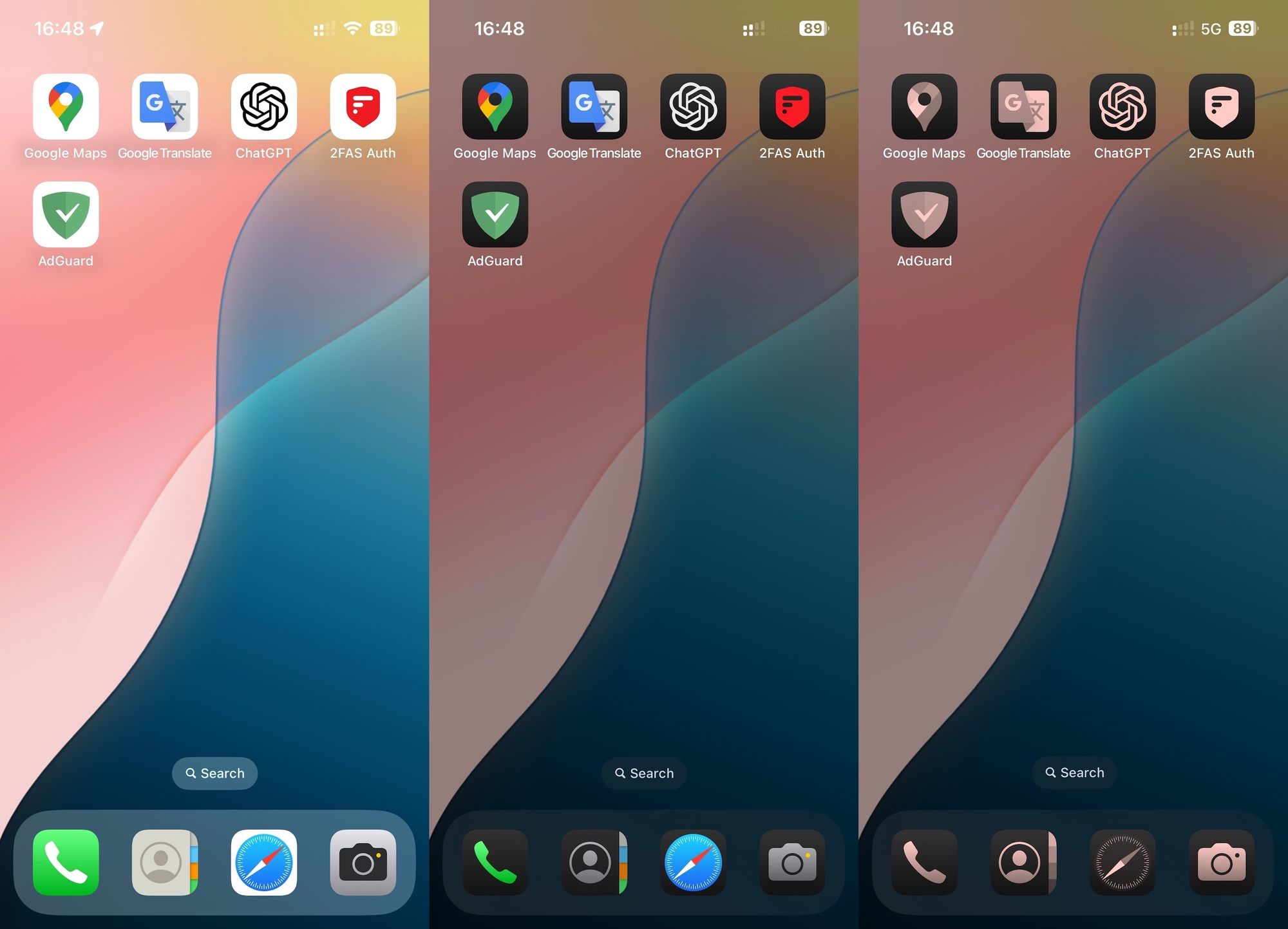
Changelog
Improvements
- Customizable application icons for iOS 18 #2372
DnsLibs (DNS filtering engine)
- Updated DnsLibs to v2.5.51 #2386
Scriptlets (JavaScript enhancement for filtering rules)
- Scriptlets updated to v1.11.16
How to install AdGuard For iOS
4.5.5
Apple fixed its iOS 17 bug that limited the number of Safari content-blocking rules, which contradicted their own Safari Content Blocking API documentation. That lets us remove our temporary workaround for that problem. In short, that means you can finally enable a large number of filters without them crashing, thanks to the fact that all of the 900K rules (provided by 6 AdGuard content blockers) are available again, as they are supposed to. Also, we updated Scriptlets — one of the essential libraries needed for the app’s stable performance.
If you are using iOS 17, please note that for this fix to work you need to update to the latest iOS.
If you are using iOS 16 and below, this bug doesn’t affect you.
Changelog
Fixes
- Some filter rules are not applied when a large number of filters is enabled #2346
Scriptlets (JavaScript enhancement for filtering rules)
- Scriptlets updated to v1.11.1