Creating loosely-coupled Reactive Feature Components
-
Re-usability is a pattern that solves the problem of duplication. It can be as simple as creating Functions, Classes, Interfaces to more complex UI-Components and Feature-Components.
-
The article focuses initially on the re-usability of UI-Views(UIComponents) and then the FeatureComponents.
-
Emphasis is on the Dependency-Inversion Principle, where both the Low-level(Feature Component) and High-level component (One incorporating the low-level components) both depend on abstraction, to create loosely-coupled systems.
Before proceeding to Feature Components, we’ll start with a brief overview of UI-Components(re-usability of Views).

- Data is sent downwards from HLC → LLC, while the Events are sent from the LLC → HLC.
Low-Level Component (UIComponent): It only renders itself based on the data provided by the High-level component. And propagates the events to the High-level component(👇). It’s devoid of business-logic.
class UIComponent(
  private val data: ComponentData,
  private val eventDispatch: UIComponentEventDispatch) {

  // Renders based on the data provided by HLC
  fun render(view: UIComponentView) {
    view.data = data
    view.invalidate()
  }

  fun onRandomEvent(payLoad: Data) {
    // Sends the event to the HLC
    eventDispatch.handleEvent1(payLoad)
  }
}

interface UIComponentEventDispatch {
  fun handleEvent1(payLoad: Data)
}
High-level Component: Provides the data for the UI-Components(LLC), and handles the events from the UIComponent(👇). Example: Click events. It holds all the business logic. It is a single source of truth that holds the state/data for all the UI-Component.
class HighLevelComponent {
  // Provides the data for UI component and passes the handler for handling events from UIComponent dispatch
  val uiComponent = UIComponent(data, UIComponentEventHandler())

  // Handles the events from the UIComponent.
  inner class UIComponentEventHandler: UIComponentEventDispatch {
    fun handleEvent1(payLoad: Data) { ... }
  }

  fun renderPage() {
    uiComponent.render(uiComponentView)
  }
}
UIComponents are useful when there is re-usability of UI-views, while Feature Component has larger functionality.
- Apart from receiving the data, it also produces the data itself.
- Contains its own business-logic.
- Needs lesser hand-holding than UIComponent and is useful for designing SDKs and standalone features
Why Reactive Feature Component?:- With multiple Components producing data, we need a way to synchronize them. Ex: Data produced by FC1 might affect FC2.
We will take a bottom-up approach, where we Design and Implement the Low-level Feature components first, and later look their incorporation into the High-level Component.
For demonstration purposes, we build a Flight Booking screen. It includes the following four Low-level Feature Components DateSelection, FlightsSelection, HotelSelection, and SummaryComponent.

The design of the FeatureComponent looks like this(👇)
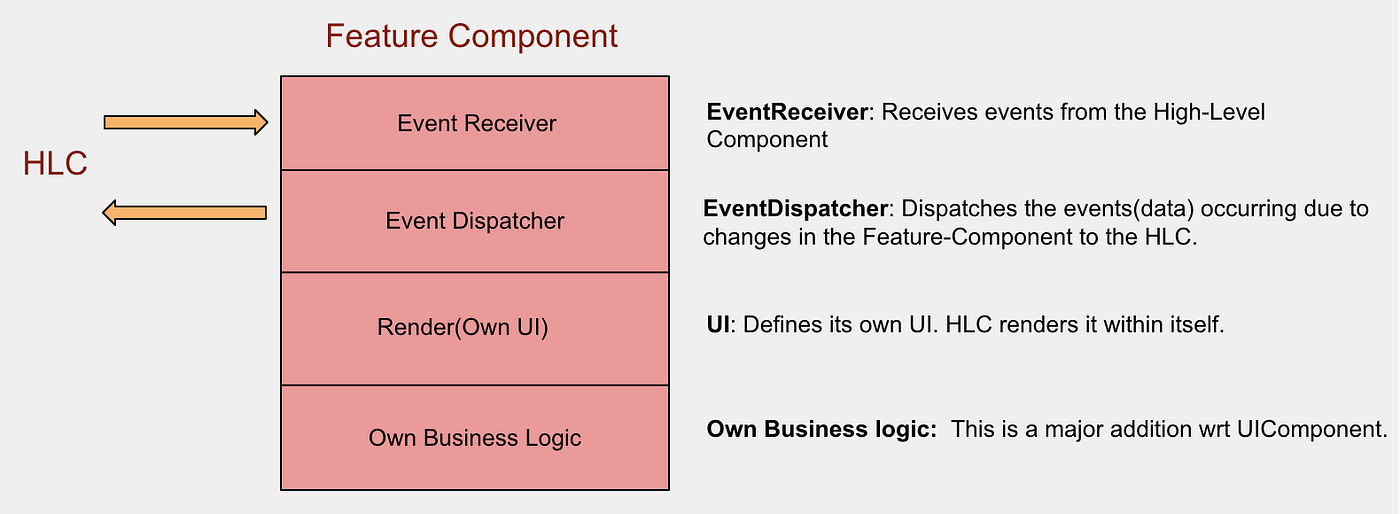
Let’s look at the Flight Feature Component
Dispatches the events to High-level-Component. This is like a channel through which events are sent to the outside world(HLC).
interface EventDispatcher

/**
 * Dispatches the events from the FlightFeatureComponent. This is like a channel through which we sent events to the outside world
 * There are two types of event
 * 1. Change in FeatureState needs to be propagated
 * 2. Other events like Clicks that are controlled by the parent and not handled by the current FeatureComponent
 */
interface FlightEventDispatcher : EventDispatcher {
    fun onFlightSelection(flight: Flight)
}onFlightSelectiona flight selection event is sent to the outside world. This may then be used by another FeatureComponent.
Feature Component receives the events from the High-level component.
interface EventReceiver

interface FlightEventReceiver : EventReceiver {
    // Change in date will let the FlightComponent to update itself.
    // Makes an API call to fetch the flights for the specified date
    fun dateChange(date: Date)

    fun onRemoveSelection()
}
This is a gateway through which it receives events from the HLC.
dateChangeA- change in date from another component is received. On reception, it fetches the flights for the said date.onRemoveSelection- clears the selected flight.
Every Feature Component has its own UI.
interface UI<V : ViewGroup> {
    fun render(view: V)
}

interface FeatureComponent<V:ViewGroup>: UI<V>- Every FeatureComponent extends the UI interface, implying that they define their own UI.
- HLC attaches it.
renderis a public API for the HLC to render the FeatureComponent by passing the view(More detail later in Implementation 👇).
Defining the FeatureComponent Contract
interface FeatureComponent<V: ViewGroup, E: EventDispatcher> : UI<V> {
    val eventDispatcher: E
}- All FeatureComponents implement this interface. It is generic on EventDispatcher.
class FlightFeatureComponent(
    override val eventDispatcher: FlightEventDispatcher
) : FeatureComponent<FlightView, FlightEventDispatcher> {

    fun onFlightSelected(flight: Flight) {
        eventDispatcher.onFlightSelection(flight)
    }
}EventDispatcheris a dependency of the Feature Component.- The component passes on the events to this interface. In this case, it sends the
selectedFlightevent.
class FlightFeatureComponent(
    override val eventDispatcher: FlightEventDispatcher
) : FeatureComponent<FlightView, FlightEventDispatcher>, FlightEventReceiver {

    private val store: FlightStore = TODO("Business logic implementation of Feature component")

    override fun dateChange(date: Date) {
        store.dispatchActions(FetchFlights(date))
    }

    override fun onRemoveSelection() {
        store.dispatchActions(FlightAction.RemoveSelectedFlight)
    }
}- Flight FeatureComponent implements the
FlightEventReceiverinterface. This provides it the capability to receive events from the HLC. In this case, it receivesdateChangeandremoveSelectionevents and passes them to its business layer(store).
class FlightFeatureComponent(
    override val eventDispatcher: FlightEventDispatcher
) : FeatureComponent<FlightView, FlightEventDispatcher>, FlightEventReceiver, FlightUiDelegate {

    private val uiState = MutableStateFlow(FlightsUiState.initState())
    private val store = FlightStore()

    override fun render(view: FlightView) {
        view.prepare(uiState, uiDelegate = this@FlightFeatureComponent)
    }

    override fun onFlightClick(flight: Flight) {
         store.updateSelectedFlight(flight)
    }
}
- Flight FeatureComponent implements the UI interface on FlightView defining its own UI.
Divide it into 2 parts — Business layer and View-Layer
class BookingScreenViewModel {
    ...
    val flightComponent = FlightFeatureComponent(eventDispatcher = FlightEventDispatchListener())

    // Listener to receive the events from the Component's EventReceiver
    inner class FlightEventDispatchListener : FlightEventDispatcher {
        override fun onFlightSelection(flight: Flight) {
            // Handle the flight selection in the business layer of the Booking screen (HLC)
        }
    }
    ...
}- It creates the Feature Components.
- To receive events from the FeatureComponents(LLC), HLC implements the dispatcher (
FlightEventDispatcher) in the form of inner class (FlightEventDispatchListener), which is then passed on as a dependency for component creation(👆).
class FlightFeatureComponent(): FlightEventReceiver

class BookingScreenViewModel {
    ...
    val flightComponent = FlightFeatureComponent(eventDispatcher = FlightEventDispatchListener())

    // An event to clear all the selections in the screen
    fun clearSelections() {
        flightComponent.onRemoveSelection()
    }
    ...
}- To send events to Feature Component, HLC can directly call the methods of FlightComponent, as it has the capability to receive events. See
clearSelections.
class BookingScreen : Fragment() {
    private val vm = MainViewModel()

    override fun onCreate(savedInstanceState: Bundle?) {
        ...
        vm.flightComponent.render(flight_view)
    }
}- It is only responsible for rendering the FeatureComponents created by the business-layer.
What if HLC components have a large number of components? The HLC would be over-burdened with synchronizing and passing the events between different FeatureComponents.
- A better approach would be to make the HLC a mediator for passing events to FeatureComponents.
- Whenever it receives an event from one FeatureComponent, it passes the event blindly to other FeatureComponents.
- All FeatureComponent receive all the events but chooses the events on which they want to react and ignore the rest.
- This way both are loosely coupled and any component can be attached to the HLC.