Private deployment process of H5-Dooring(English) #150

Description


Welcome to H5-Dooring 👋
H5-Dooring is a powerful, open source, free H5 visual page configuration solution dedicated to providing a simple, convenient, professional and reliable, unlimited set of H5 landing page best practices. The technology stack is mainly react, developed in the background using nodejs.
- Commercial license, including a full set of source code
- Subsequent Dooring updates are submitted here, and you can pick up if you need to update
- Authorize private repositories for enterprises
- Dooring series products have applied for software copyright, please follow the commercial license agreement to use, prohibit distribution and open source, otherwise they will be investigated for legal responsibility
Project SchemaNew
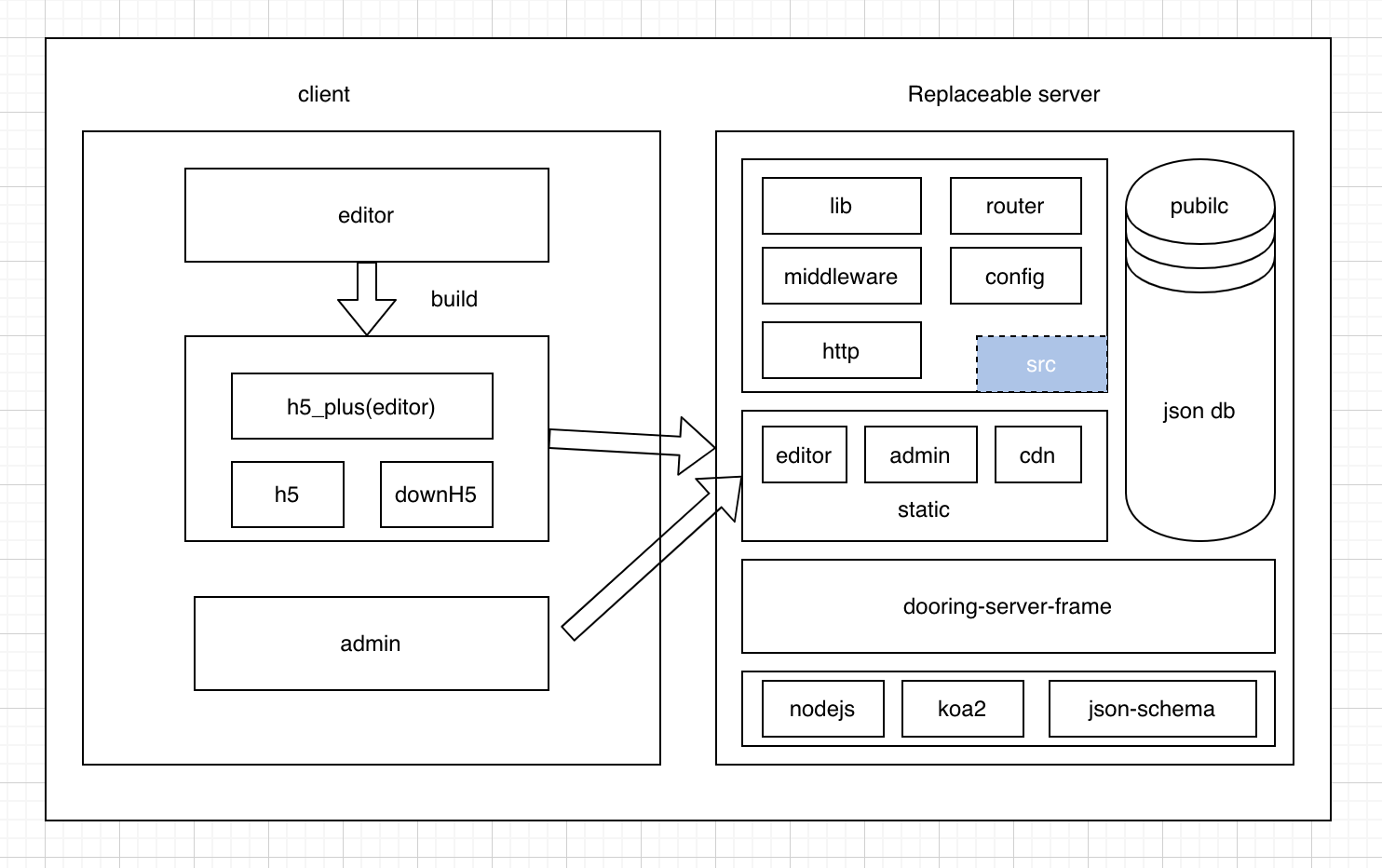
H5-Dooring technology architecture includes the core editor side, the management background (can be replaced with your own internal use, or transformed into internal use), and the server side (the replaceable server side, which can be replaced with your own company's service system), and the corresponding directories are as follows:
- editor (H5-Dooring editor)
- admin(Manage the back-end end)
- server(Server-side, only used for data support and page rendering)
Environment parameters
| Package name | Version | Remark |
|---|---|---|
| nodejs | 14.15.4 | this version is recommended |
| yarn(recommend) | 1.22.4 | npm, pnpm, etc. can also be used, but you need to ensure that the version is consistent |
Browser support
Modern browsers does not support IE browser
 IEdge |
 Firefox |
 Chrome |
 Safari |
|---|
Run locally
editor project
purchase privatized authorized companies can go into the delivered editor project and execute the installation package command:
yarn
After the installation is complete, run the command again:
yarn start
At this time, the IP port number of the access will be printed in the terminal console, and we can open it in the browser to run.
Construct
We can see the following script configuration in the package.json file of the project:
"scripts": {
    "start": "umi dev -- editor",
    "start:h5": "umi dev -- h5",
    "start:down": "umi dev -- downH5",
    "build": "umi build -- editor",
    "build:h5": "umi build -- h5",
    "build:down": "umi build -- downH5"
  }
Here is an introduction to the purpose of these commands:
- build Used to package editor projects
- build:h5 For packing H5 base works, required
- build:down Base project for packaging and downloading codes (mainly used to download H5 page codes online)
After we finish building, we will move the packaged files to the server/static directory. Deployment also requires only the server directory.
Common configuration
Engineering we use umi3.0, so we manage the public configuration related to the editor under the .umirc.ts file, here we need to pay attention to the define in the file, mainly used to provide custom configuration:
define: {
    START_ENV,
    lang,
    // Configure the domain name for H5 access
    h5Domain: 'cn.dooring.vip',
    // Sets the current version number
    curVersion: dooringVersion,
    // ICP filing information
    copyright: '鄂ICP备18024675号-3',
    // Whether to display the update pop-up window
    showUpdateModal: true,
    // Changelog
    updateList:  [
      "1. 新增表格组件",
      "2. 国际化优化",
      "3. 表单详情页支持内部滚动",
      "4. 个人图片库性能优化",
      "5. 下载代码功能优化"
    ],
    // Website logo address
    logo: 'http://cdn.dooring.cn/dr/logo.ff7fc6bb.png',
    // Whether the entry page displays sponsored brands and copyright notices
    showAdsAndTip: true,
    // Get the QR code of the login code when logging in
    qrcode: 'http://cdn.dooring.cn/dr%2Fcode1.png',
    // Friendly link display
    friendLinks: [
      {
        name: 'V6',
        link: 'http://v6.dooring.cn/beta',
        title: '可视化大屏编辑器'
      },
      {
        name: 'Power',
        link: '/powernice',
        title: '文档编辑器'
      }
    ],
    //  Default language
    defaultLocale: 'zh-CN',
    langMap: langMap
  },
admin
With the editor project, I will not introduce them all here.
server(Server engineering)
Again, we go to that directory and execute the installation command:
yarn
run:
yarn start
If you start editor or admin separately, we cannot access the server request normally, so at this time, we need to configure the local server IP, and configure the editor or admin project IP whitelist in the ** server ** project, as follows:
// editor/.umirc.ts
{
    define: {
        devServer: 'http://192.xx.xx.xxx:3000'
    }
}

// server/src/index.js
// 38 line
const whiteList = [
    // Editor IP address
    'http://192.168.1.3:8000',
];
In this way, we can solve the problem of the server running locally across domains.
The deployment goes live
We just need to upload the server directory to the server and install nodejs, yarn, if you need to do load balancing, we can use pm2, use pm2 to do complex balancing:
pm2 start dist/index.js -i maxNotes
1. cdn issue
At present, some static resources in the H5-Dooring project are stored in the Dooring server CDN, and enterprises need to replace the CDN of dooring with an external or enterprise's own CDN or static server before deployment.
2. Installation error problem
Node-SaaS installation failures may be encountered during the installation process, and the following solutions can be used here:
When npm installs node-sass dependencies, it downloads the .node file from the github.com. Due to the problem of the domestic network environment, this download time may be very long, and even cause the timeout failure。
Solution one
npm i node-sass --sass_binary_site=https://npm.taobao.org/mirrors/node-sass/

// linux、mac
SASS_BINARY_SITE=https://npm.taobao.org/mirrors/node-sass/ npm install node-sass

// window
set SASS_BINARY_SITE=https://npm.taobao.org/mirrors/node-sass/ && npm install node-sass
Solution 2: Use CNPM
cnpm install node-sassSolution 3: Create an .npmrc file
Create an .npmrc file in the root directory of the project and copy the following code to the file
sass_binary_site=https://npm.taobao.org/mirrors/node-sass/
phantomjs_cdnurl=https://npm.taobao.org/mirrors/phantomjs/
electron_mirror=https://npm.taobao.org/mirrors/electron/
registry=https://registry.npm.taobao.org/
It must also be added under .bashrc in the home directory:
export SASS_BINARY_SITE="https://npm.taobao.org/mirrors/node-sass"At last
$ sudo npm install --unsafe-perm -g node-sass
In this way, the node-saaS error problem can be solved.