How to right click?
#758


-
|
Im using an Apple track pad with MagicWB Lite (fresh install). I can't right click to access menus. Normally I would do this using two fingers on the track pad. I don't see it mentioned in the help docs either. Help? |
Beta Was this translation helpful? Give feedback.
Answered by
ghost
Nov 20, 2022
Replies: 1 comment
-
|
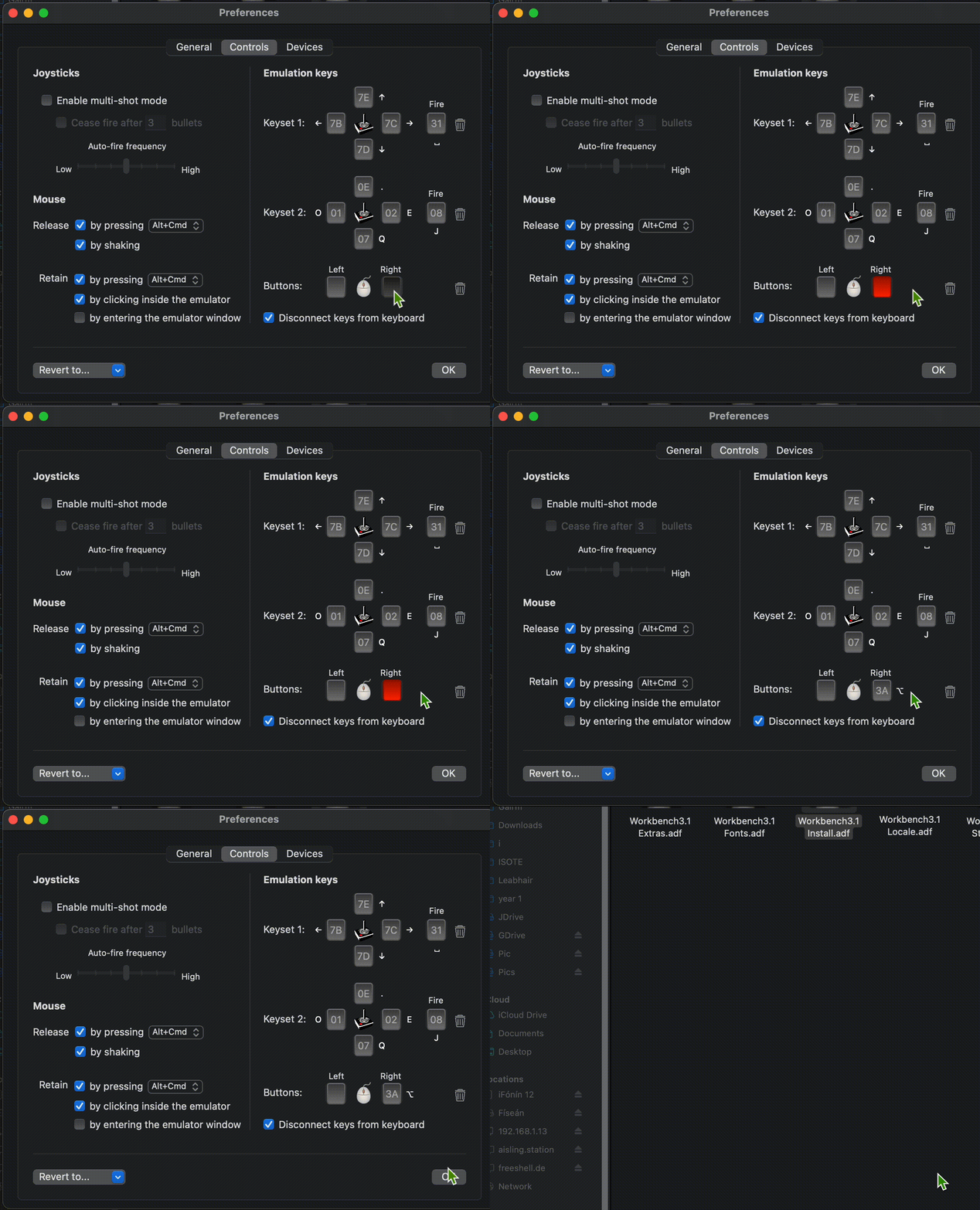
I figured it out. The user must go to Preferences -> Controls. Click the box beside the right of the mouse so that it turns red. Then press the modifier you would like to make right click work (I used option in the video below). Now when you press the modifier in vAmiga, it will behave as a right mouse click.
|
Beta Was this translation helpful? Give feedback.
0 replies
Sign up for free
to join this conversation on GitHub.
Already have an account?
Sign in to comment
I figured it out. The user must go to Preferences -> Controls.
Click the box beside the right of the mouse so that it turns red.
Then press the modifier you would like to make right click work (I used option in the video below).
Now when you press the modifier in vAmiga, it will behave as a right mouse click.