
Replies: 3 comments 1 reply

-
|
I've never tried, but I think I would approach it on a change event and then set the default value you want using JS or Jquery. |
Beta Was this translation helpful? Give feedback.

-
|
There is also a render address section in the checkout.js that should populate this data with your DNN user profile info. If the profile address data doesn't get populated it will not work however. You can try requiring your users to input their State(Region) in the DNN user profile settings when they register. That way Open Store should populate it with the user's info. If you're not registering users ahead of time(and/or not requiring their Region input) this may not help and js or jQuery would likely be the better route. |
Beta Was this translation helpful? Give feedback.

-
|
I think that you are looking for something like this => `<script> });
|
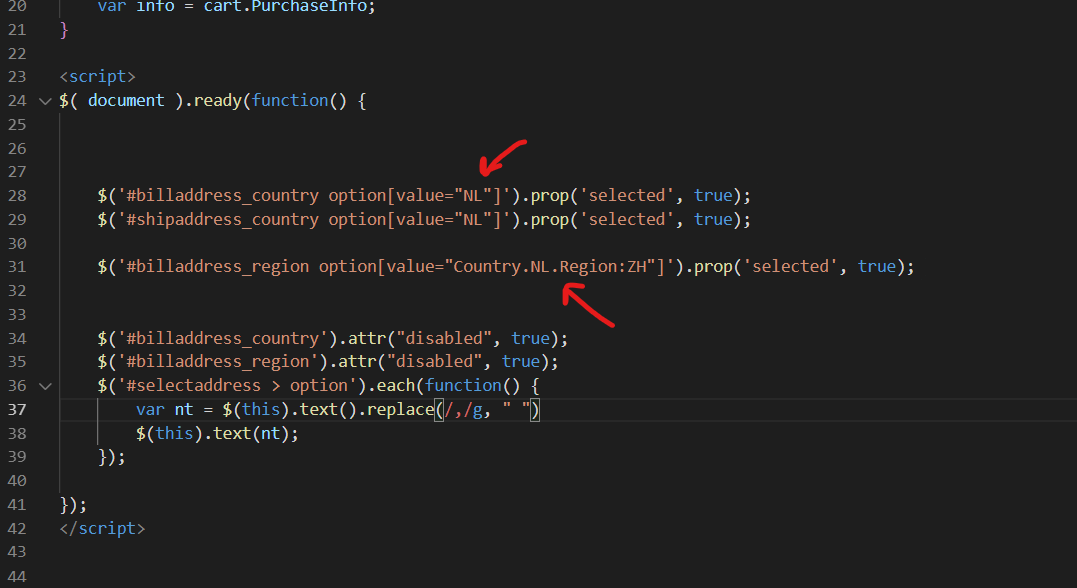
Beta Was this translation helpful? Give feedback.

-
|
I cheated. I looked through various suggestions and thought of an 'old-school' way to solve the clients issue without code. I added a row to the 'list' table with the 'state' preceded by a blank space. The default sort order is alpha-num so the blank space sorts first. That way. if they do not select a state, it's is the correct state (for the client) and if they select a state, it is also correct. Simple, not very technically helpful. I should try out Rodien's solution and see if that works as well. |
Beta Was this translation helpful? Give feedback.


Uh oh!
There was an error while loading. Please reload this page.
Uh oh!
There was an error while loading. Please reload this page.
-
Is there a way to set the default dropdown region/state in the selection dropdown during checkout? It currently displays Alabama (alpha/numeric sort) and the client wants his state first in the list so customers do not have to make a selection. He only sells classes to residents of Texas.
CheckoutAddress.cshtml reads:
`
`
CheckoutRegion.cshtml reads:
Beta Was this translation helpful? Give feedback.
All reactions