Display new products on top #149


-
|
Guys, Is there a way to display newly added products at the top? e.g. sorting by date... |
Beta Was this translation helpful? Give feedback.
Replies: 3 comments

-
|
You can follow the example on the ProductDisplayAjaxList.cshtml file for the preprocessor token. Then it requires a change in the ProductView.orderbytext resx string value which is used to generate the drop down options. That should be all you need to do. |
Beta Was this translation helpful? Give feedback.
-
|
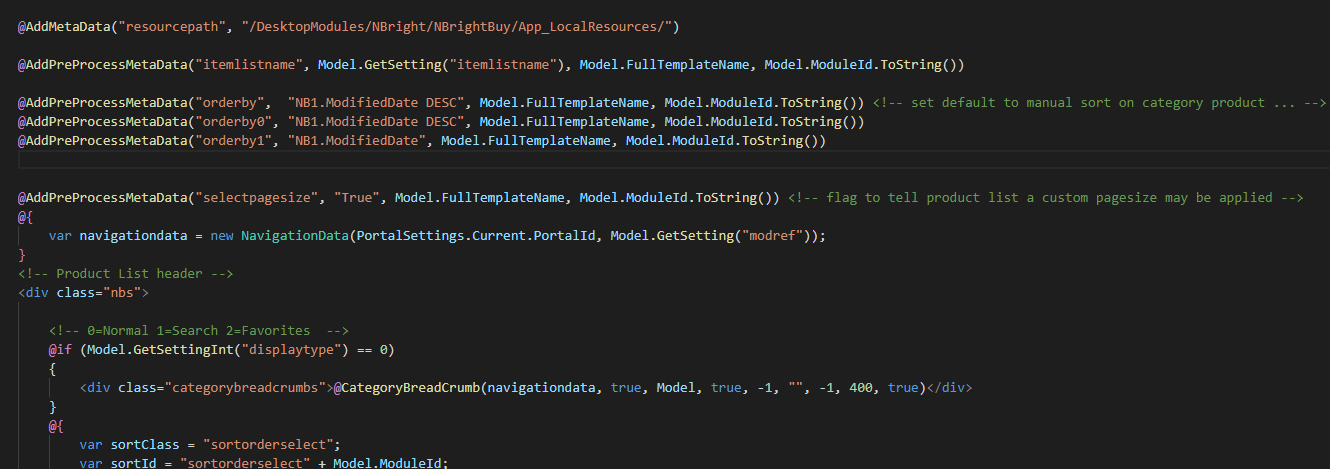
I have a follow up... I have the following code: ` @AddPreProcessMetaData("itemlistname", Model.GetSetting("itemlistname"), Model.FullTemplateName, Model.ModuleId.ToString()) @AddPreProcessMetaData("orderby", "NB1.ModifiedDate DESC", Model.FullTemplateName, Model.ModuleId.ToString()) @AddPreProcessMetaData("selectpagesize", "True", Model.FullTemplateName, Model.ModuleId.ToString()) But it is not working properly. When the productlist is loaded the products are not displayed as ModifiedDate DESC, but as soon as I change the page size, they So, ModifiedDate DESC only works when I change the page size. It feels like the @AddPreProcessMetaData orderby needs to be trigger a second time for it to work. Have you encounter this behavior before?
|
Beta Was this translation helpful? Give feedback.
-
|
I do see this behavior now... Good eye. When I walk it through the debugger the NavigationData's OrderBy property is always populated so the meta token isn't getting read from. From what I can tell we may need to check for firstRender in addition to the isNull at 1764 so that the token gets read. OpenStore/Components/Product/ProductFunctions.cs Line 1764 in a3e6a21 |
Beta Was this translation helpful? Give feedback.


You can follow the example on the ProductDisplayAjaxList.cshtml file for the preprocessor token.
@AddPreProcessMetaData("orderby5", "NB1.ModifiedDate", Model.FullTemplateName, Model.ModuleId.ToString()) @AddPreProcessMetaData("orderby6", "NB1.ModifiedDate DESC", Model.FullTemplateName, Model.ModuleId.ToString())Then it requires a change in the ProductView.orderbytext resx string value which is used to generate the drop down options.
Default sort,Sort by price (low to high),Sort by price (high to low),Sort by reference,Sort by name, Sort by date(ascending), Sort by date(descending)That should be all you need to do.