






This ESPHome External Component can emulate the Philips LivingColors 1st generation LED light and accompanying remote control.
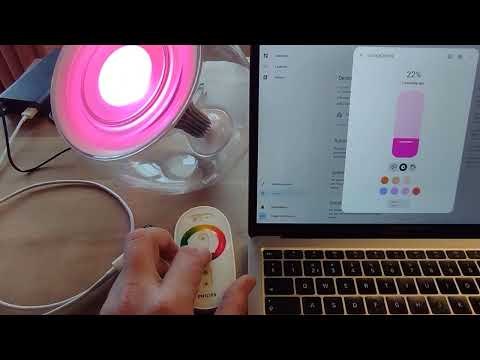
Features:
- Sending commands to the LivingColors LED light
- Receiving commands from LivingColors LED light and LivingColors remote control
- Enable native color cycling light effect
- Pair/unpair LivingColors LED light
This ESPHome component only works with the 1st generation of LivingColors LED lights, not with the 2nd generation or later. A 1st generation can be recognised by the 4 LEDs (2 red, 1 green, 1 blue) and a power supply which gives 5.6 Volts. The 1st generation remote control is not marked as such.
| 1st generation | 2nd generation | |
|---|---|---|
| LEDs | 4 LEDs | 7 LEDs |
| Power | 5.6 Volt | 18.5 Volt |
| Remote | No marking | GEN2 |
- Philips LivingColors 1st generation LED light
- ESP8266, ESP32 or other ESPHome supported microcontroller
- CC2500 transceiver module
The solder pads of the CC2500 transceiver are just a bit closer spaced than the width of a ribbon cable, you need a steady hand to solder the wires.

But I've created a Wemos mini Shield that is tested with the D1 mini and C3 mini. Contact me if you like to buy one!

| CC2500 | Wemos D1 mini Shield V2 |
Wemos C3 mini Shield V2 |
|---|---|---|
| GND | GND | GND |
| VDD | 3V3 | 3V3 |
| SI | GPIO13 | GPIO4 |
| SCLK | GPIO14 | GPIO2 |
| SO | GPIO12 | GPIO3 |
| GDO2 (interrupt) | GPIO15 | GPIO5 |
| GDO0 | A0 | GPIO0 |
| CSn | GPIO16 | GPIO1 |
For other configurations you can check the ESPHome CC2500 component.
The data needed to control the LivingColors LED light consists of a 14 byte packet which contains:
- 4 byte light address
- 4 byte remote address
- 1 byte fixed value, always 0x11
- 1 byte command
- 1 byte serial number, increases by 1 on every transmit
- 3 byte HSV color data
To set up this LivingColors component, you first need to place a top-level SPI and CC2500 component which defines the GPIO pins to use.
Example YAML for Wemos C3 mini and CC2500 shield:
esphome:
  name: livingcolors1
  friendly_name: LivingColors 1st generation

external_components:
  - source:
      type: git
      url: https://github.com/rrooggiieerr/esphome-cc2500
      # ref: 0.0.3
    components: [cc2500]
  - source:
      type: git
      url: https://github.com/rrooggiieerr/esphome-livingcolors1
      # ref: 0.0.3
    components: [livingcolors1]

esp32:
  board: lolin_c3_mini
  variant: esp32c3

# Enable logging
logger:
  level: INFO

# Enable Home Assistant API
api:
  encryption:
    key: ...

ota:
  - platform: esphome
    password: ...

wifi:
  ssid: !secret wifi_ssid
  password: !secret wifi_password
CC2500 settings for Wemos D1 mini and CC2500 Shield V2.0
spi:
  clk_pin: GPIO14
  mosi_pin: GPIO13
  miso_pin: GPIO12

cc2500:
  cs_pin: GPIO16
  gdo0_pin: A0
  gdo2_pin: GPIO15 # Interrupt
  output_power: 0xFF
SPI settings for Wemos C3 mini and CC2500 Shield V2.0
spi:
  clk_pin: GPIO2
  mosi_pin: GPIO4
  miso_pin: GPIO3

cc2500:
  cs_pin: GPIO1
  gdo0_pin: GPIO0
  gdo2_pin: GPIO5 # Interrupt
  output_power: 0xFF
LivingColors settings
livingcolors1:

button:
  - platform: livingcolors1
    pair:
      name: "Pair LivingColors"
    unpair:
      name: "Unpair LivingColors"

light:
  - platform: livingcolors1
    name: "LivingColors"
    address: 0x...
    restore_mode: RESTORE_DEFAULT_OFF
There are two ways to detect the address needed to send and receive LivingColors commands. In both cases you need to enable info loglevel in your ESPHome configuration and keep the log console open. When a new LivingColors address is detected, the address will be printed to the ESPHome console.
Flash your ESP with the above example configuration YAML except for the button and light components. Control your LivingColors LED light with the LivingColors remote control, it doesn't really matter in which way you control it. Switching on/off or changing the color, anything does. When the LivingColors component detects the command it will print the address to the logging console.
You can now use this address in the button and light components.
This method is particularly useful if you don't have the remote control. Flash your ESP with the above example configuration YAML except for the light component. Keep the ESP with CC2500 module close to the LivingColors LED light. When clicking the Pair LivingColors button the address will be printed to the logging console when pairing is successful.
You can now use this address in the light component.
If your LivingColors LED light skips commands the distance between the light and the CC2500 module
might be on the limit resulting in range issues. You can increase the number of commands repeats
the code sends by setting the send_repeats parameter of the light component. The default number
of repeats is 7, just like the LivingColors remote is sending.
light:
  - platform: livingcolors1
    name: "LivingColors"
    address: 0x...
    send_repeats: 15
    restore_mode: RESTORE_DEFAULT_OFF
You can contribute to this component, or show your appreciation, in the following ways.
Help other ESPHome and Philips LivingColors 1st generation users find this external component by starring this GitHub page. Click ⭐ Star on the top right of the GitHub page.
Do you enjoy using this ESPHome component? Please consider supporting my work through one of the following platforms, your donation is greatly appreciated and keeps me motivated:
Book a one-hour ESPHome support session. I’ll help you troubleshoot your ESPHome setup or answer your ESPHome-related questions.
What can be done in one hour:
- ESPHome walktrough, I explain to you how ESPHome works
- Assistance setting up your ESP device
- Install and configure an ESPHome (External) Component
What takes more time:
- Support for ESPHome Component developers
If you would like to have an ESPHome component developed for your product or are in need for a freelance ESP developer for your project please contact me, you can find my email address on my GitHub profile.


