
Replies: 5 comments 3 replies

-
|
As said before CTRL+Tab in my widows system web /pdf browser (Edge) ALWAYS moves from current tab to the next on the right |
Beta Was this translation helpful? Give feedback.

-
|
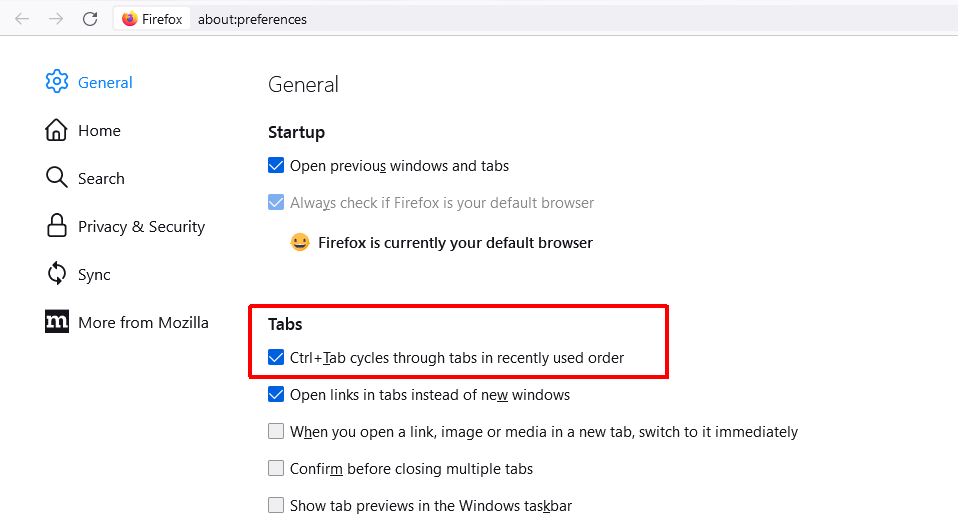
You are right, edge browser also does not have this very desirable feature. In that case, it has been left to third party developers to implement the feature. Of course edge is only one browser. Notably the behavior of alt + tab in Windows is MRU (most recently used) order. MRU tab switching is implemented in firefox and other chromium browsers as well as in popular IDE's . It may not be everyones favorite default behavior, but it is not uncommon and often, users cite this feature as the reason they use a given browser. A setting would allow the user to decide which tab order to use. |
Beta Was this translation helpful? Give feedback.

-
|
Well my Firefox 101 must be odd because it works the same windows way too, any order move the tabs or open randomly each time ctrl tab moves to the one on the right ?, You must be setting yours to an enhanced/custom setting. Most of my apps don't have tabs even my acrobat is before tabs introduction, so had to test tracker and guess what however I change opening order or even shuffle tabs, it follows SumatraPDF method too, perhaps its just a windows system thing. my Alt+Tab is commandeered by widows to move from app to app in the same left to right order. |
Beta Was this translation helpful? Give feedback.

-
No it is not odd. It just depends on the preference you set, which is all @fisher-j is requesting. I am +1 for this option as well. I find SumatraPDF's current behaviour unhelpful when I ant to switch back and forth between two documents.
|
Beta Was this translation helpful? Give feedback.

-
|
Added a change in DaPa@1664721 which implements this request via an advanced option CtrlTabLastViewed (default false). When CtrlTabLastViewed = true, then Ctrl+Tab behaves as in Firefox, going back to the most recent tab. |
Beta Was this translation helpful? Give feedback.

-
|
Any reason you didn't create a PR @DaPa ? Be great to have this in a Sumatra release. |
Beta Was this translation helpful? Give feedback.

-
|
Sorry for the late answer, I just created a PR in #4382. Hope sumatrapdf authors review it carefully and maybe find a better implementation, thanks! |
Beta Was this translation helpful? Give feedback.

-
|
Shame it wasn't merged. SumatraPDF still doesn't have Ctrl+Tab in most recent order. Instead, what was delivered is the same left-to-right order, just with a list of tabs shown. |
Beta Was this translation helpful? Give feedback.


Uh oh!
There was an error while loading. Please reload this page.
-
I would like to be able to use ctrl + tab to switch tabs in "last viewed" order. Thus, ctrl + tab + tab (tab twice while holding ctrl) would go to the 2nd most recently viewed tab in the queue and ctrl + tab + tab + tab would go to the third and so on. This behavior is common in software with tab interfaces and is useful when you are primarily switching back and forth between two tabs and you do not want to remember tab numbers.
This is related to #646 where the command palette was suggested as an adequate tab switching mechanism. But sometimes filenames are not all that intuitive and in any case, it is much slower than ctrl + tab.
Beta Was this translation helpful? Give feedback.
All reactions