Unable to identify active tabs #3093

Replies: 7 comments 1 reply

-
|
Hi-Light tab is white other is greyed out full name of web downloading file is visible
|

Beta Was this translation helpful? Give feedback.

-
|
Thanks for the answer.
|

Beta Was this translation helpful? Give feedback.

-
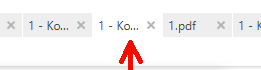
It looks very clear to me on my laptop.
If the lighter colour of the active tab does not stand out clearly on your laptop or monitor, then you might wish to check your brightness/contrast settings in case that is minimising the difference between active & background tabs. |

Beta Was this translation helpful? Give feedback.
-
|
I like sumatrapdf, therefore I use it on more than one machine. I can't believe that all these machines have monitors with wrong settings. And I will certainly not adjust all these monitors just for one program just because the developer thinks the difference between active and inactive tab is big enough. If nobody else has a problem with it it's ok but for me I won't use sumatrapdf any more. This is ridiculous. |
Beta Was this translation helpful? Give feedback.
-
|
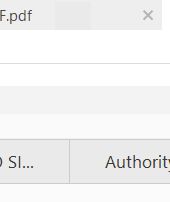
For comparison, here's the tab bar of SumatraPDF (at the top) and Acrobat (at the bottom). Click on the image to see it full sized.
The active tabs are the same colour. The inactive tabs are very nearly the same colour. If you look closely at the right hand Sumatra tab, you can see a little rectangle of very slightly darker grey (between the letters .pdf and the close tab icon) where I have pasted a piece of the Acrobat tab over the Sumatra tab. Acrobat is darker, but only just.
I think the main difference is that the Sumatra tab bar is not as tall. But honestly, as I said previously, the active tab is easy to spot on the laptop I am using. |

Beta Was this translation helpful? Give feedback.
-
|
Although the colors appear to be similar in SumatraPDF and Acrobat, the active tab in Acrobat is easieer to identify. You already mentioned it, the tabs are taller, despite of that the active tab in Acrobat has the "x" for closing the tab and the design of Acrobat seems to make it easier to recognize the active tab. I did some searching and I found that the problem already mentioned in 2016. And it still exists. I am not the only one. |
Beta Was this translation helpful? Give feedback.

-
|
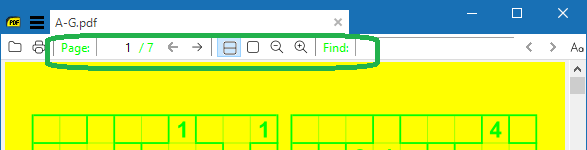
you can change the colours in the source code see #1985 but the outer VisStudio themes control was designed for prior to windows 8 at which point many of the newer metro colours looked "flatter" in lighter or darker win 10 for reference this was one example discussed in #743 |
Beta Was this translation helpful? Give feedback.

-
|
I have to agree with Pete-10 here about the active tab not standing out. |

Beta Was this translation helpful? Give feedback.


Uh oh!
There was an error while loading. Please reload this page.
-
Hello
While I love the size of sumatrapdf, there is one major downside. I am not able to identify the active tab. Most of the time i have a lot of tabs open and its nearly unpossible to say which tab ist active. And as if this isn't enough, sumatrapdf doesen't show the full name of a pdf while the mouse is over a tab. Maybe that might not matter if you have just one tab opened, for me sumatrapdf is useless.
I can't understand at all why this isn't the case for anyone else. And for the developer himself.
Please fix this problem.
Pete
Beta Was this translation helpful? Give feedback.
All reactions