Provides a simple way of building
Android notifications
with buttons with callbacks, no java knowledge required.
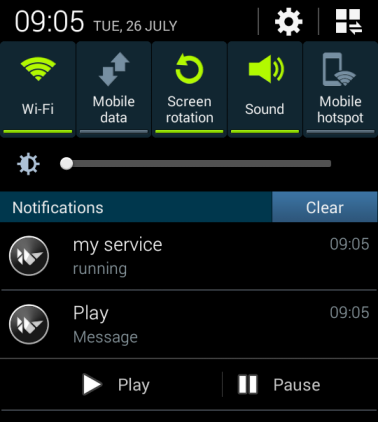
Buttons allow you to control your background services while using other apps
from noti_builder.noti_builder import Notification_BuildernBuilder = Notification_Builder()nBuilder.set_title('myTitle')
nBuilder.set_message('myMessage')
nBuilder.set_ticker('Button example')nBuilder.set_subtext(str)## 0. Displayed button name
## 1. icon integer available at https://developer.android.com/reference/android/R.drawable.html
## 2. callback
## action= android PendingIntent action, button name will be used if not provided
nBuilder.add_button('Play', 17301540 , callback, action='Play')nBuilder.build()nBuilder.set_vibrate(float)nBuilder.set_sound(str)### Default is "org.renpy.android.ACTION_"
### Buttons broadcast "intent name"+"button action",
### for example, Play button broadcasts "org.renpy.android.ACTION_Play"
nBuilder.set_intentName(str)nBuilder.remove_notification()Access android notification builder directly
nBuilder.javaBuilder
### For example, nBuilder.javaBuilder.setOngoing(True) will make notification ongoing
### Remember that javaBuilder is reset when nBuilder.build is callednBuilder.remove_buttons()nBuilder.set_ongoing(True)nBuilder.set_autocancel(True)nBuilder creates BroadcastReceivers when buttons are added to listen for touches,
Start/stop and get object list with
nBuilder.start()
nBuilder.stop()

nBuilder.get_receivers()
### BroadcastReceivers have start/stop methods,
### control them directly by getting the list and running BroadcastReceiver methods