   ______                _                      __
  / ____/___  __________(_)___ _   _____  _____/ /_
 / /   / __ \/ ___/ ___/ / __ \ | / / _ \/ ___/ __/
/ /___/ /_/ / /  (__  ) / / / / |/ /  __(__  ) /_
\____/\____/_/  /____/_/_/ /_/|___/\___/____/\__/

Automatic Snapshot Tool for Proxmox VE (Made in Italy)




# Check available releases at: https://github.com/Corsinvest/cv4pve-autosnap/releases
# Download specific version (replace VERSION with actual version number)
wget https://github.com/Corsinvest/cv4pve-autosnap/releases/download/VERSION/cv4pve-autosnap-linux-x64.zip
unzip cv4pve-autosnap-linux-x64.zip

# Create snapshot with retention
./cv4pve-autosnap --host=YOUR_HOST --username=root@pam --password=YOUR_PASSWORD --vmid=100 snap --label=daily --keep=7

# Clean old snapshots
./cv4pve-autosnap --host=YOUR_HOST --username=root@pam --password=YOUR_PASSWORD --vmid=100 clean --label=dailyClick to expand navigation
|
|

# Check available releases and get the specific version number
# Visit: https://github.com/Corsinvest/cv4pve-autosnap/releases

# Download specific version (replace VERSION with actual version like v1.2.3)
wget https://github.com/Corsinvest/cv4pve-autosnap/releases/download/VERSION/cv4pve-autosnap-linux-x64.zip

# Alternative: Get latest release URL programmatically
LATEST_URL=$(curl -s https://api.github.com/repos/Corsinvest/cv4pve-autosnap/releases/latest | grep browser_download_url | grep linux-x64 | cut -d '"' -f 4)
wget "$LATEST_URL"

# Extract and make executable
unzip cv4pve-autosnap-linux-x64.zip
chmod +x cv4pve-autosnap

# Optional: Move to system path
sudo mv cv4pve-autosnap /usr/local/bin/# Check available releases at: https://github.com/Corsinvest/cv4pve-autosnap/releases
# Download specific version (replace VERSION with actual version)
Invoke-WebRequest -Uri "https://github.com/Corsinvest/cv4pve-autosnap/releases/download/VERSION/cv4pve-autosnap-win-x64.zip" -OutFile "cv4pve-autosnap.zip"
# Extract
Expand-Archive cv4pve-autosnap.zip -DestinationPath "C:\Tools\cv4pve-autosnap"
# Add to PATH (optional)
$env:PATH += ";C:\Tools\cv4pve-autosnap"# Check available releases at: https://github.com/Corsinvest/cv4pve-autosnap/releases
# Download specific version (replace VERSION with actual version)
wget https://github.com/Corsinvest/cv4pve-autosnap/releases/download/VERSION/cv4pve-autosnap-osx-x64.zip
unzip cv4pve-autosnap-osx-x64.zip
chmod +x cv4pve-autosnap
# Move to applications
sudo mv cv4pve-autosnap /usr/local/bin/
cv4pve-autosnap --host=192.168.1.100 --username=backup@pve --password=your_password [commands]cv4pve-autosnap --host=192.168.1.100 --api-token=backup@pve!token1=uuid-here [commands] |
# Use interactive password prompt that stores to file
cv4pve-autosnap --host=192.168.1.100 --username=backup@pve --password=file:/etc/cv4pve/password [commands]

# First run: prompts for password and saves to file
# Subsequent runs: reads password from file automatically |
The --vmid parameter supports powerful pattern matching based on the GetVmsAsync method with jolly patterns:
| Pattern | Syntax | Description | Example |
|---|---|---|---|
| Single ID | ID |
Specific VM/CT by ID | --vmid=100 |
| Single Name | name |
Specific VM/CT by name | --vmid=web-server |
| Multiple IDs | ID,ID,ID |
Comma-separated list | --vmid=100,101,102 |
| Mixed ID/Names | ID,name,ID |
Mix IDs and names | --vmid=100,web-server,102 |
| ID Ranges | start:end |
Range of IDs (inclusive) | --vmid=100:110 |
| Complex Ranges | start:end,ID,start:end |
Multiple ranges and IDs | --vmid=100:107,200,300:305 |
| Wildcard Names | %pattern% |
Contains pattern | --vmid=%web%,%db% |
| Prefix Match | pattern% |
Starts with pattern | --vmid=web%,db% |
| Suffix Match | %pattern |
Ends with pattern | --vmid=%server,%prod |
| All VMs | @all |
All VMs in cluster | --vmid=@all |
| All on Node | @all-node |
All VMs on specific node | --vmid=@all-pve1 |
| All on Current | @all-$(hostname) |
All VMs on current host | --vmid=@all-$(hostname) |
| Pool Selection | @pool-name |
All VMs in specific pool | --vmid=@pool-production |
| Tag Selection | @tag-name |
All VMs with specific tag | --vmid=@tag-backup |
| Node Selection | @node-name |
All VMs on specific node | --vmid=@node-pve1 |
| Node Current | @node-$(hostname) |
All VMs on current host | --vmid=@node-$(hostname) |
| Exclusions | -ID or -name |
Exclude specific VM/CT | --vmid=@all,-100,-test-vm |
| Wildcard Exclusions | -%pattern% |
Exclude pattern matches | --vmid=@all,-%test%,-%dev% |
| Range Exclusions | -start:end |
Exclude range of IDs | --vmid=@all,-200:299 |
| Tag Exclusions | -@tag-name |
Exclude VMs with tag | --vmid=@all,-@tag-test |
| Pool Exclusions | -@pool-name |
Exclude pool VMs | --vmid=@pool-prod,-@pool-dev |
| Node Exclusions | -@node-name |
Exclude node VMs | --vmid=@all,-@node-pve2 |
Real-World Selection Examples
# Single VM by ID
--vmid=100

# Single VM by name
--vmid=database-server

# Multiple VMs mixed
--vmid=100,web-server,102,mail-server

# Range of VMs
--vmid=100:110

# Complex ranges
--vmid=100:107,-105,200:204,300

# Wildcard patterns with %
--vmid=web%,db%,%server  # web*, db*, *server
--vmid=%test%,%dev% # *test*, *dev*# All VMs in production pool
--vmid=@pool-production
# All VMs tagged as critical
--vmid=@tag-critical
# All VMs on specific node
--vmid=@node-pve1
# All VMs on current hostname
--vmid=@node-$(hostname)# All VMs except specific IDs
--vmid=@all,-100,-101
# All VMs except by name
--vmid=@all,-test-vm,-backup-server
# All VMs except wildcard patterns
--vmid=@all,-%test%,-%dev%
# All VMs except range
--vmid=@all,-200:299
# Production pool except test tagged
--vmid=@pool-production,-@tag-test
# All except specific node
--vmid=@all,-@node-pve2
# Complex exclusions with wildcards
--vmid=@all,-100:110,-@tag-development,-%test%# Contains pattern (equivalent to *web* in shell)
--vmid=%web% # Matches: web-server, my-web-app, web01
# Starts with pattern (equivalent to web* in shell)
--vmid=web% # Matches: web-server, webmail, web01
# Ends with pattern (equivalent to *server in shell)
--vmid=%server # Matches: web-server, mail-server, db-server
# Multiple wildcard patterns
--vmid=web%,db%,%prod # web*, db*, *prod
# Complex selections with wildcards
--vmid=%web%,%db%,100:110,mail-server
# Exclude wildcard patterns
--vmid=@all,-%test%,-%dev%,-%staging%
Create Snapshots
cv4pve-autosnap --host=pve.domain.com --username=root@pam --password=secret --vmid=100 snap --label=daily --keep=7cv4pve-autosnap --host=pve.domain.com --api-token=backup@pve!token=uuid --vmid=100,101,102 snap --label=backup --keep=3 --statecv4pve-autosnap --host=pve.domain.com --username=backup@pve --password=secret --vmid="@all,-100,-test-vm" snap --label=nightly --keep=5Clean Old Snapshots
cv4pve-autosnap --host=pve.domain.com --username=root@pam --password=secret --vmid=100 clean --label=dailycv4pve-autosnap --host=pve.domain.com --api-token=backup@pve!token=uuid --vmid=@pool-production clean --label=weekly --keep=4Status & Monitoring
cv4pve-autosnap --host=pve.domain.com --username=root@pam --password=secret --vmid=100 statuscv4pve-autosnap --host=pve.domain.com --api-token=backup@pve!token=uuid --vmid=@all status --output=jsonProduction Environment Patterns
# Backup all production VMs tagged as 'critical'
cv4pve-autosnap --host=cluster.company.com --api-token=backup@pve!prod=uuid --vmid=@tag-critical snap --label=critical-daily --keep=14

# Backup entire customer pool except test VMs
cv4pve-autosnap --host=pve.company.com --username=backup@pve --password=secret --vmid="@pool-customer1,-@tag-test" snap --label=customer-backup --keep=30

# Node-specific backup with range exclusion
cv4pve-autosnap --host=pve-cluster.local --api-token=ops@pve!node1=uuid --vmid="@node-pve1,-200:299" snap --label=node1-backup --keep=7Cron Examples
# Edit crontab
crontab -e

# Daily backup at 2 AM (keep 7 days)
0 2 * * * /usr/local/bin/cv4pve-autosnap --host=pve.local --api-token=backup@pve!daily=uuid --vmid=@tag-production snap --label=daily --keep=7

# Weekly backup on Sunday at 3 AM (keep 4 weeks)
0 3 * * 0 /usr/local/bin/cv4pve-autosnap --host=pve.local --api-token=backup@pve!weekly=uuid --vmid=@all snap --label=weekly --keep=4 --state

# Monthly cleanup on 1st day at 4 AM
0 4 1 * * /usr/local/bin/cv4pve-autosnap --host=pve.local --api-token=backup@pve!cleanup=uuid --vmid=@all clean --label=old-snapshots
| Permission | Purpose | Scope |
|---|---|---|
| VM.Audit | Read VM/CT information | Virtual machines |
| VM.Snapshot | Create/delete snapshots | Virtual machines |
| Datastore.Audit | Check storage capacity | Storage systems |
| Pool.Audit | Access pool information | Resource pools |
Creating API Tokens
# Follow Proxmox VE documentation for:
# - API token creation with proper privilege separation
# - Permission assignment for required roles
# - Required permissions: VM.Audit, VM.Snapshot, Datastore.Audit, Pool.Audit
# Refer to official Proxmox VE API documentation for detailed stepscv4pve-autosnap --host=pve.local --api-token=backup@pve!backup-token=uuid-from-creation [commands]
|
|

Pre/Post Snapshot Automation
Hook scripts receive environment variables for custom automation:
CV4PVE_AUTOSNAP_PHASE        # pre-snapshot, post-snapshot, pre-clean, post-clean
CV4PVE_AUTOSNAP_VMID         # VM/CT ID
CV4PVE_AUTOSNAP_VMNAME       # VM/CT name
CV4PVE_AUTOSNAP_VMTYPE       # qemu or lxc
CV4PVE_AUTOSNAP_LABEL        # Snapshot label
CV4PVE_AUTOSNAP_KEEP         # Retention count
CV4PVE_AUTOSNAP_SNAP_NAME    # Snapshot name
CV4PVE_AUTOSNAP_VMSTATE      # Memory state included (1/0)
CV4PVE_AUTOSNAP_DURATION     # Operation duration
CV4PVE_AUTOSNAP_STATE        # Operation status (1/0)
CV4PVE_AUTOSNAP_DEBUG        # Debug mode enabled (1/0)
CV4PVE_AUTOSNAP_DRY_RUN      # Dry run mode enabled (1/0)
The repository includes example hook scripts in the hooks/ directory for different platforms:
- Windows Batch: hook-template.bat
- Unix/Linux: hook-template.sh
- PowerShell: hook-template.ps1
- Metrics: send-metrics.sh (for sending metrics to monitoring systems)
These scripts provide templates with all available environment variables and phase handling logic that you can customize for your automation needs.
#!/bin/bash
# /usr/local/bin/cv4pve-hook.sh

case $CV4PVE_AUTOSNAP_PHASE in
    "pre-snapshot")
        echo "$(date): Starting snapshot for VM $CV4PVE_AUTOSNAP_VMID"
        # Send notification to monitoring system
        curl -X POST "https://monitoring.company.com/api/events" -d "{'type':'snapshot_start','vm':'$CV4PVE_AUTOSNAP_VMID'}"
        ;;
    "post-snapshot")
        echo "$(date): Completed snapshot $CV4PVE_AUTOSNAP_SNAP_NAME"
        # Log to central system
        logger "cv4pve-autosnap: Created snapshot $CV4PVE_AUTOSNAP_SNAP_NAME for VM $CV4PVE_AUTOSNAP_VMID"
        ;;
esaccv4pve-autosnap --host=pve.local --api-token=backup@pve!token=uuid --vmid=100 --script-hook=/usr/local/bin/cv4pve-hook.sh snap --label=daily --keep=7Intelligent Storage Management
cv4pve-autosnap automatically monitors storage usage:
# Set custom storage threshold (default: 95%)
cv4pve-autosnap --host=pve.local --api-token=backup@pve!token=uuid --max-perc-storage=85 --vmid=@all snap --label=daily --keep=7----------------------------------------------------------------------------
| Storage | Type | Valid | Used % | Max Disk (GB) | Disk (GB) |
----------------------------------------------------------------------------
| pve-local/ssd | zfspool | Ok | 78.2 | 1000 | 782 |
| pve-local/hdd | zfspool | Ok | 45.1 | 2000 | 902 |
| nfs-backup | nfs | Ok | 23.4 | 5000 | 1170 |
----------------------------------------------------------------------------
Flexible Naming Patterns
Customize snapshot naming with C# datetime format strings. The timestamp format follows the Microsoft .NET Custom Date and Time Format Strings specification.
# Default format: yyMMddHHmmss (e.g., 250811143022)
cv4pve-autosnap --vmid=100 snap --label=daily

# ISO format: yyyy-MM-dd_HH-mm-ss (e.g., 2025-08-11_14-30-22)
cv4pve-autosnap --vmid=100 --timestamp-format="yyyy-MM-dd_HH-mm-ss" snap --label=daily

# Custom format with day names: yyyyMMdd_dddd_HHmmss (e.g., 20250811_Monday_143022)
cv4pve-autosnap --vmid=100 --timestamp-format="yyyyMMdd_dddd_HHmmss" snap --label=backup

# European format: dd.MM.yyyy-HH.mm.ss (e.g., 11.08.2025-14.30.22)
cv4pve-autosnap --vmid=100 --timestamp-format="dd.MM.yyyy-HH.mm.ss" snap --label=daily| Specifier | Description | Example | Result |
|---|---|---|---|
| Year | |||
yy |
2-digit year | yy |
25 |
yyyy |
4-digit year | yyyy |
2025 |
| Month | |||
M |
Month (1-12) | M |
8 |
MM |
Month (01-12) | MM |
08 |
MMM |
Short month name | MMM |
Aug |
MMMM |
Full month name | MMMM |
August |
| Day | |||
d |
Day (1-31) | d |
11 |
dd |
Day (01-31) | dd |
11 |
ddd |
Short day name | ddd |
Mon |
dddd |
Full day name | dddd |
Monday |
| Hour | |||
h |
Hour 12-format (1-12) | h |
2 |
hh |
Hour 12-format (01-12) | hh |
02 |
H |
Hour 24-format (0-23) | H |
14 |
HH |
Hour 24-format (00-23) | HH |
14 |
| Minute | |||
m |
Minute (0-59) | m |
30 |
mm |
Minute (00-59) | mm |
30 |
| Second | |||
s |
Second (0-59) | s |
22 |
ss |
Second (00-59) | ss |
22 |
| Millisecond | |||
f |
Tenths of second | f |
7 |
ff |
Hundredths of second | ff |
72 |
fff |
Milliseconds | fff |
722 |
| Time Period | |||
tt |
AM/PM designator | tt |
PM |
| Format String | Example Output | Use Case |
|---|---|---|
yyMMddHHmmss |
250811143022 | Default compact format |
yyyy-MM-dd_HH-mm-ss |
2025-08-11_14-30-22 | ISO-like readable format |
yyyyMMdd-HHmmss |
20250811-143022 | Date-time separation |
dd.MM.yyyy-HH.mm.ss |
11.08.2025-14.30.22 | European format |
yyyy_MM_dd_HH_mm_ss |
2025_08_11_14_30_22 | Underscore format |
yyyyMMdd_dddd |
20250811_Monday | Date with day name |
MMM_dd_yyyy_HHmm |
Aug_11_2025_1430 | Month abbreviation |
Parameter Files for Complex Setups
Use parameter files for complex configurations:
# /etc/cv4pve/production.conf
--host=pve-cluster.company.com
--api-token=backup@pve!production=uuid-here
--vmid=@pool-production,-@tag-test
--max-perc-storage=90
--timeout=300
--validate-certificatecv4pve-autosnap @/etc/cv4pve/production.conf snap --label=daily --keep=14 --state# Development environment
cv4pve-autosnap @/etc/cv4pve/dev.conf snap --label=dev-snapshot --keep=3
# Staging environment
cv4pve-autosnap @/etc/cv4pve/staging.conf snap --label=staging --keep=5
# Production environment
cv4pve-autosnap @/etc/cv4pve/production.conf snap --label=production --keep=30
|
|

Authentication Problems
# Check credentials
cv4pve-autosnap --host=pve.local --username=root@pam --password=test --vmid=100 status

# Verify API token format
cv4pve-autosnap --host=pve.local --api-token=user@realm!tokenid=uuid --vmid=100 status# Check user permissions in Proxmox
pveum user list
pveum user permissions backup@pveConnection Issues
# Test connectivity
ping pve.local
telnet pve.local 8006

# Check SSL certificate
cv4pve-autosnap --host=pve.local --validate-certificate --username=root@pam --password=secret --vmid=100 status# Use IP instead of hostname
cv4pve-autosnap --host=192.168.1.100 ...
# Disable SSL validation for testing (not recommended for production)
cv4pve-autosnap --host=pve.local --username=root@pam --password=secret --vmid=100 statusStorage Issues
# Check storage status
cv4pve-autosnap --host=pve.local --api-token=token --vmid=100 status# Lower storage threshold
cv4pve-autosnap --host=pve.local --api-token=token --max-perc-storage=80 --vmid=100 snap --label=daily --keep=3VM Selection Issues
# Debug VM selection
cv4pve-autosnap --host=pve.local --api-token=token --vmid=@tag-nonexistent status# List all VMs to verify IDs/names
cv4pve-autosnap --host=pve.local --api-token=token --vmid=@all status
# Check specific pool
cv4pve-autosnap --host=pve.local --api-token=token --vmid=@pool-production statusEnable Detailed Logging
# Enable debug output
cv4pve-autosnap --host=pve.local --api-token=token --vmid=100 --debug snap --label=debug-test --keep=1

# Test run without making changes
cv4pve-autosnap --host=pve.local --api-token=token --vmid=100 --dry-run snap --label=test --keep=3
|
Complete setup and usage guide |
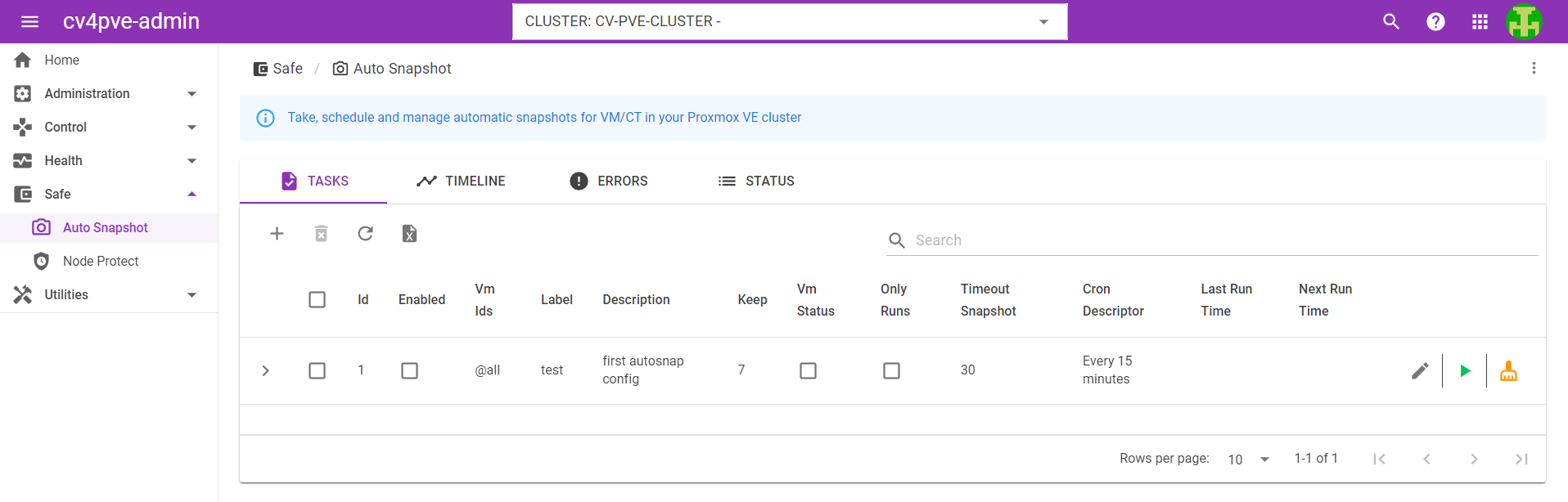
Web interface for cv4pve-autosnap |


| Resource | Description |
|---|---|
| QEMU Guest Agent | Setup guide for QEMU guest agent |
| API Documentation | Proxmox VE API reference |
| cv4pve-tools Suite | Complete cv4pve tools ecosystem |

Important: Without QEMU Guest Agent, snapshots are like "pulling the power plug" on your VM. The agent ensures filesystem consistency during snapshot operations.
|
|
# Check if guest agent is working
cv4pve-autosnap --host=pve.local --api-token=token --vmid=100 status

# Look for agent warnings in output:
# "VM 100 consider enabling QEMU agent see https://pve.proxmox.com/wiki/Qemu-guest-agent"
Complete Parameter List
cv4pve-autosnap [global-options] [command] [command-options]| Parameter | Description | Example |
|---|---|---|
--host |
Proxmox host(s) | --host=pve.local:8006 |
--username |
Username@realm | --username=backup@pve |
--password |
Password or file | --password=secret or --password=file:/path |
--api-token |
API token | --api-token=user@realm!token=uuid |
| Parameter | Description | Default |
|---|---|---|
--timeout |
Operation timeout (seconds) | 30 |
--validate-certificate |
Validate SSL certificate | false |
| Parameter | Description | Example |
|---|---|---|
--vmid |
VM/CT selection pattern | --vmid=100,101,@pool-prod |
| Parameter | Description | Default |
|---|---|---|
--max-perc-storage |
Max storage usage % | 95 |
--timestamp-format |
Snapshot timestamp format | yyMMddHHmmss |
| Parameter | Description | Options |
|---|---|---|
--output |
Output format | text, json, jsonpretty |
--debug |
Enable debug mode | false |
--dry-run |
Test run without changes | false |
Snapshot Creation Options
cv4pve-autosnap [global-options] snap [snap-options]| Parameter | Description | Required |
|---|---|---|
--label |
Snapshot label/category | Yes |
--keep |
Number of snapshots to retain | Yes |
--state |
Include VM memory state | No |
--script-hook |
Path to hook script | No |
# Basic snapshot with retention
cv4pve-autosnap --host=pve.local --api-token=token --vmid=100 snap --label=daily --keep=7

# Snapshot with memory state
cv4pve-autosnap --host=pve.local --api-token=token --vmid=100 snap --label=backup --keep=3 --state

# Snapshot with custom hook
cv4pve-autosnap --host=pve.local --api-token=token --vmid=100 snap --label=daily --keep=7 --script-hook=/opt/scripts/backup-hook.shSnapshot Cleanup Options
cv4pve-autosnap [global-options] clean [clean-options]| Parameter | Description | Notes |
|---|---|---|
--label |
Label to clean | Matches exact label |
--keep |
Snapshots to preserve | 0 = remove all |
# Clean old daily snapshots (keep newest 7)
cv4pve-autosnap --host=pve.local --api-token=token --vmid=100 clean --label=daily --keep=7

# Remove all snapshots with specific label
cv4pve-autosnap --host=pve.local --api-token=token --vmid=100 clean --label=old-backup --keep=0

# Clean across multiple VMs
cv4pve-autosnap --host=pve.local --api-token=token --vmid=@pool-development clean --label=test --keep=0Snapshot Status & Reporting
cv4pve-autosnap [global-options] status [status-options]# Table format (default)
cv4pve-autosnap --host=pve.local --api-token=token --vmid=100 status
# JSON format for automation
cv4pve-autosnap --host=pve.local --api-token=token --vmid=100 status --output=json
# Pretty JSON for debugging
cv4pve-autosnap --host=pve.local --api-token=token --vmid=100 status --output=jsonpretty┌──────┬─────┬───────────────────┬──────────────────────────────┬──────────────────────────────┬─────────────────┬─────┐
│ NODE │ VM │ TIME │ PARENT │ NAME │ DESCRIPTION │ RAM │
├──────┼─────┼───────────────────┼──────────────────────────────┼──────────────────────────────┼─────────────────┼─────┤
│ pve1 │ 100 │ 25/08/11 09:21:35 │ no-parent │ autodaily250811092135 │ cv4pve-autosnap │ │
│ pve1 │ 100 │ 25/08/11 12:23:09 │ autodaily250811092135 │ autodaily250811122309 │ cv4pve-autosnap │ │
│ pve1 │ 100 │ 25/08/12 06:50:23 │ autodaily250811122309 │ autodaily250812065023 │ cv4pve-autosnap │ X │
└──────┴─────┴───────────────────┴──────────────────────────────┴──────────────────────────────┴─────────────────┴─────┘
Professional support and consulting available through Corsinvest.