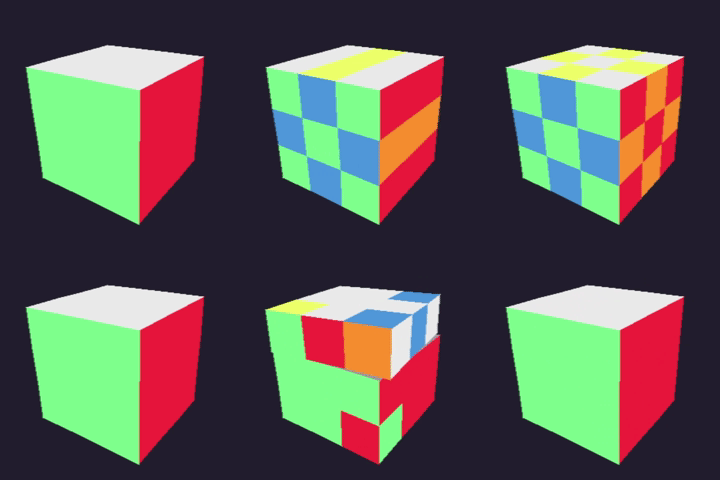
A fast and lightweight Rubik’s Cube simulator written in Rust, featuring smooth real-time rendering and intuitive controls.
-
Pixels + winit rendering– lightweight, fast, and perfect for pixel-based graphics. pixels crate.io page -
Manual 2D projection– all cube transformations and perspective math are done by hand, no external 3D engine. -
Intuitive key mappings– speedcube-ready controls designed to feel natural for cubers and provide highest mobility. Nothing better than relearning all of your algorithms on the keyboard all over again! -
Smooth performance– Fluid experience with 120 FPS. -
Timer functionality– measure your solve times directly in the app. -
Custom settings- Adjust performance and cube speed settings
With some command-line parameters, you can adjust some of the application's attributes such as:
- rendered resolution
--res(directly affects performance) - speed at which the cube rotates
--rs - speed at which layers are rotating during a move
--ms
There are available 3 presets (low, medium, high) for each setting.
kostka --res medium --ms high --rs low
The medium presets are set by default if no flags specified.
For further info use the --help option.
Key mappings are designed to resemble real cube rotations as much as possible. Experiment a bit — after a few tries it becomes second nature.
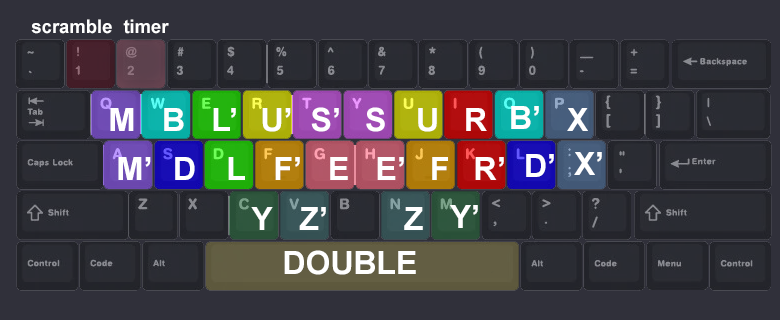
Timer can be switched on and off with the 2 key. You can only start the timer after resetting the game and scrambling the cube with the 1 key.
Make sure that cargo bin directory is added to system's PATH
cargo install kostka
kostka
Requires Rust installed (latest stable recommended).