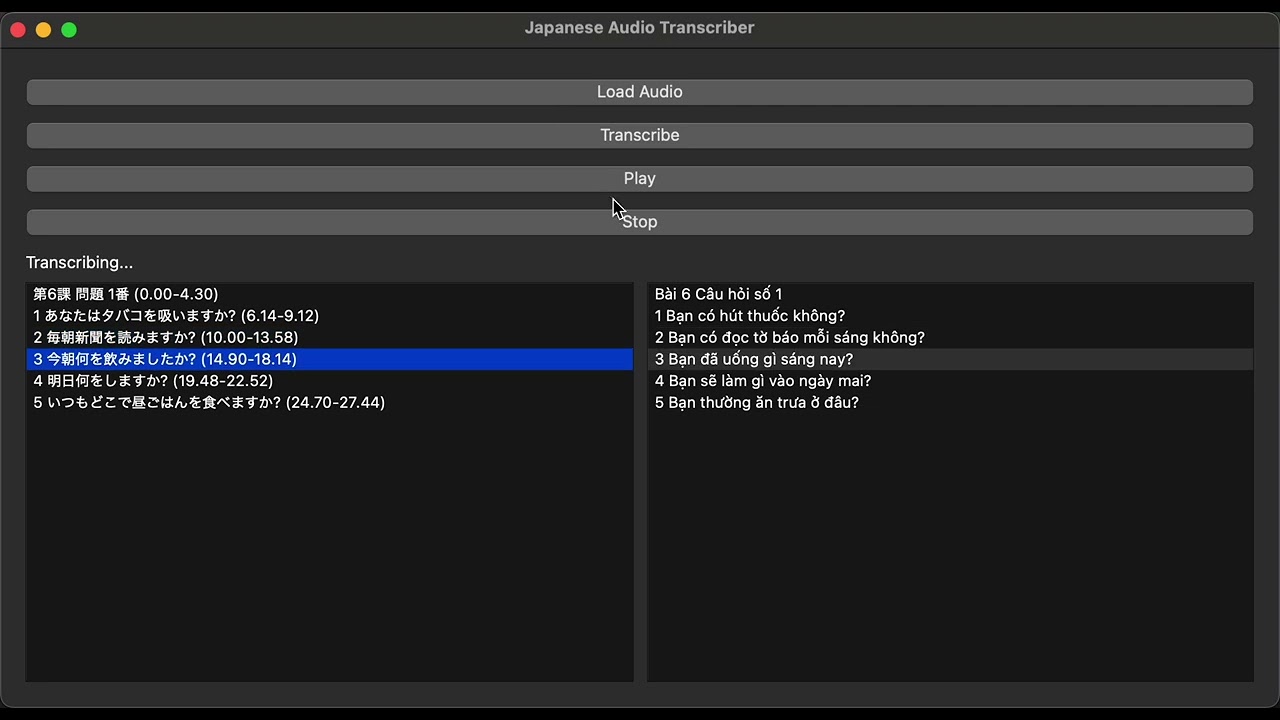
A Python desktop application for Japanese audio transcription using Whisper, with an interactive UI for playback and sentence navigation. Perfect for language learners who want to study audio with timestamps.
- Load any Japanese audio file (
.mp3,.wav). - Transcribe audio into sentences with timestamps using Whisper.
- Play and stop audio.
- Click on sentences to jump to the corresponding point in the audio.
- Status updates for model loading and transcription progress.
- Safe on macOS with PyTorch + multiprocessing.
- Highly sentence-based transcription for better navigation.
- Translate transcripts to Vietnamese (optional).

- Clone the repository:
git clone https://github.com/chuongmep/japanese-audio-transcriber.git
cd japanese-audio-transcriber- Create a virtual environment and activate it:
python -m venv venv
source venv/bin/activate   # macOS/Linux
venv\Scripts\activate # Windows- Install dependencies:
pip install -r requirements.txt
requirements.txtshould include at least:PySide6 whisper torch pydub simpleaudio
- (macOS only) Make sure
ffmpegis installed for audio processing:
brew install ffmpegWindows
winget install --id Gyan.FFmpeg -eRun the application:
python main.py- Click Load Audio to select a Japanese audio file.
- Click Transcribe to generate sentences with timestamps.
- Use Play / Stop to listen to the audio.
- Click on any sentence on the right panel to jump to that point in the audio.
- Whisper automatically uses the best model available. The current version uses
small. You can change tomediumorlargefor higher accuracy. - The application uses a separate thread for transcription to prevent crashes on macOS with PyTorch.
- For large audio files, transcription may take several minutes.
Contributions are welcome! You can improve:
- Word-level clickable transcription.
- Support for other languages.
- Export transcripts to CSV or SRT format.
- UI enhancements.
MIT License – see LICENSE file.
- Whisper TypeError: argument of type 'NoneType' is not iterable
pip install git+https://github.com/openai/whisper.git