-
- Bokhodir Urinboev
-
-
Dilorom Aliev
-
Feruza Latipova
-
Rakhmatjon Khasanov
-
- Your task is to do program to understand the movement of a car from a target video. Download the video and make working video of yours. You can do it using your own algorithms.
- Target video URL:
https://drive.google.com/file/d/1RMq9j_-mxkqPX_C4OYdoJmdfnp15ef0S/view?usp=drivesdk
- Example of your program output can be seen in video Lane_Lines_Detection.mp4.
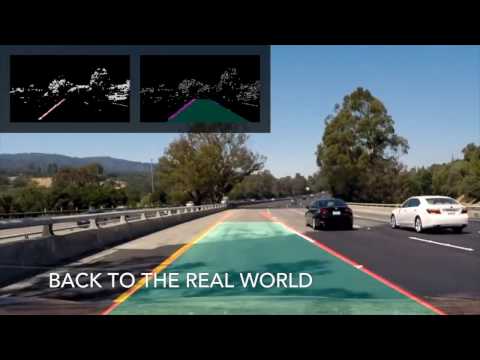
- Image denoising
- You can denoise the image using Gaussian blur function, since it’s the fastest and most useful filter. Gaussian filtering is done by convolving each point in the input array with a Gaussian kernel and then summing them all to produce the output array
- Edge detection from binary image
- Before detecting the edges, convert the 3-channel color image to 1 channel gray image, apply binarization technique to reduce the features from image then use 2D filter to find the edges.
- Mask the image
- Mask the half size of the image and take only the lower part. You need to detect the edges there
- Hough lines detection
- Express lines in the Polar system. Get the Hough lines from the detected edges (4 points) and store all those lines in a variable. As soon as you get all the points, separate them into those which lay on left side and right side
- Left and right lines separation
- As soon as you separate all the lines, do the regression of the lines and merge the several close lines into one bigger line and remove other unnecessary lines and in the end make two thick lines.
- Drawing the complete line
- Draw lines on an original image
- Predict the turn
- Print out the text on which side the car is moving in the video from obtained lines and performed regressions.
- You will have to predict the turn and calculate the frame per second (FPS) rate of your video. Video size should be chosen as: 1024x768, 800x600, 640x480, 400x300 and FPS should be compared.