Complete Guide for Translators
I am looking for translators! If you enjoy using my application or would like to make your first contribution to someone else's project, and you speak language, that is not yet included in Counter For Messenger, keep on reading!
Since v1.1.0 I have added multi-language support for my application, so it is time to access wider audience.
For now (09.10.2023) only Polish, English and Greek languages are supported. I wish that my app would be more accessible for people from another countries. So if you are interested in translating my app, here's a guide how to do it.
Forking project and choosing your language tag First thing you have to do, is to make a fork of my project. You can do that, by clicking this icon on your screen:

Then, a clone of my project will appear in your profile. It will be named after your username, e.g.: User/CounterForMessenger.
After successfully cloning my project, navigate to this specific location in files in "langs" folder:

As you can see on the picture, there are files named: [language].py
So what now?
Choose a language that you want to translate to.
Now, create copy of one the already existing file (I recommend using English), and change name of it to your language.
For example, German language translation file, would be named as follows: Deutschland.py
Now you are fully prepared to translate file in it.
Translating Guidelines When you open one of the files (I will use English in order to explain), you will notice specific key = value pairs
TITLE_APP_NAME = 'Counter for messenger'
TITLE_NOT_APPLICABLE = 'N/A'
TITLE_INITIAL_CONFIG = 'Initial configuration'
TITLE_GIVE_INBOX = 'Indicate inbox folder'
TITLE_NO_SELECTION = 'None selected'
...
There are two main things, that you need to follow:
Do not change the first value written in caps, only the value after "="! Also, be aware, that I code on a daily basis, so it is possible that you may have an outdated version of the source file. But don't worry - we will resolve conflicts in differences in files together.
Now it's time to translate every single value according to the template you have copied. You don't need to change anything in code, as it will be automated for detecting new translation files.
Creating a pull request After you completed your translation, you need to create a pull request for me to review it. If everything will be good, your language will become available in next update!
In order to create a new pull request, after committing changes to your new translation file, go to main page of your fork (that's where README.md is shown) and just simply click Compare & pull request:
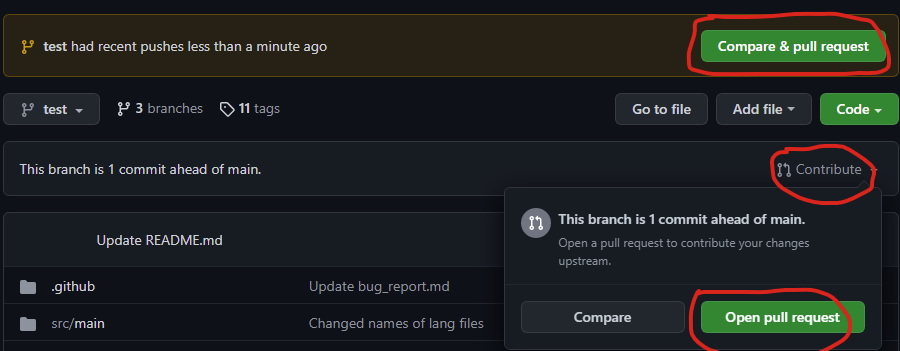
And that's it! Congratulations, you have become a contributor for my project! You will be included in contributors panel in my project.
Thank you very much!