Go to german installation guide: GER
- Description
- Requirements
- Installation
- Configuration
- Execution
- Implementation in MS Excel (Office365)
- Refresh Data
The script reads current market data of any cryptocurrencies via the API of CoinGecko.com and creates a report (JSON file). which can be included e.g. for portfolio monitoring in Microsoft Excel.

The skript is written in Pyhton. Phyton must be installed on the end device to run:
https://www.python.org/downloads
For the HTTP/HTTPS queries the Pyhton package "Requests" is additionally required, installation under Windows:
WIN + R
cmd.exe
pip install requests
Download the current GitHub repository at:
https://github.com/Kwaeksler/Current-Marketdata-for-Cryptocurrencies > Code > Download ZIP
Unzip the ZIP file and save it to a desired location.
git clone https://github.com/Kwaeksler/Current-Marketdata-for-Cryptocurrencies.git
In the file Coins.txt the desired cryptocurrencies can be specified. Please add the cryptocurrencies from line three. The API id of the cryptocurrency from CoinGecko.com must be specified, which can be found on the respective coin page:
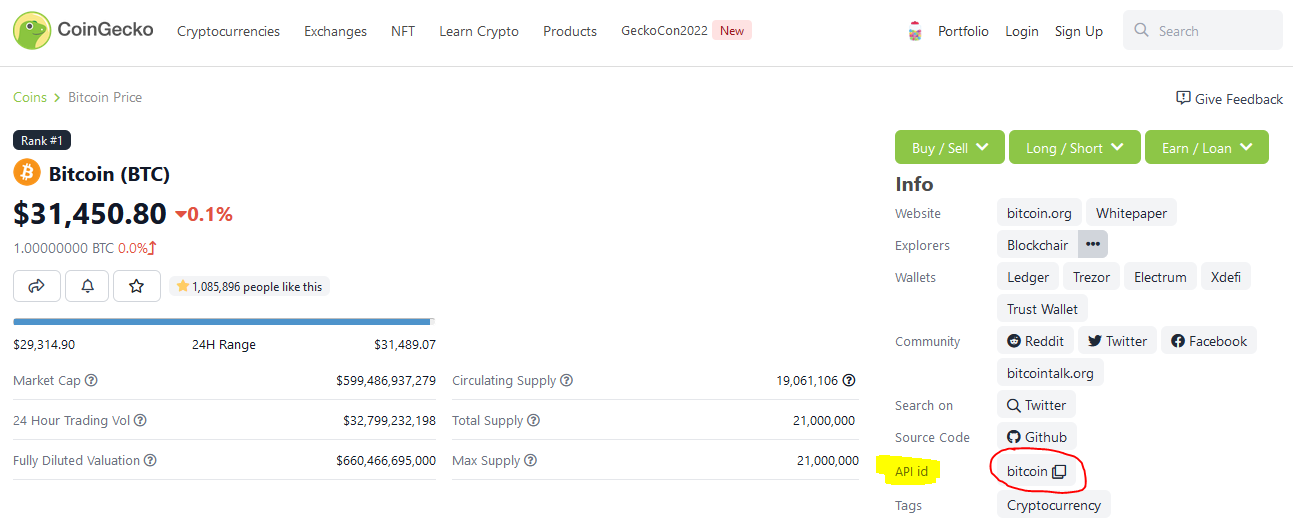
Example configuration:
Enter Coins (API-ID from CoinGecko.com) - Only one value per line:
------------------------------------------------------------------
bitcoin
ethereum
tether
binancecoin
In the file getCGData.py in the area Configuration the program can be configured. For this purpose the values of the variables can be adjusted (optional):
| Variable | Explanation |
|---|---|
| FileCoins | Specification of a string for the file name, without file extension! In this file the desired cryptocurrencies must be specified, which are to be queried. The file must be in the format .txt! Default: Coins |
| FileJson | Specification of a string for the file name, without file extension! The report will be stored in this file. Default: CoinData |
| Currency | Specification in which currency the market data should be retrieved. Default: eur More options: usd, btc, eth, ... |
| Debug | Possibilities: True The terminal window remains open after the script is finished to view the history and any errors that occurFalseThe terminal window will be closed after the script is finished |
| date_format | The output of the timestamps can be configured as desired. Default: %d.%m.%Y = 08.06.2022 |
(The free API of CoinGecko.com allows only about 50 queries per minute. If more cryptocurrencies are queried, the program is interrupted more often.)
The program can be executed by double-clicking on the file getCGData.py.
Alternatively via command line: py getCGData.py
It is recommended to insert a new spreadsheet for implementation and implement the JSON file there:
Data > Get Data > From File > From JSON > Select *.JSON-File > Import
Transform the Rewards to Table:
- Select or enter delimiter:
None - How to handle extra columns:
Show as errors

- Via the symbol next to "Column1" the original column names can be shown (left picture)
- Here you have to uncheck 'Use original column name as prefix' (middle image)
- Columns that are not needed can be hidden (middle image)
- By right-clicking on a column header, individual columns can be moved in the order (right image)
The dialog can be closed by clicking the Close & Load button. Afterwards a dynmaic table should appear on the spreadsheet, which can be formatted.
Running the getCGData.py file will update the .JSON file.
Then, in Microsoft Excel, the previously inserted table can be updated via Data > Update all.
Go to english installation guide: ENG
- Beschreibung
- Voraussetzungen
- Installation
- Konfiguration
- Ausführung
- Implementierung in MS Excel (Office365)
- Daten aktualisieren
Das Skript liest aktuelle Marktdaten von beliebigen Kryptowährungen über die API von CoinGecko.com aus und erstellt ein Report (JSON-Datei), welcher z.B. für die Portfolioüberwachung in Microsoft Excel eingebunden werden kann.
Das Skript ist in Pyhton programmiert, Phyton muss zur Ausführung auf dem Endgerät installiert sein:
https://www.python.org/downloads
Für die HTTP/HTTPS-Abfragen wird zusätzlich das Pyhton-Paket "Requests" benötigt, Installation unter Windows:
WIN + R
cmd.exe
pip install requests
Download des aktuellen GitHub Repositories unter:
https://github.com/Kwaeksler/Current-Marketdata-for-Cryptocurrencies > Code > Download ZIP
Die ZIP-Datei entpacken und an einen gewünschten Ort abspeichern.
git clone https://github.com/Kwaeksler/Current-Marketdata-for-Cryptocurrencies.git
In der Datei Coins.txt können die gewünschten Kryptowährungen angegeben werden, welche ausgelesen werden sollen. Bitte ab Zeile drei die Kryptowährungen hinzufügen. Angegeben werden muss die API id der jeweiligen Kryptowährung von CoinGecko.com, welche auf der jeweiligen Coin-Seite zu finden ist:
Beispielkonfiguration:
Enter Coins (API-ID from CoinGecko.com) - Only one value per line:
------------------------------------------------------------------
bitcoin
ethereum
tether
binancecoin
In der Datei getCGData.py im Bereich Configuration kann das Programm konfiguriert werden, dazu können die Werte der Variablen angepasst werden (Optional):
| Variable | Erläuterung |
|---|---|
| FileCoins | Angabe einer beliebigen Zeichenkette für den Dateinamen, ohne Dateiendung! In dieser Datei müssen die gewünschten Kryptowährungen angegeben werden, welche abgefragt werden sollen. Die Datei muss im Format .txt vorliegen! Default: Coins |
| FileJson | Angabe einer beliebigen Zeichenkette für den Dateinamen, ohne Dateiendung! In dieser Datei werden die Marktdaten abgespeichert. Default: CoinData |
| Currency | Angabe in welcher Währung die Marktdaten abgerufen werden sollen. Default: eur Weitere Möglichkeiten: usd, btc, eth, uvm. |
| Debug | Möglichkeiten: True Das Terminal-Fenster bleibt nach Beendigung des Skriptes geöffnet, um den Verlauf und auftretende Fehler einzusehenFalseDas Terminal-Fenster wird nach Beendigung des Skriptes geschlossen |
| date_format | Die Ausgabe der Zeitstempel kann beliebig konfiguriert werden. Default: %d.%m.%Y = 08.06.2022 |
(Die freie API von CoinGecko.com erlaubt nur ca. 50 Abfragen pro Minute. Werden mehr Kryptowährungen abgefragt, wird das Programm öfter untebrochen.)
Das Programm kann durch einen Doppelklick auf die Datei getCGData.py ausgeführt werden.
Alternativ über die Kommandozeile: py getCGData.py
Es ist empfehlenswert ein neues Tabellenblatt für die Implementierung einzufügen und dort die JSON-Datei zu implementieren:
Daten > Daten abrufen > Aus Datei > Von JSON > *.JSON-Datei auswählen > Importieren
Im geöffneten Listentool die Rewards Zu Tabelle konvertieren:
- Trennzeichen eingeben oder auswählen:
Keine - Behandlung zusätzlicher Spalten:
Als Fehler anzeigen

- Über das Symbol neben "Column1" lassen sich die originalen Spaltennamen einblenden (linkes Bild)
- Hier muss der Haken bei
Ursprünglichen Spaltennamen als Präfix verwendenentfernt werden (mittleres Bild) - Nicht benötigte Spalten können ausgeblendet werden (mittleres Bild)
- Durch einen Rechtsklick auf eine Spaltenüberschrift lassen sich einzelne Spalten in der Reihenfolge verschieben (rechtes Bild)
Der Dialog kann durch Klick auf die Schaltfläche Schließen & laden beendet werden. Anschließend sollte eine dynmaische Tabelle auf dem Tabellenblatt erscheinen, welche formatiert werden kann.
Durch das Ausführen der getCGData.py-Datei wird die .JSON-Datei aktualisiert.
Anschließend kann in Microsoft Excel die vorher eingefügte Tabelle über Daten > Alle Aktualisieren aktualisiert werden.