Graphics tutorial
In this tutorial, we are going to look at some rendering basics. These basics include the rendering of basic shapes and text, using cameras and render textures.
Drawing graphics to a window happens through the tml::RenderWindow class. The RenderWindow class inherits from tml::Window and tml::RenderTarget classes. To learn more about windowing related things, you can check out the window tutorial.
TML offers two ways of drawing onto render targets. You can instantiate drawable objects like tml::Circle, tml::Rectangle etc. Or you can use the tml::RenderTarget::Draw* functions.
#include <TML/Graphics.h>

int main()
{
    tml::RenderWindow window(800, 600, "Drawing graphics");

    tml::Circle circle;
    circle.SetPosition(400, 300);
    circle.SetRadius(100);

    while(window.IsOpen())
    {
        tml::Event event{};
        while(window.PollEvents(event))
        {
            if(event.type == tml::Event::Closed)
                window.Close();
        }

        window.Clear();
        window.Draw(circle)
        window.Display();
    }

    return 0;
}
Here we are instantiating a tml::Circle and setting its position to [400, 300] and its radius to 100. We then only have to call window.Draw(circle) in between window.Clear() and window.Display().
The alternative way of doing this is by calling window.DrawCircle in between window.Clear() and window.Display(); This requires less typing, but rendering things this way is going to be slower. Though either way is fine.
#include <TML/Graphics.h>

int main()
{
    tml::RenderWindow window(800, 600, "Drawing graphics");

    while(window.IsOpen())
    {
        tml::Event event{};
        while(window.PollEvents(event))
        {
            if(event.type == tml::Event::Closed)
                window.Close();
        }

        window.Clear();
        window.DrawCircle(
            Vector2f(400, 300), /// Center point
            100,                /// Radius
            tml::Color::Red     /// Color
        );
        window.Display();
    }

    return 0;
}As with the other drawables, drawing text can be done in two ways. The quick and dirty way, by calling window.DrawText(), or the better way, by instantiating a tml::Text object and then drawing that.
Drawing text the quick and dirty way is done by calling window.DrawText(), and passing as arguments, the text string, the position of the text, the font size, and optional color.
Like so:
window.Clear();
window.DrawText("Hello world", tml::Vector2f(300, 300), 40, tml::Color::Green);
window.Display();But the better way would be to create a tml::Text object, and drawing that onto the screen. This way is better because the vertex data is going to be cached for faster drawing. This can't happen when drawing the quick and dirty way.
The better way also gives you more control over the text.
#include <TML/Graphics.h>

int main()
{
    tml::RenderWindow window(800, 600, "Drawing graphics");
    tml::Text text("Hello world", tml::Vector2f(300, 250), 40, tml::Color::Green);

    while(window.IsOpen())
    {
        tml::Event event{};
        while(window.PollEvents(event))
        {
            if(event.type == tml::Event::Closed)
                window.Close();
        }

        window.Clear();
        window.Draw(text);
        window.Display();
    }

    return 0;
}
Transforming the view in TML happens through the tml::Camera class. You can translate, rotate and scale the view.
Let's take the last example and use the tml::Camera to transform it.
#include <TML/Graphics.h>

int main()
{
    tml::RenderWindow window(800, 600, "Drawing graphics");
    tml::Text text("Hello world", tml::Vector2f(300, 250), 40, tml::Color::Green);

    /// Creating a new camera.
    tml::Camera camera;

    camera.Rotate(30);                    /// Rotate the camera.
    camera.Move(tml::Vector2f(0, -25));   /// Move the camera.
    camera.Zoom(1.5f);                    /// Zoom in.

    while(window.IsOpen())
    {
        tml::Event event{};
        while(window.PollEvents(event))
        {
            if(event.type == tml::Event::Closed)
                window.Close();
        }

        window.Clear();
        window.SetCamera(camera); /// After clearing the window, set the camera.
        window.Draw(text);
        window.Display();
    }

    return 0;
}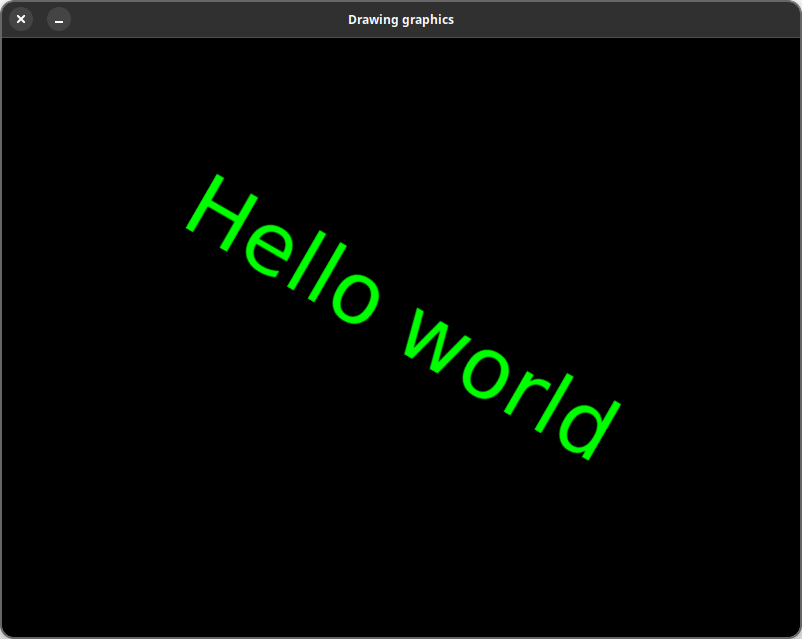
Remember, you have to use window.SetCamera() after clearing the window. Otherwise, the transforms are not going to apply.
If you want to draw something without the camera transformations, you can use the window.ResetCamera() function.
Example:
window.Clear();
window.SetCamera(camera);
window.Draw(text);

window.ResetCamera();
window.Draw(something_else);
window.Display();
This will draw text using the camera, and something_else without camera.
You might also want to render things onto a texture. In TML this is as easy as drawing things onto a window.