
Line King sorts, changes case, removes dups, removes blank lines, splits and joins lines, encodes to Base64, etc. It's the ultimate toolbox for line / text manipulation. It's also smart, only displaying what is relevant to what is selected.
The best line manipulation extension for VS Code ever? Many people are saying so.
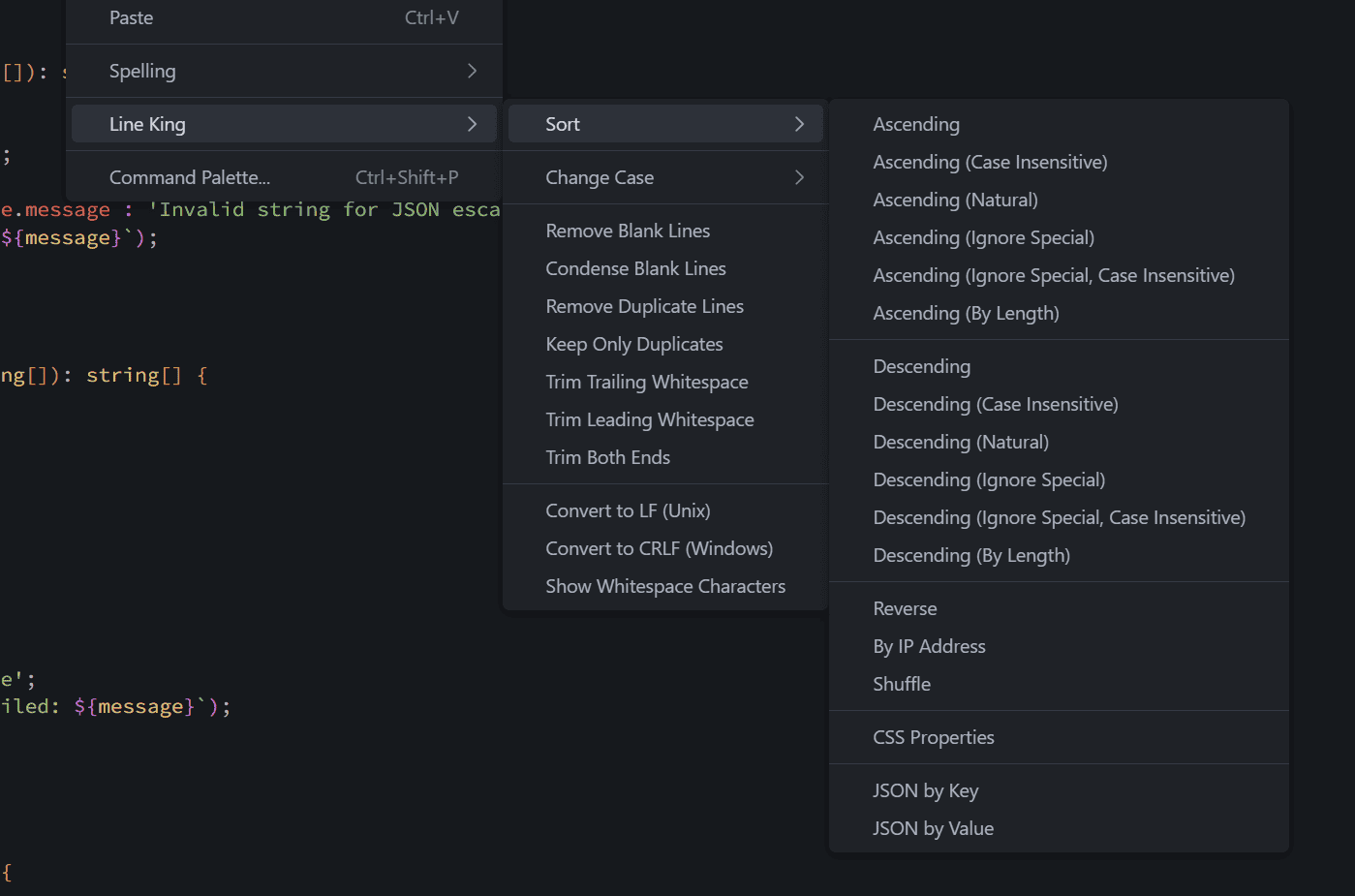
Works on selection or entire document.
- Sort Ascending/Descending - Standard alphabetical sort (case-sensitive or case-insensitive)
- Natural Sort - Intelligently sorts numbers (e.g.,
A2comes beforeA10) - Sort by Length - Organize lines by their character count (shortest or longest first)
- Unique Sort - Sorts and removes duplicates in one operation
- Reverse - Reverses the order of lines
- IP Address Sort - Sorts lines containing IPv4 addresses numerically
- Shuffle - Randomize line order
- CSS Properties Sort - Sorts CSS/SCSS/LESS properties alphabetically or by length within rule blocks
- Remove Blank Lines - Deletes all empty lines
- Condense Blank Lines - Reduces multiple consecutive blank lines to just one
- Remove Duplicates - Keeps the first occurrence, removes the rest (preserves order)
- Keep Only Duplicates - Useful for finding repeated data; removes all unique lines
- Trim Whitespace - Remove leading, trailing, or both from each line
-
Case Conversion:
- UPPERCASE
- lowercase
- Sentence case
- Title Case
- camelCase
- PascalCase
- kebab-case
- snake_case
-
Encoding/Decoding:
- URL Encode/Decode
- Base64 Encode/Decode
- JSON String Escape/Unescape
- Duplicate Line/Selection - Smarter duplication that handles newlines correctly
- Join Lines - Combines selected lines using a configurable separator
- Split Selection - Splits text based on a custom separator you specify
- Align to Separator - Aligns text around a separator (e.g.,
=,:,,) - Insert Numeric Sequence - Replaces selection with sequential numbers (1, 2, 3...)
- Show Whitespace Characters - Display line endings
LF(↓),CRLF(↵), spaces (·), and tabs (→) - Convert Line Endings - Convert between LF (Unix) and CRLF (Windows) formats
- Cleanup on Save - Automatically tidy files when you save
- Select text or place cursor in the document
- Right-click to open the context menu
- Look for the Line King submenu
- Choose your desired operation
- Press
Ctrl+Shift+P(Windows/Linux) orCmd+Shift+P(Mac) - Type "Line King" to see all available commands
- Select the command you want to run
-
Line Operations (Sort, Tidy, Join, Align):
- With selection: Automatically expands selection to encompass the full lines.
- Without selection: Operates on the entire document.
-
Text Operations (Case, Encode, Transform):
- With selection: Operates strictly on the selected text characters.
- Without selection: Operates on the entire document.
-
Multiple selections: All commands handle multiple cursors/selections intelligently.
Access settings via: File > Preferences > Settings > Extensions > Line King
| Setting | Description | Default |
|---|---|---|
lineKing.joinSeparator |
Character or string used when joining lines together. | " " (Space) |
lineKing.cleanupOnSave |
Action to run on save: none, removeBlankLines, trimTrailingWhitespace, or sortCssProperties. |
none |
lineKing.cssSortStrategy |
Strategy for CSS sorting: alphabetical (by property name) or length (by line length). |
alphabetical |
{
  "lineKing.joinSeparator": ", ",
  "lineKing.cleanupOnSave": "trimTrailingWhitespace",
  "lineKing.cssSortStrategy": "alphabetical"
}All commands are available through the Command Palette (Ctrl+Shift+P / Cmd+Shift+P):
Line King: Sort: Ascending (A-Z)Line King: Sort: Ascending (Case Insensitive)Line King: Sort: Descending (Z-A)Line King: Sort: Descending (Case Insensitive)Line King: Sort: Unique (Remove Duplicates)Line King: Sort: Unique (Case Insensitive)Line King: Sort: Natural (Alphanumeric)Line King: Sort: By Length (Shortest)Line King: Sort: By Length (Longest)Line King: Sort: Reverse OrderLine King: Sort: By IP AddressLine King: Sort: ShuffleLine King: Sort: Sort CSS Properties
Line King: Tidy: Remove Blank LinesLine King: Tidy: Condense Blank LinesLine King: Tidy: Remove Duplicate LinesLine King: Tidy: Keep Only DuplicatesLine King: Tidy: Trim Trailing WhitespaceLine King: Tidy: Trim Leading WhitespaceLine King: Tidy: Trim Both Ends
Line King: Case: UPPERCASELine King: Case: lowercaseLine King: Case: Sentence caseLine King: Case: Title CaseLine King: Case: camelCaseLine King: Case: kebab-caseLine King: Case: snake_caseLine King: Case: PascalCase
Line King: Dev: URL EncodeLine King: Dev: URL DecodeLine King: Dev: Base64 EncodeLine King: Dev: Base64 DecodeLine King: Dev: JSON String EscapeLine King: Dev: JSON String Unescape
Line King: Tools: Duplicate SelectionLine King: Tools: Join LinesLine King: Tools: Split Selection...Line King: Tools: Align to Separator...Line King: Tools: Insert Numeric Sequence (1,2,3...)Line King: Util: Show Whitespace CharactersLine King: Util: Hide Whitespace CharactersLine King: Util: Convert to LF (Unix)Line King: Util: Convert to CRLF (Windows)
Before:
Zebra
Apple
banana
Cherry
After (Ascending, Case Insensitive):
Apple
banana
Cherry
Zebra
Before:
.container {
    z-index: 10;
    background-color: white;
    padding: 20px;
    margin: 0 auto;
    display: flex;
}After:
.container {
    background-color: white;
    display: flex;
    margin: 0 auto;
    padding: 20px;
    z-index: 10;
}Before:
name = "John"
age = 30
email = "[email protected]"
After (Align to =):
name  = John
age   = 30
email = [email protected]
- Visual Studio Code version 1.106.1 or higher
- No additional dependencies required
Line King is designed to work in:
- ✅ Local VS Code
- ✅ VS Code Web (browser)
- ✅ Virtual Workspaces
- ✅ Untrusted Workspaces
Please report issues and feature requests to Line King issues.
MIT.