



- What is KitOps?
- Try KitOps
- How Teams Use KitOps
- KitOps Architecture
- Security and Compliance
- KitOps by Role
- Integrations
- Community and Support
KitOps is a CNCF open source tool for packaging, versioning, and securely sharing AI/ML projects.
Built on the same OCI (Open Container Initiative) technology that underlies containers, KitOps packages everything your model needs for development or production into a versioned and layered artifact stored in your existing container registry. It integrates with all your AI/ML, CI/CD, and DevOps tools.
As part of the Kubernetes AI/ML technology stack, KitOps is the preferred solution for packaging, versioning, and managing AI assets in security-conscious enterprises, governments, and cloud operators who need to self-host AI models and agents.
KitOps is governed by the CNCF (the same organization that manages Kubernetes, OpenTelemetry, and Prometheus). This video provides an outline of KitOps in the CNCF.
KitOps is also the enterprise implementation of the CNCF ModelPack specification for a vendor-neutral AI/ML interchange format. The Kit CLI supports both ModelKit and ModelPack formats transparently. Contributing companies to ModelPack include Red Hat, PayPal, ANT Group, and ByteDance.
?style=for-the-badge)
?style=for-the-badge)
- Install the CLI: for MacOS, Windows, and Linux.
- Pack your first ModelKit: Either:
- Import from HuggingFace: Pull models directly from HuggingFace into a ModelKit with HuggingFace Import.
- Navigate to your project directory and run
kit init .to auto-generate a Kitfile, then follow the Getting Started guide to pack, push, and pull.
- Push it to your registry: Use
kit pushto start using your existing enterprise registry as a secure and curated registry for AI agents, models, and MCP servers. - Explore pre-built ModelKits: Try quick starts for LLMs, computer vision models, and more.
For those who prefer to build from source, follow these steps to get the latest version from our repository.
Most teams start by using KitOps to version a model or agent when it's ready for staging or production. ModelKits serve as immutable, self-contained packages that simplify CI/CD deployment, artifact signing, AI SBOM creation, and deployment / rollback. This prevents unknown AI workloads from entering production and keeps datasets, model weights, and config synced and trackable.
Learn more: CI/CD integration
Teams in regulated industries use KitOps to scan and gate models before they reach production. Build a ModelKit, sign it with Cosign, run security scans, attach reports as signed attestations, and only allow attested ModelKits to move forward. KitOps provides a security and auditing layer on top of whatever tools you already use.
Learn more: Securing ModelKits
Mature teams extend KitOps to development. Every milestone (new dataset, tuning checkpoint, retraining event) is stored as a versioned ModelKit. One standard system (OCI) for every model version, with tamper-evident and content-addressable storage.
Learn more: How KitOps is Used
KitOps packages your project into a ModelKit - a self-contained, immutable bundle that includes everything required to reproduce, test, or deploy your AI/ML model.
ModelKits can include agents, model weights, MCP servers, datasets, prompts, experiment run results and hyperparameters, metadata, environment configurations, code, and more.
ModelKits are:
- Tamper-proof - Every component protected by SHA-256 digests, ensuring consistency and traceability
- Signable - Full Cosign compatibility for cryptographic verification
- Compatible - Natively stored and retrieved in all major OCI container registries
- Selectively unpacked - Pull only the layers you need (just the model, just the dataset, etc.)
KitOps can also create ModelPack-compliant packages using the CNCF model-spec format. Both formats are vendor-neutral standards, and Kit commands (pull, push, unpack, inspect, list) work transparently with both.
ModelKits elevate AI artifacts to first-class, governed assets, just like application code.
A Kitfile defines where each artifact lives in your ModelKit. You can generate one automatically with kit init.
The Kit CLI lets you create, manage, run, and deploy ModelKits. Key commands include:
kit pack- Package your project into a ModelKit (add--use-model-packfor ModelPack format)kit unpack- Extract all or specific layers from a ModelKitkit push/kit pull- Share ModelKits through any OCI registrykit init- Auto-generate a Kitfile from an existing project directorykit diff- Compare differences between two ModelKitskit list- List available ModelKits and ModelPackskit inspect- View the contents of a ModelKit without unpacking
The PyKitOps library lets data scientists work with ModelKits in Python. Use it to pack, push, pull, and inspect ModelKits without leaving your favorite tool's workflow.
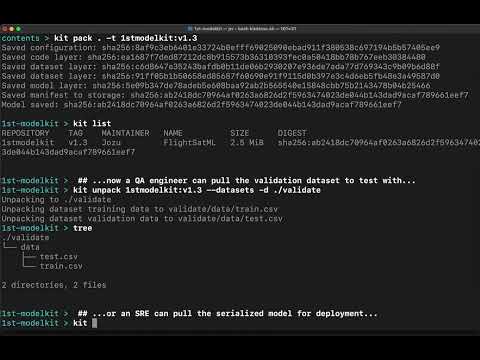
This video shows how KitOps streamlines collaboration between data scientists, developers, and SREs using ModelKits.
KitOps provides artifact and project metadata for organizations that need to establish and maintain chain-of-custody and provenance for their AI/ML assets:
- Immutable digests - Every ModelKit component is SHA-256 hashed. Any modification to any file is detected via OCI digest verification when the artifact is pulled or fetched, and the tampered artifact is rejected.
- Cryptographic signatures - Sign ModelKits with Cosign (key-based or keyless via OIDC). Unsigned or tampered ModelKits can be blocked in CI/CD.
- AI Bill of Materials - ModelKits provide a structured inventory of all components (model weights, datasets, code, configs) with version tracking, serving as the foundation for AI SBOMs.
- Transparency logging - Combine with Rekor for append-only signature records.
- Audit-ready lineage - Full version history from experiment through staging to production, stored in your OCI registry.
These properties make ModelKits suitable for compliance frameworks that require artifact integrity, provenance verification, and audit trails, including the EU AI Act, NIST AI RMF, ISO 42001, and similar regulatory requirements.
Learn more: Securing Your Model Supply Chain
KitOps is also used by Jozu Hub, that adds centralized policy administration, five-layer security scanning, signed attestations, and tamper-evident audit logs. Jozu Hub installs behind your firewall and works with your existing OCI registry in private cloud, datacenter, or air-gapped environments.
- Use ModelKits in existing CI/CD pipelines with GitHub Actions, Dagger, and other systems
- Store and manage models in your current container registry
- Deploy to Kubernetes using the init container or KServe
- Build golden paths for secure AI/ML deployment
- Package datasets and models without infrastructure hassle using
kit packor the PyKitOps SDK - Import models from HuggingFace into governed ModelKits
- Track experiments with MLFlow integration
- Use AI/ML models like any dependency with standard tools and APIs
- Pull only the layers you need (model, dataset, code) without downloading the full package
- Integrate with Kubeflow Pipelines and other ML tooling
KitOps works with the tools you already use:
- MLFlow - Package experiment runs as versioned ModelKits
- CI/CD - GitHub Actions, Dagger, and other pipeline tools
- Kubernetes initContainer - Unpack ModelKits as init containers
- KServe - Serve models directly from ModelKits
- Kubeflow Pipelines - Use ModelKits in ML pipeline steps
- ModelPack - CNCF vendor-neutral packaging format
See the full integration list.
For support, release updates, and general KitOps discussion, please join the KitOps Discord. Follow KitOps on X for daily updates.
If you need help there are several ways to reach our community and Maintainers outlined in our support doc
We love our KitOps community and contributors. To learn more about the many ways you can contribute (you don't need to be a coder) and how to get started see our Contributor's Guide. Please read our Governance and our Code of Conduct before contributing.
Your insights help KitOps evolve as an open standard for AI/ML. We deeply value the issues and feature requests we get from users in our community. To contribute your thoughts, navigate to the Issues tab and click the New Issue button.
Wednesdays @ 13:30 - 14:00 (America/Toronto)
- Google Meet
- +1 647-736-3184 (PIN: 144 931 404#)
- More numbers
At KitOps, inclusivity, empathy, and responsibility are at our core. Please read our Code of Conduct to understand the values guiding our community.



![@dependabot[bot]](https://avatars.githubusercontent.com/in/29110?s=64&v=4)


