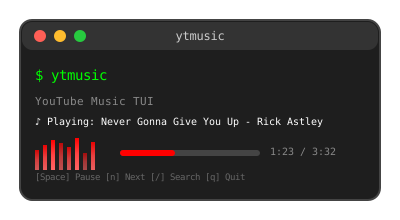




A terminal user interface for YouTube Music, built with Go and Bubbletea. This application uses a Python bridge to interact with the YouTube Music API via ytmusicapi.
- 🎵 Search and play music from YouTube Music
- 📱 Terminal-based UI with keyboard navigation
- 🔐 Secure authentication via YouTube Music
- ⏯️ Full playback controls (play/pause/next/previous)
- 🔀 Shuffle and repeat modes
- 📋 Access your playlists and liked songs
- 🎚️ Queue management
- 🐛 Debug mode for troubleshooting
- Go 1.18 or higher - Install Go
- Python 3.10+ - Install Python
- mpv - For audio playback
- pip - Python package manager
sudo apt update
sudo apt install mpv python3-pip

# Note: Ubuntu 22.04+ has Python 3.10+
# For older Ubuntu versions, you may need to install Python 3.10+ manually
python3 --version # Check your Python version# Using Homebrew
brew install mpv python3sudo pacman -S mpv python-pip# Install ytmusicapi
pip3 install ytmusicapi-
Clone the repository
git clone https://github.com/pergatore/ytmusic.git cd ytmusic -
Check Python version and install dependencies
# Check Python version (must be 3.10+)
python3 --version

# If you have Python 3.10+, install ytmusicapi
pip3 install ytmusicapi

# If your Python is older, you'll need to install Python 3.10+
# Ubuntu 22.04+: sudo apt install python3.10 python3.10-pip
# macOS: brew install [email protected]
# Or download from: https://www.python.org/downloads/
-
Build the application
go build -o ytmusic ./cmd/ytmusic
Or install directly:
go install ./cmd/ytmusic
Important: You need to authenticate with YouTube Music to access your playlists and use the full functionality. We recommend OAuth authentication for the most stable experience.
OAuth provides the most stable and long-lasting authentication. As of November 2024, it requires both OAuth tokens and client credentials.
- Go to Google Cloud Console
- Create a new project:
- Click "Select a project" → "New Project"
- Name:
YouTube Music TUI(or any name you prefer) - Click "Create"
- Select your project from the dropdown
- Go to API Library
- Search for "YouTube Data API v3"
- Click on it and press "Enable"
- Go to Credentials page
- Click "Create Credentials" → "OAuth 2.0 Client IDs"
- If prompted to configure OAuth consent screen:
- Choose "External" (unless you have a Google Workspace account)
- Fill in required fields:
- App name:
YouTube Music TUI - User support email: Your email
- Developer contact information: Your email
- App name:
- Save and continue through the steps
- Add yourself as a test user in "Test users" section
- Create OAuth Client ID:
- Application type:
⚠️ "TVs and Limited Input devices" (NOT Desktop application!) - Name:
YouTube Music TUI - Click "Create"
- Application type:
- Download the JSON file:
- Click the download button next to your client ID
- Save it as
client_secret.json
# Create the ytmusic config directory
mkdir -p ~/.ytmusic

# Copy your downloaded client credentials
cp /path/to/your/downloaded_client_secret.json ~/.ytmusic/client_secret.json# Create OAuth authentication (this creates oauth_auth.json)
ytmusicapi oauth --file ~/.ytmusic/oauth_auth.jsonFollow the prompts:
- A browser window will open
- Sign in to your Google/YouTube Music account
- Grant permission to the application
- Copy the authorization code back to the terminal
You should now have BOTH files:
ls -la ~/.ytmusic/
# Should show:
# oauth_auth.json      (OAuth tokens - created by ytmusicapi oauth command)
# client_secret.json (Client credentials - downloaded from Google Cloud Console)# Test that OAuth authentication works
python3 scripts/ytmusic_bridge.py playlists --limit 5 --debugIf successful, you should see your playlists listed.
If OAuth setup is too complex, you can use browser authentication, though it may expire more frequently.
# Set up authentication using browser method
ytmusicapi browser --file ~/.ytmusic/headers_auth.jsonThis method emulates your browser session by reusing its request headers.
- Open a new tab
- Open the developer tools (Ctrl-Shift-I) and select the "Network" tab
- Go to https://music.youtube.com and ensure you are logged in
- Find an authenticated POST request: The simplest way is to filter by
/browseusing the search bar of the developer tools. If you don't see the request, try scrolling down a bit or clicking on the library button in the top bar.
- Verify that the request looks like this:
- Status: 200
- Method: POST
- Domain: music.youtube.com
- File:
browse?...
- Copy the request headers: Right click → Copy → Copy Request Headers
- Verify that the request looks like this:
- Status: 200
- Name:
browse?...
- Click on the Name of any matching request
- In the "Headers" tab, scroll to the section "Request headers"
- Copy everything starting from
"accept: */*"to the end of the section
- Run the ytmusicapi setup command:
ytmusicapi browser --file ~/.ytmusic/headers_auth.json - Paste the copied headers when prompted
- The authentication file will be saved automatically
# Test that authentication works
python3 scripts/ytmusic_bridge.py playlists --limit 5 --debug- "Access blocked": Make sure you added yourself as a test user in the OAuth consent screen
- "Client secret not found": Check that
~/.ytmusic/client_secret.jsonexists and contains your credentials - "Invalid client": Ensure you downloaded the correct JSON file from Google Cloud Console and chose "TVs and Limited Input devices"
- "'NoneType' object is not subscriptable": This usually means missing client credentials or insufficient permissions
- Authentication expires quickly: Try OAuth method instead
- No playlists found: You might not have any playlists, or authentication failed
- Headers capture fails: Make sure you're copying from music.youtube.com, not google.com
# Check if ytmusicapi is installed
python3 -c "import ytmusicapi; print('OK')"

# Check authentication files
ls -la ~/.ytmusic/

# Test without authentication
python3 scripts/ytmusic_bridge.py search --query "test" --limit 3
If successful, you should see your playlists listed.
# Run the application
./ytmusic

# Enable debug mode (recommended for troubleshooting)
./ytmusic -debug

# Show help
./ytmusic -help↑/↓- Navigate up/down in listsEnter- Play selected track or open selected playlistp- Toggle between tracks and playlists view
Space- Pause/resume playbackn- Play next trackb- Play previous trackr- Cycle repeat modes (Off → One → All)s- Toggle shuffle mode
/- Search for musicEsc- Exit search modeR- Reset authentication cookiesq- Quit application
ytmusic/
├── cmd/
│   └── ytmusic/
│       └── main.go              # Application entry point
├── internal/
│   ├── api/
│   │   ├── auth.go              # Authentication handling
│   │   ├── bridge.go            # Python bridge communication
│   │   ├── client.go            # Main API client
│   │   ├── player.go            # Stream URL handling
│   │   ├── playlist.go          # Playlist data structures
│   │   └── track.go             # Track data structures
│   ├── player/
│   │   ├── player.go            # Music player (mpv interface)
│   │   └── queue.go             # Playback queue management
│   ├── ui/
│   │   ├── model.go             # TUI models and state
│   │   ├── update.go            # TUI update logic
│   │   └── view.go              # TUI rendering
│   └── utils/
│       └── utils.go             # Shared utilities
├── scripts/
│   └── ytmusic_bridge.py        # Python bridge to ytmusicapi
├── go.mod                       # Go dependencies
└── README.md                    # This file
The application uses a hybrid Go + Python architecture:
Go TUI Application
       ↓
Python Bridge Script (scripts/ytmusic_bridge.py)
       ↓
ytmusicapi Library
       ↓
YouTube Music API
This design allows us to:
- Use Go for the fast, responsive terminal UI
- Leverage the mature Python ytmusicapi library for API access
- Maintain separation between UI and API logic
# Check if the script exists and is executable
ls -la scripts/ytmusic_bridge.py

# Test the bridge directly
python3 scripts/ytmusic_bridge.py search --query "test" --debug# Check if ytmusicapi is installed
python3 -c "import ytmusicapi; print('OK')"
# If not found, reinstall
pip3 install --user ytmusicapi
# Or install system-wide
sudo pip3 install ytmusicapi# For OAuth: Re-run authentication setup with proper credentials
ytmusicapi oauth --file ~/.ytmusic/oauth_auth.json
# For Browser: Re-run authentication setup
ytmusicapi browser ~/.ytmusic/headers_auth.json
# Check if auth files exist
ls -la ~/.ytmusic/
# Test authentication
python3 scripts/ytmusic_bridge.py playlists --debug# Install mpv for your system
# Ubuntu/Debian: sudo apt install mpv
# macOS: brew install mpv
# Windows: Download from https://mpv.io/
# Test mpv
mpv --version- Make sure you're logged into the correct YouTube Music account
- Try refreshing your browser authentication
- Some accounts may not have any created playlists
- Check that you have both
oauth_auth.jsonANDclient_secret.jsonfor OAuth
Always use debug mode when troubleshooting:
./ytmusic -debugDebug logs are saved to:
~/.ytmusic/logs/ytmusic_YYYY-MM-DD.log~/.ytmusic/logs/player_YYYY-MM-DD.log
If you encounter issues:
- Check the debug logs in
~/.ytmusic/logs/ - Test the Python bridge directly:
python3 scripts/ytmusic_bridge.py search --query "test" --debug - Verify all dependencies are installed
- Re-run authentication setup
- Rate Limiting: YouTube Music has rate limits. Avoid making too many requests in a short time.
- Authentication: OAuth tokens are more stable than browser headers and rarely expire.
- Google API Limits: The free tier includes 10,000 YouTube API requests per day, which is plenty for personal use.
- Browser Headers: If using browser authentication, you may need to re-authenticate periodically if sessions expire.
- Network: You need an active internet connection to search and stream music.
- Privacy: Your authentication tokens are stored locally in
~/.ytmusic/directory. Keep these files secure. - OAuth Requirements: As of November 2024, OAuth requires both oauth_auth.json AND client_secret.json files, with "TVs and Limited Input devices" as the application type.
MIT License - see LICENSE file for details.
Contributions are welcome! Please feel free to submit a Pull Request.
- ytmusicapi - Unofficial API for YouTube Music
- Bubbletea - Terminal UI framework
- mpv - Media player