
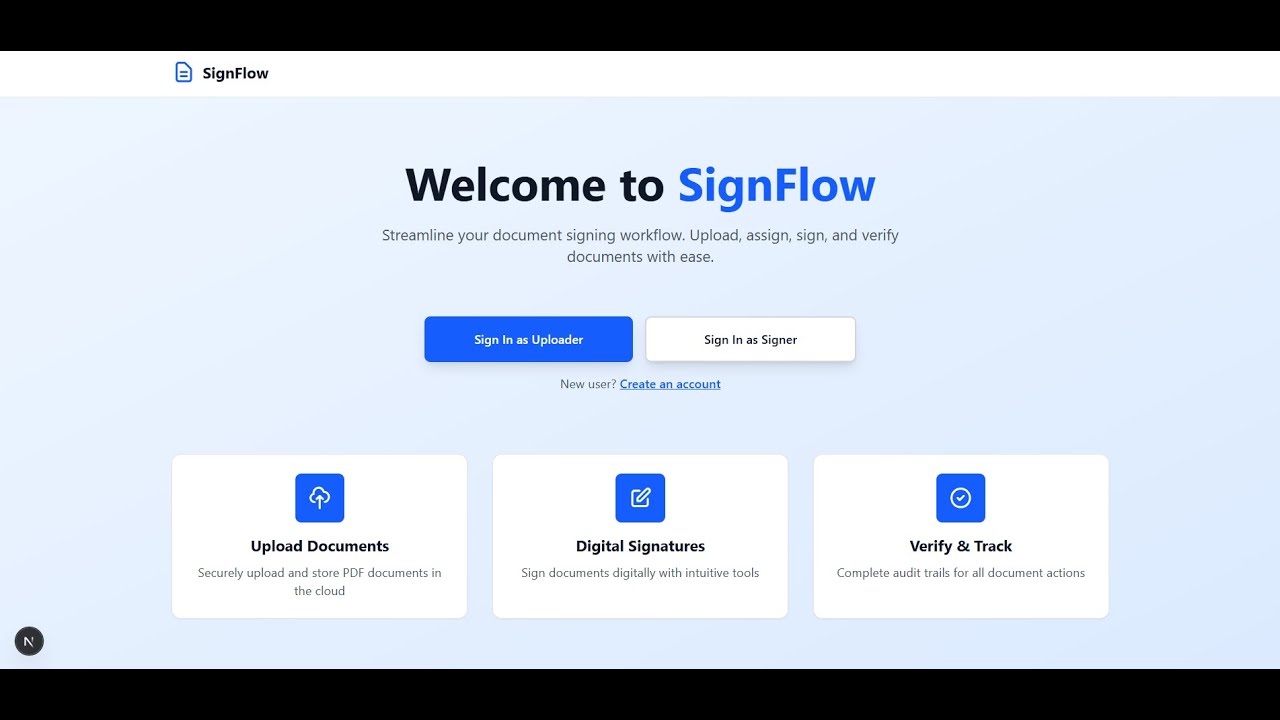
A modern, secure, and intuitive platform for digital document signing workflows





- Overview
- Features
- Tech Stack
- Architecture
- Database Schema
- Project Structure
- Installation
- Environment Variables
- API Documentation
- Usage
- Deployment
- Contributing
SignFlow is a full-stack PDF signing application designed to streamline document workflows. It enables uploaders to assign documents for digital signatures and allows signers to complete signing tasks with ease. The platform features JWT-based authentication, role-based access control, real-time status tracking, and comprehensive audit logging.
- Secure Authentication - JWT-based auth with OTP verification
- Digital Signatures - Canvas-based signature capture with PDF embedding
- Cloud Storage - AWS S3 integration for scalable document storage
- Audit Trails - Complete action logging for compliance
- Mobile Responsive - Optimized for all device sizes
- Production Ready - Session management, error handling, and security best practices
- JWT-based authentication with secure token management
- OTP-based signup via email (Nodemailer + Gmail SMTP)
- Role-based access control (Uploader / Signer)
- Session tracking with device, browser, OS, and IP logging
- Auto-submit OTP on 6th digit entry for better UX
- Upload PDF documents to AWS S3
- Assign documents to signers via email
- Review signed documents (Accept/Reject with reason)
- View audit logs and document history
- Dashboard with real-time stats:
- Pending documents
- Awaiting review (signed)
- Verified documents
- Rejected documents
- View assigned documents
- Digital signature capture via canvas
- Auto-filled email, manual name/date fields
- Submit signed documents
- Dashboard with stats:
- Awaiting signature
- Signed documents
- Verified documents
- Rejected documents
- Document statuses: PENDING → SIGNED → VERIFIED / REJECTED
- PDF preview with embedded signature overlay
- Audit logging for all document actions
- Email notifications for document assignments
- Timestamps for upload, signature, verification events
- Tracks all document actions (Created, Assigned, Signed, Verified, Rejected)
- Records user information (name, email, timestamp)
- Accessible via dedicated modal in uploader dashboard
- Provides complete compliance trail for regulatory requirements
- Live statistics for both uploader and signer roles
- Visual stat cards with color-coded metrics
- Smart alert banners for pending actions
- Fully responsive grid layouts for all devices
- Modal-based authentication for seamless user experience
- Toast notifications with undo functionality
- Professional document upload animations
- Mobile-first responsive design optimized for all screen sizes
- Clean, intuitive interface built with Tailwind CSS
- Quick database reset (
npm run reset-db) for development - Automated seeding (
npm run seed) for test data - Foreign key constraint handling for data integrity
- Automated database migrations with Prisma
| Technology | Version | Purpose |
|---|---|---|
| Next.js | 15.5.5 | React framework with App Router |
| React | 19.1.0 | UI library |
| TypeScript | 5.0 | Type-safe development |
| Tailwind CSS | 4.0 | Utility-first styling |
| pdf-lib | 1.17.1 | PDF manipulation and signature embedding |
| react-signature-canvas | 1.1.0 | Digital signature capture |
| react-pdf | 10.2.0 | PDF rendering and preview |
| pdfjs-dist | 5.4.296 | PDF.js worker for rendering |
| axios | 1.12.2 | HTTP client |
| dayjs | 1.11.18 | Date formatting |
| react-draggable | 4.5.0 | Signature field positioning |
| Technology | Version | Purpose |
|---|---|---|
| Node.js | 20+ | JavaScript runtime |
| Express | 5.1.0 | Web framework |
| Prisma | 6.17.1 | ORM and database toolkit |
| SQLite | - | Development database |
| bcryptjs | 3.0.2 | Password hashing |
| jsonwebtoken | 9.0.2 | JWT authentication |
| AWS SDK (S3) | 3.908.0 | Cloud file storage |
| Multer | 2.0.2 | File upload handling |
| Nodemailer | 6.9.16 | Email service |
| pdf-lib | 1.17.1 | PDF signature embedding |
| CORS | 2.8.5 | Cross-origin resource sharing |
| dotenv | 17.2.3 | Environment configuration |
| swagger-ui-express | 5.0.1 | API documentation |
| nodemon | 3.1.10 | Development auto-reload |
- AWS S3 - Document storage with pre-signed URLs
- Gmail SMTP - Email delivery service
- Git - Version control
- GitHub - Code repository
┌─────────────────────────────────────────────────────────────────┐
│                          CLIENT LAYER                            │
│  ┌──────────────┐  ┌──────────────┐  ┌──────────────┐          │
│  │   Browser    │  │    Mobile    │  │    Tablet    │          │
│  │  (Desktop)   │  │    Device    │  │    Device    │          │
│  └──────┬───────┘  └──────┬───────┘  └──────┬───────┘          │
│         │                 │                 │                    │
│         └─────────────────┴─────────────────┘                    │
│                           │                                      │
└───────────────────────────┼──────────────────────────────────────┘
                            │
                            ▼
┌─────────────────────────────────────────────────────────────────┐
│                    FRONTEND (Next.js 15)                         │
│  ┌────────────────────────────────────────────────────────┐    │
│  │  App Router (TypeScript + React 19)                    │    │
│  │  ┌──────────┐  ┌──────────┐  ┌──────────┐             │    │
│  │  │   Auth   │  │ Uploader │  │  Signer  │             │    │
│  │  │  Modal   │  │Dashboard │  │Dashboard │             │    │
│  │  └──────────┘  └──────────┘  └──────────┘             │    │
│  │  ┌──────────────────────────────────────┐             │    │
│  │  │  PDF Preview & Signature Components  │             │    │
│  │  └──────────────────────────────────────┘             │    │
│  └────────────────────────────────────────────────────────┘    │
│  Tailwind CSS + Responsive Design                               │
└───────────────────────────┬─────────────────────────────────────┘
                            │
                            │ HTTPS (REST API)
                            │ JWT Bearer Token
                            │
                            ▼
┌─────────────────────────────────────────────────────────────────┐
│                   BACKEND (Node.js + Express)                    │
│  ┌────────────────────────────────────────────────────────┐    │
│  │  API Routes                                            │    │
│  │  ┌──────────┐  ┌──────────┐  ┌──────────┐             │    │
│  │  │   Auth   │  │Documents │  │  Email   │             │    │
│  │  │  Routes  │  │  Routes  │  │  Queue   │             │    │
│  │  └──────────┘  └──────────┘  └──────────┘             │    │
│  └────────────────────────────────────────────────────────┘    │
│  ┌────────────────────────────────────────────────────────┐    │
│  │  Middleware Layer                                      │    │
│  │  ┌──────────┐  ┌──────────┐  ┌──────────┐             │    │
│  │  │   Auth   │  │   CORS   │  │  Multer  │             │    │
│  │  │Middleware│  │          │  │ (Upload) │             │    │
│  │  └──────────┘  └──────────┘  └──────────┘             │    │
│  └────────────────────────────────────────────────────────┘    │
│  ┌────────────────────────────────────────────────────────┐    │
│  │  Services Layer                                        │    │
│  │  ┌──────────┐  ┌──────────┐  ┌──────────┐             │    │
│  │  │ AWS S3   │  │   Email  │  │   PDF    │             │    │
│  │  │ Service  │  │ Service  │  │ Service  │             │    │
│  │  └──────────┘  └──────────┘  └──────────┘             │    │
│  └────────────────────────────────────────────────────────┘    │
└───────────────────────┬────────────┬────────────────────────────┘
                        │            │
                        ▼            ▼
        ┌───────────────────┐  ┌──────────────┐
        │   Prisma ORM      │  │   AWS S3     │
        │                   │  │   Bucket     │
        └─────────┬─────────┘  └──────────────┘
                  │
                  ▼
        ┌───────────────────┐
        │  SQLite Database  │
        │  ┌──────────────┐ │
        │  │    Users     │ │
        │  │  Documents   │ │
        │  │  AuditLogs   │ │
        │  │  Sessions    │ │
        │  │ OTPHistory   │ │
        │  │ EmailQueue   │ │
        │  └──────────────┘ │
        └───────────────────┘
┌──────────┐
│  Client  │
└────┬─────┘
     │
     │ 1. Login Request
     ├─────────────────────────────────────────────────────────▶
     │                                                          ┌──────────────┐
     │                                                          │   Backend    │
     │                                                          │  (Express)   │
     │                                                          └──────┬───────┘
     │                                                                 │
     │                                                                 │ 2. Validate Credentials
     │                                                                 │ (bcrypt compare)
     │                                                                 ▼
     │                                                          ┌──────────────┐
     │                                                          │   Database   │
     │                                                          │   (Prisma)   │
     │                                                          └──────┬───────┘
     │                                                                 │
     │                                                                 │ 3. Create Session
     │                                                                 │
     │◀────────────────────────────────────────────────────────────────┤
     │ 4. JWT Token + User Data                                       │
     │                                                                 │
     │ 5. Upload PDF Request (with JWT)                               │
     ├─────────────────────────────────────────────────────────────────▶
     │                                                                 │
     │                                                                 │ 6. Authenticate JWT
     │                                                                 │
     │                                                                 │ 7. Upload to S3
     │                                                                 ▼
     │                                                          ┌──────────────┐
     │                                                          │    AWS S3    │
     │                                                          └──────┬───────┘
     │                                                                 │
     │                                                                 │ 8. Get Pre-signed URL
     │                                                                 │
     │                                                                 ▼
     │                                                          ┌──────────────┐
     │                                                          │   Database   │
     │                                                          │ Save Doc Info│
     │                                                          └──────┬───────┘
     │                                                                 │
     │                                                                 │ 9. Create Audit Log
     │                                                                 │
     │                                                                 │ 10. Send Email
     │                                                                 ▼
     │                                                          ┌──────────────┐
     │                                                          │   Nodemailer │
     │                                                          └──────────────┘
     │◀────────────────────────────────────────────────────────────────┤
     │ 11. Success Response                                            │
     │                                                                 │
     │ 12. Sign Document Request                                      │
     ├─────────────────────────────────────────────────────────────────▶
     │                                                                 │
     │                                                                 │ 13. Get PDF from S3
     │                                                                 │
     │                                                                 │ 14. Embed Signature
     │                                                                 │    (pdf-lib)
     │                                                                 │
     │                                                                 │ 15. Upload Signed PDF
     │                                                                 │
     │                                                                 │ 16. Update DB Status
     │                                                                 │
     │◀────────────────────────────────────────────────────────────────┤
     │ 17. Success Response                                            │
     │                                                                 │
┌────────────┐         ┌────────────┐         ┌────────────┐
│  Sign Up   │         │ OTP Verify │         │  Password  │
│   Step 1   │────────▶│   Step 2   │────────▶│   Step 3   │
└────────────┘         └────────────┘         └────────────┘
     │                       │                       │
     │ Name, Email, Role     │ 6-Digit OTP          │ Password
     ▼                       ▼                       ▼
┌──────────────────────────────────────────────────────────┐
│                   Backend Validation                      │
│  • Email uniqueness  • OTP expiry check  • Hash password │
└───────────────────────────┬──────────────────────────────┘
                            │
                            ▼
                   ┌────────────────┐
                   │  Create User   │
                   │  in Database   │
                   └────────┬───────┘
                            │
                            ▼
                   ┌────────────────┐
                   │ Generate JWT   │
                   │  Create Session│
                   └────────┬───────┘
                            │
                            ▼
                   ┌────────────────┐
                   │   Return Token │
                   │   + User Data  │
                   └────────────────┘
┌─────────────────────────────────┐
│            User                 │
├─────────────────────────────────┤
│ • id (UUID, PK)                 │
│ • name (String)                 │
│ • email (String, Unique)        │
│ • password (String, Hashed)     │
│ • role (Enum: UPLOADER/SIGNER) │
│ • createdAt (DateTime)          │
└──────────┬──────────────────────┘
           │
           │ 1:N
           │
           ▼
┌─────────────────────────────────┐        ┌─────────────────────────────────┐
│         Document                │        │          AuditLog               │
├─────────────────────────────────┤        ├─────────────────────────────────┤
│ • id (UUID, PK)                 │◀──────▶│ • id (UUID, PK)                 │
│ • name (String)                 │  1:N   │ • documentId (FK)               │
│ • originalFileName (String)     │        │ • action (String)               │
│ • fileUrl (String)              │        │ • performedBy (String)          │
│ • s3Key (String)                │        │ • details (String, Optional)    │
│ • status (Enum)                 │        │ • createdAt (DateTime)          │
│ • uploadedById (UUID, FK)       │        └─────────────────────────────────┘
│ • assignedTo (String, Email)    │
│ • signatureData (String)        │
│ • signedAt (DateTime)           │
│ • verifiedAt (DateTime)         │
│ • rejectedAt (DateTime)         │
│ • rejectionReason (String)      │
│ • createdAt (DateTime)          │
│ • updatedAt (DateTime)          │
└──────────┬──────────────────────┘
           │
           │ Status Flow
           ▼
    ┌─────────────┐
    │   PENDING   │
    └──────┬──────┘
           │
           ▼
    ┌─────────────┐
    │   SIGNED    │
    └──────┬──────┘
           │
       ┌───┴───┐
       ▼       ▼
┌──────────┐ ┌──────────┐
│ VERIFIED │ │ REJECTED │
└──────────┘ └──────────┘


┌─────────────────────────────────┐
│           Session               │
├─────────────────────────────────┤
│ • id (UUID, PK)                 │
│ • userId (UUID, FK)             │───┐
│ • token (String, Unique)        │   │
│ • device (String)               │   │ N:1
│ • browser (String)              │   │
│ • os (String)                   │   │
│ • ip (String)                   │   │
│ • userAgent (String)            │   │
│ • lastActivity (DateTime)       │   │
│ • expiresAt (DateTime)          │   │
│ • createdAt (DateTime)          │   │
└─────────────────────────────────┘   │
                                      │
                                      ▼
                             ┌─────────────┐
                             │    User     │
                             └─────────────┘


┌─────────────────────────────────┐
│         OTPHistory              │
├─────────────────────────────────┤
│ • id (UUID, PK)                 │
│ • email (String)                │
│ • otp (String)                  │
│ • purpose (String)              │
│ • verified (Boolean)            │
│ • verifiedAt (DateTime)         │
│ • expiresAt (DateTime)          │
│ • createdAt (DateTime)          │
└─────────────────────────────────┘


┌─────────────────────────────────┐
│         EmailQueue              │
├─────────────────────────────────┤
│ • id (UUID, PK)                 │
│ • to (String)                   │
│ • subject (String)              │
│ • template (String)             │
│ • data (JSON String)            │
│ • status (Enum)                 │
│ • attempts (Int)                │
│ • maxAttempts (Int)             │
│ • error (String)                │
│ • sentAt (DateTime)             │
│ • scheduledFor (DateTime)       │
│ • createdAt (DateTime)          │
│ • updatedAt (DateTime)          │
└─────────────────────────────────┘
- User → Document: One-to-Many (A user can upload multiple documents)
- Document → AuditLog: One-to-Many (Each document has multiple audit entries)
- User → Session: One-to-Many (A user can have multiple active sessions)
- OTPHistory: Standalone (Tracks all OTP attempts)
- EmailQueue: Standalone (Manages email delivery queue)
Document.uploadedById- Fast uploader queriesDocument.assignedTo- Fast signer queriesDocument.status- Status-based filteringSession.userId- User session lookupSession.token- JWT validationAuditLog.documentId- Document historyOTPHistory.email- OTP verification
backend/
├── config/
│   └── swagger.js                 # Swagger configuration
├── db/
│   └── prismaClient.js            # Prisma client instance
├── middleware/
│   ├── auth.js                    # JWT authentication middleware
│   └── upload.js                  # Multer file upload configuration
├── prisma/
│   ├── schema.prisma              # Database schema definition
│   ├── migrations/                # Database migrations
│   └── seed.js                    # Seed script for test data
├── routes/
│   ├── auth.js                    # Authentication endpoints
│   ├── documents.js               # Document CRUD operations
│   └── health.js                  # Health check endpoint
├── scripts/
│   └── reset-db.js                # Database reset utility
├── services/
│   ├── s3Service.js               # AWS S3 integration
│   ├── emailService.js            # Nodemailer email service
│   └── pdfService.js              # PDF manipulation with pdf-lib
├── uploads/                       # Temporary file uploads (gitignored)
├── .env                           # Environment variables (gitignored)
├── .env.example                   # Environment template
├── .gitignore                     # Git ignore rules
├── package.json                   # Dependencies and scripts
├── server.js                      # Express server entry point
└── swagger.yaml                   # OpenAPI specification
frontend/
├── app/
│   ├── components/
│   │   ├── Header.tsx             # Navigation header
│   │   ├── AuthModal.tsx          # Login/Signup modal
│   │   ├── DocumentReviewModal.tsx # Accept/Reject modal
│   │   └── AuditLogModal.tsx      # Document history modal
│   ├── contexts/
│   │   ├── ToastContext.tsx       # Global toast notifications
│   │   └── ModalContext.tsx       # Modal management
│   ├── config/
│   │   └── api.ts                 # API endpoints configuration
│   ├── uploader/
│   │   ├── page.tsx               # Uploader dashboard
│   │   ├── upload/
│   │   │   └── page.tsx           # Document upload form
│   │   └── preview/
│   │       └── [id]/
│   │           └── page.tsx       # Document preview & review
│   ├── signer/
│   │   ├── page.tsx               # Signer dashboard
│   │   ├── sign/
│   │   │   └── [id]/
│   │   │       └── page.tsx       # Document signing interface
│   │   └── preview/
│   │       └── [id]/
│   │           └── page.tsx       # Signed document preview
│   ├── globals.css                # Global styles & Tailwind
│   ├── layout.tsx                 # Root layout
│   └── page.tsx                   # Landing page
├── public/                        # Static assets
├── .gitignore                     # Git ignore rules
├── next.config.js                 # Next.js configuration
├── tailwind.config.js             # Tailwind CSS configuration
├── tsconfig.json                  # TypeScript configuration
└── package.json                   # Dependencies and scripts
- Node.js 20.x or higher
- npm or yarn
- Git
- AWS Account (for S3 storage)
- Gmail Account (for email service)
git clone https://github.com/reachvivek/SignFlow.git
cd SignFlowcd Project/backend
# Install dependencies
npm install
# Create environment file
cp .env.example .env
# Edit .env with your credentials (see Environment Variables section)
# Generate Prisma client
npx prisma generate
# Run database migrations
npx prisma migrate dev
# Seed database with test users
npm run seed
# Start backend server
npm run devBackend will run on http://localhost:5000
cd ../frontend

# Install dependencies
npm install

# Start frontend server
npm run dev
Frontend will run on http://localhost:3000
- Frontend: http://localhost:3000
- Backend API: http://localhost:5000
- API Documentation: http://localhost:5000/api-docs
- Prisma Studio:
npx prisma studio(Database GUI)
After running npm run seed:
| Role | Password | |
|---|---|---|
| Uploader | [email protected] | password123 |
| Signer | [email protected] | password123 |
# Server Configuration
PORT=5000
NODE_ENV=development

# Database
DATABASE_URL="file:./prisma/dev.db"

# JWT Secret (Generate: openssl rand -base64 32)
JWT_SECRET=your-super-secret-jwt-key-change-this

# AWS S3 Configuration
AWS_REGION=ap-south-1
AWS_ACCESS_KEY_ID=your-aws-access-key
AWS_SECRET_ACCESS_KEY=your-aws-secret-key
AWS_S3_BUCKET_NAME=your-s3-bucket-name

# Email Configuration (Gmail)
EMAIL_HOST=smtp.gmail.com
EMAIL_PORT=587
EMAIL_SECURE=false
EMAIL_USER=[email protected]
EMAIL_PASS=your-app-specific-password
EMAIL_FROM=SignFlow <[email protected]>

# Frontend URL (for CORS)
FRONTEND_URL=http://localhost:3000Create .env.local:
NEXT_PUBLIC_API_URL=http://localhost:5000- Go to Google Account Security
- Enable 2-Step Verification
- Go to App Passwords
- Create new app password for "Mail"
- Use generated password in
EMAIL_PASS
- Create S3 bucket in AWS Console
- Enable "Block all public access" = OFF
- Add CORS configuration:
[
    {
        "AllowedHeaders": ["*"],
        "AllowedMethods": ["GET", "PUT", "POST", "DELETE"],
        "AllowedOrigins": ["http://localhost:3000"],
        "ExposeHeaders": []
    }
]- Create IAM user with S3 permissions
- Get Access Key ID and Secret Access Key
Access interactive API documentation at:
http://localhost:5000/api-docs
POST /api/auth/send-otp
Content-Type: application/json

{
  "name": "John Doe",
  "email": "[email protected]",
  "role": "UPLOADER"
}POST /api/auth/verify-otp
Content-Type: application/json
{
"email": "[email protected]",
"otp": "123456"
}POST /api/auth/complete-signup
Content-Type: application/json
{
"email": "[email protected]",
"password": "securePassword123"
}POST /api/auth/login
Content-Type: application/json
{
"email": "[email protected]",
"password": "password123",
"role": "UPLOADER"
}
Response:
{
"success": true,
"token": "eyJhbGciOiJIUzI1NiIsInR5cCI6IkpXVCJ9...",
"user": {
"id": "uuid",
"name": "Uploader User",
"email": "[email protected]",
"role": "UPLOADER"
}
}POST /api/auth/logout
Authorization: Bearer <token>
Response:
{
"success": true,
"message": "Logged out successfully"
}POST /api/documents/upload
Authorization: Bearer <token>
Content-Type: multipart/form-data
{
"name": "Contract Agreement",
"file": <PDF file>,
"assignedTo": "[email protected]"
}GET /api/documents
Authorization: Bearer <token>
Response (Uploader):
{
"success": true,
"documents": [...]
}
Response (Signer):
{
"success": true,
"documents": [...] // Only assigned documents
}GET /api/documents/:id
Authorization: Bearer <token>GET /api/documents/:id/view
Authorization: Bearer <token>
Response:
{
"success": true,
"data": "base64-encoded-pdf-content"
}POST /api/documents/:id/sign
Authorization: Bearer <token>
Content-Type: application/json
{
"signatureData": "data:image/png;base64,...",
"name": "John Signer",
"email": "[email protected]"
}POST /api/documents/:id/verify
Authorization: Bearer <token>
Response:
{
"success": true,
"message": "Document verified successfully"
}POST /api/documents/:id/reject
Authorization: Bearer <token>
Content-Type: application/json
{
"reason": "Signature is unclear"
}GET /api/documents/:id/audit-logs
Authorization: Bearer <token>
Response:
{
"success": true,
"auditLogs": [
{
"id": "uuid",
"action": "Created",
"performedBy": "[email protected]",
"details": "Document uploaded",
"createdAt": "2025-10-15T10:30:00Z"
}
]
}DELETE /api/documents/:id
Authorization: Bearer <token>GET /api/health
Response:
{
"status": "healthy",
"timestamp": "2025-10-15T10:30:00Z"
}- Sign Up/Login as Uploader
- Upload Document:
- Click "Upload Document"
- Select PDF file
- Enter document name
- Assign to signer's email
- Track Status on dashboard
- Review Signed Documents:
- Click "Review" on signed documents
- Accept or Reject with reason
- View Audit History:
- Click three-dot menu → "View History"
- Sign Up/Login as Signer
- View Assigned Documents on dashboard
- Sign Document:
- Click "Sign Now"
- Draw signature on canvas
- Enter name (email auto-filled)
- Submit
- Track Status of signed documents
# Reset database (truncate all tables)
npm run reset-db

# Seed with test data
npm run seed

# View database in GUI
npx prisma studio-
Set Environment Variables:
- All variables from
.env - Change
DATABASE_URLto PostgreSQL connection string - Update
FRONTEND_URLto production URL
- All variables from
-
Database Migration:
npx prisma migrate deploy- Build Command:
npm install && npx prisma generate- Start Command:
npm start-
Set Environment Variables:
NEXT_PUBLIC_API_URL=https://your-backend-url.com
-
Build Command:
npm run build- Output Directory:
.next
- Update
JWT_SECRETto secure random string - Configure AWS S3 CORS for production domain
- Update
FRONTEND_URLin backend.env - Enable HTTPS/SSL
- Set up PostgreSQL database (replace SQLite)
- Configure email service (production SMTP)
- Add rate limiting to API endpoints
- Enable production error logging
- Set up CI/CD pipeline
- Configure backup strategy
| Feature | Status | Description |
|---|---|---|
| JWT Authentication | ✅ | Secure token-based auth |
| OTP Verification | ✅ | Email-based signup verification |
| Role-Based Access | ✅ | UPLOADER / SIGNER roles |
| PDF Upload | ✅ | AWS S3 cloud storage |
| Digital Signature | ✅ | Canvas-based signature capture |
| PDF Embedding | ✅ | Signature overlay with pdf-lib |
| Document Review | ✅ | Accept/Reject workflow |
| Audit Logging | ✅ | Complete action history |
| Email Notifications | ✅ | Nodemailer integration |
| Session Management | ✅ | Device/browser/IP tracking |
| Mobile Responsive | ✅ | Optimized for all devices |
| Dashboard Stats | ✅ | Real-time role-based metrics |
| Database Reset | ✅ | npm run reset-db utility |
| API Documentation | ✅ | Swagger UI integration |
Contributions are welcome! To contribute to SignFlow:
- Fork the repository
- Create a feature branch (
git checkout -b feature/amazing-feature) - Commit your changes (
git commit -m 'Add amazing feature') - Push to the branch (
git push origin feature/amazing-feature) - Open a Pull Request
- Follow the existing code style and structure
- Write clear commit messages
- Add comments for complex logic
- Update documentation as needed
- Test thoroughly before submitting PR
MIT License - feel free to use this project for your own purposes.
Copyright (c) 2025 Vivek Singh
Vivek Singh
- GitHub: @reachvivek
- LinkedIn: Vivek Singh
For questions or collaboration opportunities, feel free to reach out!
- Next.js Team - React framework
- Prisma Team - Database toolkit
- Vercel - Deployment platform
- AWS - Cloud infrastructure
- Tailwind CSS - Styling framework
Built using Next.js, Node.js, and AWS
Star this repo if you found it helpful!