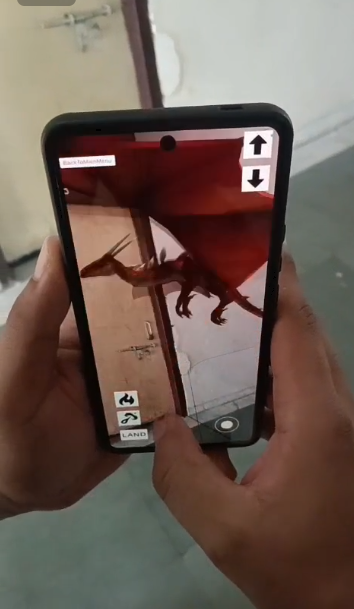
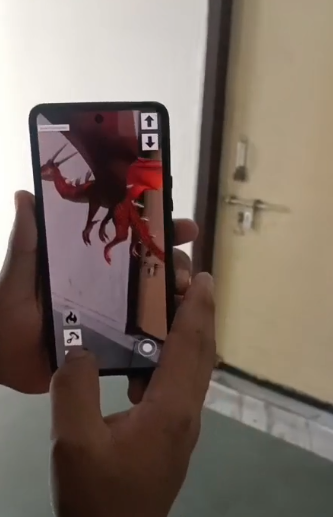
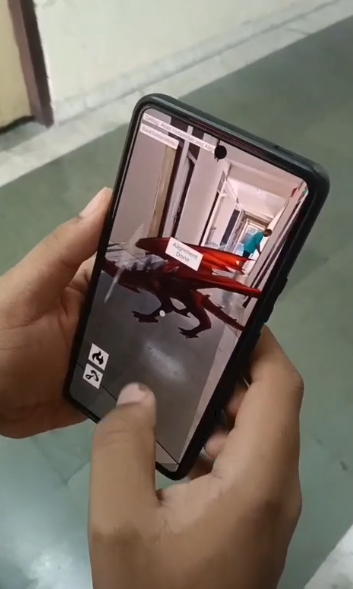
DragonAR is an augmented reality game that lets players control various types of dragons in the real world. Place your dragon in your environment, customize its appearance, and command it to fly, breathe fire, and unleash fireballs.






Throughout the project, my aim has been to make the codebase as extensible as possible - supporting additional scenes,dragon types, skins, and sound effects with minimal changes to existing code. That's why i have implemented various systems and organizational structures to achieve this goal.
The project extensively uses a custom singleton implementation (Singleton<T>) that provides several advantages over traditional Unity singletons:
public class Singleton<T> : MonoBehaviour where T : MonoBehaviour
{
    // Core implementation with thread safety via locking
    private static object m_Lock = new object();
    private static T m_Instance;

    [SerializeField] public bool dontDestroyOnLoad = true;
    [SerializeField] public bool CanICreateItAgain = false;

    // Implementation details...
}
Design Decisions:
- Configurable Persistence: Toggle for DontDestroyOnLoad behavior
- Controlled Re-instantiation: Option to allow singleton recreation after destruction
- Safe Shutdown Handling: Prevents access to destroyed instances
- Automatic Instance Creation: Self-instantiates when accessed if no instance exists
This pattern is used by PlayerData, DragonUI, and CustomSceneLoader to provide globally accessible services without relying on direct references.
The project uses enums extensively to create type-safe, easily extensible systems:
public enum DragonType
{
    Usurper,
    SoulEater,
    Nightmare,
    TerrorBringer
}

public enum LevelList
{
    MainMenu,
    SelectionScreen,
    LoadingMenu,
    AR_SCENE
}

public enum DragonColor
{
    Blue,
    Green,
    Purple,
    Red,
    Grey,
    Albino,
    DarkBlue
}
Design Decisions:
- Type Safety: Prevents incorrect value assignments
- Easy Expansion: New dragon types, levels, or colors can be added by simply extending the enum
- String Conversion: Level names can be accessed via
LevelName.ToString()for scene loading
PlayerData serves as the central data repository, persisting between scenes:
public class PlayerData : Singleton<PlayerData>
{
    public string PlayerName { get; set; } = "Zeipher";
    public DragonType DragonChoice { get; private set; } = DragonType.Usurper;
    public int DragonColorChoice { get; private set; } = 2;

    // Implementation of color palettes and mappings...

    public void ChangeMaterialBasedOnChoice(GameObject[] DragonsRef)
    {
        DragonsRef[(int)DragonChoice].GetComponentInChildren<SkinnedMeshRenderer>().material = SelectedDragonMaterial();
    }

    // Additional implementation...
}
Design Decisions:
- Encapsulated State: Properties with controlled access (public getters, private setters)
- Default Values: Sensible defaults to prevent null references
- Type-Safe Enums: Using enums for dragon types and colors to prevent invalid states
- Dictionary Mappings: Using dictionaries for efficient lookups of color values and type configurations
- Material Management: Centralized control over dragon appearance changes
The project uses Unity's new Input System with custom action maps:
IADragon.Locomotion.Fly.started += TakeFlight;
IADragon.Locomotion.FlyUpDown.performed += AltitudeChange;
IADragon.Locomotion.FlameBreath.started += FlameThrowerAttack;
Design Decisions:
- Event-Based Input: Using callbacks rather than polling for better separation of concerns
- Context-Sensitive Controls: Different input mappings based on game state (ground vs. flying)
- Hybrid Control Scheme: Combining UI joystick with action buttons for mobile-friendly controls
DragonUI manages all UI elements and their states centrally:
public void DragonPlacementStage(int stage)
{
    if (stage == 0) {
        // Initial placement state
        AlignButton.SetActive(false);
        // Other UI setup...
    }
    // Other stages...
}
Design Decisions:
- State-Based UI: UI elements toggle based on discrete game states
- Centralized Access: Singleton pattern allows any component to update UI
- Cached References: All UI elements found and cached at startup for performance
The scene flow is managed by CustomSceneLoader which provides asynchronous loading with a loading screen:
public void LoadScene(LevelList SelectedLevel)
{
    SceneManager.LoadSceneAsync("LoadingScene", LoadSceneMode.Single);
    StartCoroutine(AsyncLoad(SelectedLevel));
}

IEnumerator AsyncLoad(LevelList SelectedLevel)
{
    string SceneName = SelectedLevel.ToString();
    var AsyncLoadedScene = SceneManager.LoadSceneAsync(SceneName, LoadSceneMode.Single);

    AsyncLoadedScene.allowSceneActivation = false;
    yield return new WaitUntil(() => AsyncLoadedScene.progress >= 0.9f);
    AsyncLoadedScene.allowSceneActivation = true;
}
How It Connects:
- MainMenuHandler: Uses
CustomSceneLoader.Instance.LoadScene()to trigger scene transitions - AR_SCENE_UIHANDLER: Provides navigation back to main menu
- Enum-Based Navigation: Uses
LevelListenum to maintain type-safe scene references - Loading Screen: Shows a loading screen until the target scene is 90% loaded
.jpg?raw=true)
The dragon selection carousel demonstrates the project's extensibility-focused design:
IEnumerator SlerpItDown(float angle)
{
    if (angle > 0) { SelectionDragon++; } else { SelectionDragon--; }
    if (SelectionDragon < 0 || SelectionDragon >= NumberOfDragonTypes)
    {
        SelectionDragon=((SelectionDragon % NumberOfDragonTypes) + NumberOfDragonTypes) % NumberOfDragonTypes;
    }

    // Animation code...

    PlayerData.Instance.SetDragonChoice((DragonType)SelectionDragon);
    SwitchColorPalette((DragonType)SelectionDragon);
}
How It Connects:
- Modular Animation: Smoothly rotates between dragon models with Quaternion.Slerp
- Automatic Wrapping: The selection wraps around when reaching the beginning or end
- Dynamic UI Updates: Updates color palette UI based on selected dragon
- Data Persistence: Updates PlayerData singleton when dragon selection changes
DragonController manages all dragon behavior including movement, flight, and attacks:
void TakeFlight(InputAction.CallbackContext callbackContext)
{
    if (InAir) {
        ExitFlight();
    } else {
        InAir = true;
        animator.SetBool(TakeOffHash, true);
        // Other flight setup...
        DragonUI.Instance.DragonFly(true);
    }
}
How It Connects:
- UI Integration: Notifies
DragonUIof state changes (DragonUI.Instance.DragonFly(true)) - Input System: Receives input events from the input action asset
- Physics-Based Movement: Uses Rigidbody for realistic movement and forces
- Animation Integration: Controls the Animator component based on movement state
ARPlacementManager handles all AR functionality including surface detection and dragon placement:
void InstantiateDragon(InputAction.CallbackContext ctx, int index)
{
    if (m_RaycastManager.Raycast(RayToCenter, m_Hits, TrackableType.PlaneWithinPolygon))
    {
        Pose hitPose = m_Hits[0].pose;
        Dragon = Instantiate(dragonPrefabs[index], hitPose.position, Quaternion.identity);
        DragonInstantiated = true;
        DragonUI.Instance.DragonPlacementStage(1);
    }
}
How It Connects:
- AR Foundation Integration: Uses ARRaycastManager for surface detection
- UI State Management: Updates UI state through
DragonUI.Instance.DragonPlacementStage(1) - Player Data Integration: Accesses dragon choices from
PlayerData.Instance.DragonChoice - Input System: Responds to AR placement input actions
RotateDragons manages the dragon selection carousel and color customization:
private void SwitchColorPalette(DragonType SelectedDragonType)
{
    switch (PlayerData.Instance.DragonChoice)
    {
        case DragonType.Usurper:
            SetColorPalette(DragonType.Usurper);
            break;
        // Other cases...
    }
}

private void SetColorPalette(DragonType dragontype)
{
    DragonColor[] dragonColorPalette = PlayerData.Instance.dragonColors[dragontype];
    ColorV1.GetComponent<Image>().color = PlayerData.Instance.colorMapping[dragonColorPalette[0]];
    // Additional color assignments...
}
How It Connects:
- Data Persistence: Updates
PlayerData.Instance.SetDragonChoice()when selection changes - Visual Feedback: Updates UI color swatches based on selected dragon type
- Rotation Animation: Uses coroutines for smooth rotation animations
- Dynamic Color Options: Different dragon types have different color palettes
- Singleton Lifecycle: Careful handling of singleton destruction prevents memory leaks
- Resource Loading: Dragons are instantiated only when needed
- Reference Caching: UI elements are cached at startup to avoid expensive
GameObject.Findcalls
- Touch Controls: Custom joystick implementation for smooth mobile control
- UI Layout: Mobile-friendly button placement and sizing
- Resource Management: Careful asset management for mobile performance
The architecture was designed with these extension points in mind:
- New Dragon Types: The enum-based dragon type system makes adding new dragons straightforward
- Additional Abilities: The input system can easily accommodate new dragon abilities
- New Scenes/Levels: Adding new scenes simply requires updating the LevelList enum
- Additional Color Options: New dragon colors can be added to the DragonColor enum and mapped in PlayerData
- Sound Effects: The structure supports easy addition of sound effects for various dragon actions
┌─────────────────────┐      ┌─────────────────┐      ┌─────────────────┐
│                     │      │                 │      │                 │
│  CustomSceneLoader  │◄────►│  Scene System   │◄────►│  MainMenuHandler│
│     (Singleton)     │      │                 │      │AR_SCENE_UIHANDLER│
│                     │      └─────────────────┘      └─────────────────┘
└─────────────┬───────┘
              │
              ▼
┌─────────────────────┐      ┌─────────────────┐      ┌─────────────────┐
│                     │      │                 │      │                 │
│     PlayerData      │◄────►│  Dragon System  │◄────►│DragonController │
│     (Singleton)     │      │                 │      │                 │
│                     │      └────────┬────────┘      └─────────────────┘
└─────────────┬───────┘               │
              │                       │
              ▼                       ▼
┌─────────────────────┐      ┌─────────────────┐      ┌─────────────────┐
│                     │      │                 │      │                 │
│      DragonUI       │◄────►│    UI System    │◄────►│ AR Placement    │
│     (Singleton)     │      │                 │      │    System       │
│                     │      └─────────────────┘      └─────────────────┘
└─────────────────────┘                                        │
                                                              │
                                                              ▼
                                                     ┌─────────────────┐
                                                     │                 │
                                                     │RotateDragons    │
                                                     │Dragon Selection │
                                                     │                 │
                                                     └─────────────────┘
This architecture provides a robust foundation for the AR Dragon game, enabling clean separation of concerns while maintaining efficient communication between systems. The extensibility-focused design allows for easy addition of new features, dragon types, and gameplay elements in the future.