A comprehensive multi-tenant vulnerability reporting and management platform built with Django and React.
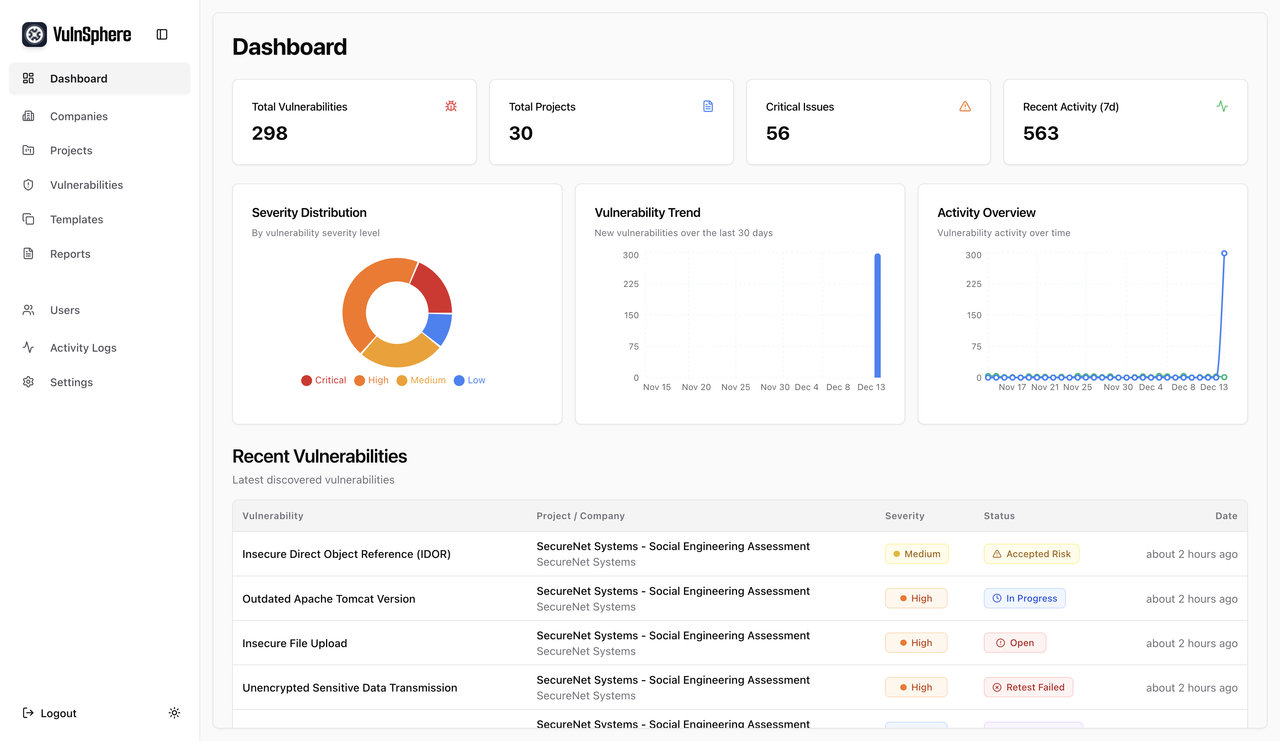
- Multi-Tenant Architecture: Securely manage multiple clients with isolated data, projects, and assets for each company.
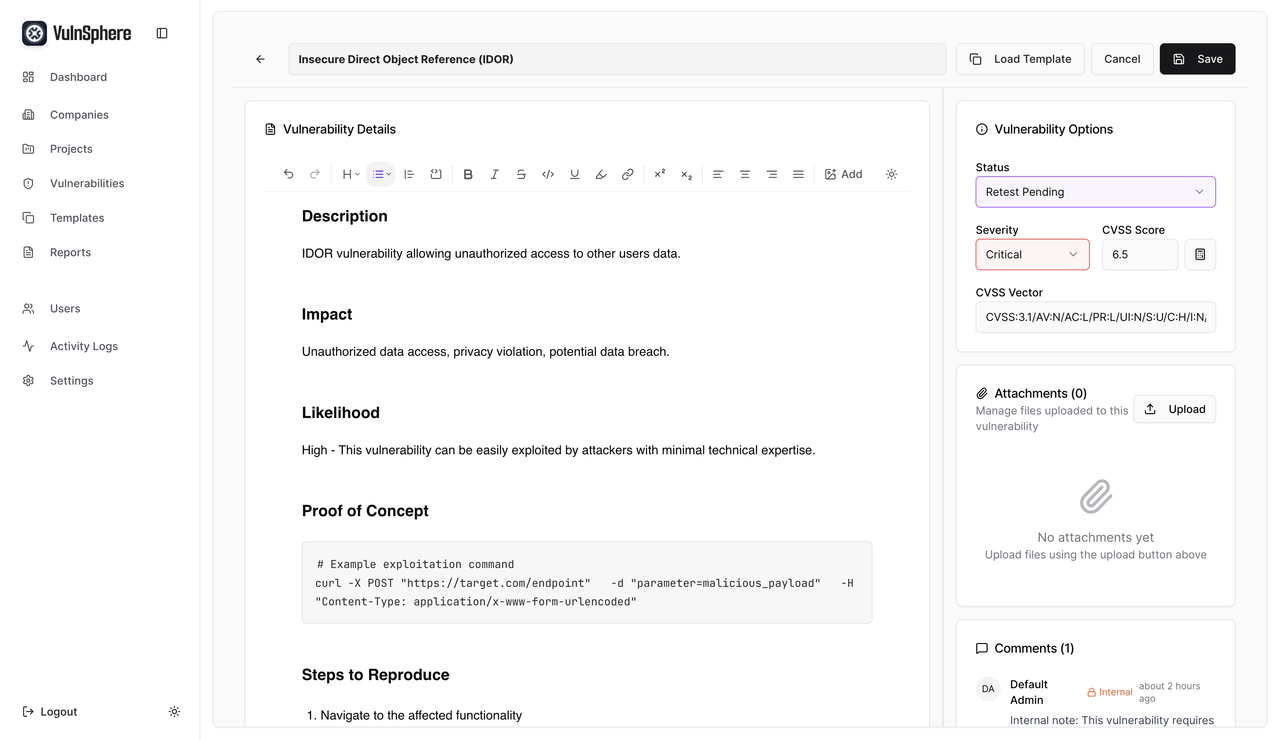
- Vulnerability Management: A complete lifecycle for tracking vulnerabilities from creation to resolution, including status updates, retesting, and risk assessment.
- Asset Management: Define and manage a wide range of assets, including web applications, servers, and mobile apps, and link them to specific projects and vulnerabilities.
- Rich Text Editor: A powerful and intuitive TipTap-based editor for detailed vulnerability descriptions, notes, and comments, with support for markdown, image uploads, and more.
- Report Generation: Generate professional and customizable security reports in DOCX and HTML formats using a flexible template system.
- Role-Based Access Control (RBAC): Granular permissions for Admins, Testers, and Clients, ensuring users only have access to the information they need.
- Activity Logging: A comprehensive audit trail that logs all significant actions within the system for accountability and security.
- Backend: Django 6.0 with Django REST Framework
- Frontend: React with modern UI components
- Database: PostgreSQL with optimized migrations
- Authentication: JWT-based with email/username login
- Containerization: Docker with multi-architecture support
- CI/CD: GitHub Actions with automated testing and security scanning
- Vulnerability Templates: Over 500 pre-loaded templates for common vulnerabilities to speed up the reporting process.
- Bulk Import/Export: Easily import and export vulnerabilities and assets using CSV files.
- Customizable Report Templates: Create and manage your own DOCX and HTML report templates for consistent and professional branding.
- Advanced Search and Filtering: Quickly find the information you need with powerful search and filtering capabilities across all modules.
- API-First Design: A comprehensive REST API with OpenAPI/Swagger documentation for easy integration with other tools.
- CVSS Scoring: Utilize CVSS v3.1 for standardized and accurate vulnerability severity assessment.
VulnSphere includes a powerful and modern rich text editor based on TipTap, providing a seamless writing experience for vulnerability details, notes, and comments. Key features include:
- Full Markdown Support: Write in markdown and have it automatically converted to rich text.
- Image Uploads: Drag and drop or paste images directly into the editor, which are securely stored as attachments.
- Code Blocks: Syntax highlighting for a variety of programming languages to clearly display code snippets.
- Text Formatting: A full suite of formatting options, including headings, bold, italics, underline, strikethrough, and more.
- Lists and Checklists: Create ordered, unordered, and task lists to organize information.
- Blockquotes and Horizontal Rules: Structure your content for clarity and readability.
- Link Management: Easily add, edit, and remove hyperlinks.
- Color Highlighting: Use different colors to highlight important text.
- Docker and Docker Compose
# Use the standalone compose file
mkdir /opt/VulnSphere && cd /opt/VulnSphere
curl -sSL https://raw.githubusercontent.com/xhzeem/VulnSphere/main/compose.standalone.yml | docker compose -f - up -d

# Access the application
# Frontend: http://localhost:3000
# Admin: http://localhost:8000/admin
# API Documentation: http://localhost:8000/api/docs/
# Default admin credentials:
#   Email: [email protected]
#   Username: admin
# Password: passwordCreate a .env file in the root directory:
# Database
DATABASE_URL=postgresql://vulnsphere:vulnsphere123@db:5432/vulnsphere

# Django
SECRET_KEY=your-secret-key-here
DEBUG=false
ALLOWED_HOSTS=localhost,127.0.0.1,0.0.0.0

# Frontend
REACT_APP_API_URL=http://localhost:8000- Navigate to the
apidirectory:cd api - Create and activate a virtual environment:
python -m venv venv source venv/bin/activate - Install dependencies:
pip install -r requirements.txt
- Run database migrations:
python manage.py migrate
- Start the development server:
python manage.py runserver
- Navigate to the
frontenddirectory:cd frontend - Install dependencies:
npm install
- Start the development server:
npm start
VulnSphere provides a comprehensive REST API for managing all aspects of the platform. The base URL for the API is /api/v1/.
- Login:
POST /auth/login/ - Logout:
POST /auth/logout/ - Get Current User:
GET /users/me/
- Companies:
GET, POST /companies/GET, PUT, PATCH, DELETE /companies/{companyId}/
- Projects:
GET, POST /companies/{companyId}/projects/GET, PUT, PATCH, DELETE /companies/{companyId}/projects/{projectId}/
- Assets:
GET, POST /companies/{companyId}/assets/GET, PUT, PATCH, DELETE /companies/{companyId}/assets/{assetId}/
- Vulnerabilities:
GET, POST /companies/{companyId}/projects/{projectId}/vulnerabilities/GET, PUT, PATCH, DELETE /companies/{companyId}/projects/{projectId}/vulnerabilities/{vulnId}/
- Comments:
GET, POST /comments/(filterable by vulnerability, project, etc.) - Attachments:
GET, POST /companies/{companyId}/projects/{projectId}/attachments/ - Retests:
GET, POST /companies/{companyId}/projects/{projectId}/vulnerabilities/{vulnId}/retests/ - Activity Logs:
GET /activity-logs/(Admin only) - Report Generation:
POST /reports/generate/ - Vulnerability Templates:
GET, POST /vulnerability-templates/
For a complete and interactive API specification, please refer to the Swagger/OpenAPI documentation available at /api/docs/.
| Variable | Description | Default |
|---|---|---|
DATABASE_URL |
PostgreSQL connection string | sqlite:///db.sqlite3 |
SECRET_KEY |
Django secret key | Auto-generated |
DEBUG |
Enable debug mode | True |
ALLOWED_HOSTS |
Allowed hosts for Django | localhost,127.0.0.1 |
vulnsphere_postgres_data: PostgreSQL data persistencevulnsphere_api_media: Uploaded files and reports
# Using GitHub Actions
1. Fork and push to your repository
2. Configure repository secrets
3. GitHub Actions will automatically build and deploy

# Manual Deployment
docker compose -f compose.standalone.yaml up -dImages are automatically built and pushed to:
ghcr.io/your-username/vulnsphere-apighcr.io/your-username/vulnsphere-frontend
Security is a top priority for VulnSphere. The platform is designed with a multi-layered security approach to protect sensitive data.
- JWT-Based Authentication: Secure, stateless authentication with configurable token expiration.
- Role-Based Access Control (RBAC): Three distinct roles (Admin, Tester, Client) with granular permissions to ensure users can only access data and features relevant to their role.
- Secure Password Policies: Enforces strong password requirements and uses modern, secure hashing algorithms.
- Multi-Tenant Data Isolation: A robust multi-tenancy model ensures that data for each company is completely isolated and cannot be accessed by other tenants.
- Input Validation: All incoming data is rigorously validated to prevent common web application vulnerabilities.
- ORM-Level SQL Injection Protection: Django's ORM is used for all database queries, providing built-in protection against SQL injection attacks.
- XSS and CSRF Protection: The platform includes measures to prevent Cross-Site Scripting (XSS) and Cross-Site Request Forgery (CSRF) attacks.
- Secure File Uploads: All file uploads are scanned and stored securely, with measures in place to prevent the execution of malicious files.
- Comprehensive Audit Trails: All significant actions are logged, providing a clear audit trail for security reviews and incident response.
- Container Security: The application is containerized using Docker, with best practices for image security and runtime isolation.
VulnSphere has a comprehensive test suite to ensure code quality and stability.
- Backend (Django):
cd api
python manage.py test
- Frontend (React):
cd frontend
npm test
- Unit Tests: Core business logic, models, and serializers are covered by unit tests.
- Integration Tests: API endpoints are tested to ensure they behave as expected.
- Component Tests: React components are tested to verify their functionality and rendering.
- Security Tests: Specific tests for authentication, authorization, and other security features.
- API health endpoint:
/api/v1/health/ - Database connection monitoring
- Container health checks in Docker
- Structured logging with JSON format
- Error tracking and alerting
- Performance monitoring
- Security event logging
- Fork the repository
- Create a feature branch
- Make your changes
- Add tests for new functionality
- Ensure all tests pass
- Submit a pull request
- Python: PEP 8 compliance
- JavaScript: ESLint configuration
- CSS: Following BEM methodology
- Commits: Conventional commit messages
- Report security vulnerabilities privately
- Follow responsible disclosure
- Security patches prioritized
This project is licensed under the MIT License - see the LICENSE file for details.
- 📖 Check the documentation
- 🐛 Report issues
- 💬 Discussions
VulnSphere - Professional vulnerability management for security teams.