Releases: xpipe-io/xpipe
20.3

- Fix SSH connections being refused after some time for OpenSSH 9.8p1+ servers for VMs due to multiple connection attempts
- Fix for old OpenSSH clients not accepting "none" for "PKCS11Provider", causing dlopen issues on those systems
- Fix for old OpenSSH clients not accepting -oProxyJump=none option
- Fix SSH config identity detection not working for patterns in host entries
- Fix hibernation behaviour setting not persisting
- Fix category collapsed state always resetting
- Fix connection entry index not being able to be cleared
- Fix various NullPointers
- Fix connection index changes not syncing properly
- Fix HTTP API not supplying CORS headers for web-based API clients
- Fix shell session with init scripts not launching if remote system's disk was full
Downloads
You can find all downloadable artifacts below attached to this release. For installation instructions, see the installation guide.
All artifacts are signed by Christopher Schnick (2E21 05AB FDBA C0EB)
20.2
Connection creation
The connection creation / configuration dialog has been reworked to allow for a more efficient workflow. When validating a connection, the window is no longer blocked, and you can continue editing the connection or also minimize it meanwhile.
Command rework
The custom command entries that you can create at New -> Command have been completely reworked. You can now create runnable commands / scripts to be run in a terminal or in the background without having to depend on creating scripts.
Remote SSH configs
This update adds back support for SSH configs located on a remote system. You can now add entries from SSH config files by searching for available connections on a remote system. If any host is configured in the config file, it will be added automatically to XPipe.
Network scan
The network scan has been improved. You can now also explicitly select detected systems even when there was no listening server running on them. Furthermore, the check whether an SSH server is listening has been improved as there were a few false negatives.
Updated names
The names and location of SSH connections in the creation menu have been updated. There is now no longer a simple SSH connection but instead just an SSH connection.
Fixes
- Fix various daemon errors on certain Linux systems where user management was done with active directory and others
- Fix custom icons sometimes not loading properly on startup
- Fix various performance issues when using a display scale other than 100%
- Fix file browser icons being blurry on scaled up high dpi displays
- Fix autoupdater on Windows not fully updating all necessary files in some circumstances
- Fix shell environment default state not being synced via git
- Fix website open action in the webtop container not returning and greying out entries
- Fix terminal tracker not tracking all terminal sessions properly, leading to some inconsistencies
- Fix WezTerm on Windows not being focused when a new tab is opened
- Fix putty install detection for serial connections
- Fix various typos
Downloads
You can find all downloadable artifacts below attached to this release. For installation instructions, see the installation guide.
All artifacts are signed by Christopher Schnick (2E21 05AB FDBA C0EB)
20.1
Gateway adjustments
The SSH gateway setting has been adjusted again to be more clear on what it does. The documentation has also been updated. The default value has also been reverted to use gateway tunnels instead of ProxyJump again as gateway tunnels turn out to still work better than jump servers.
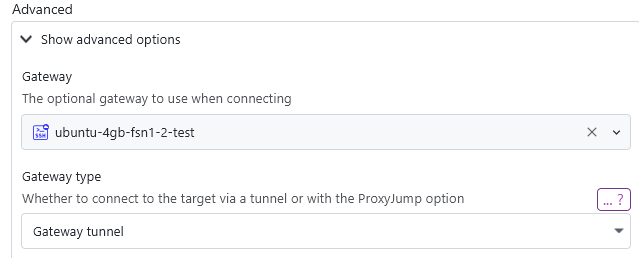
Furthermore, various fixes have been implemented for SSH gateways and EC2 gateways.
Changes
- Add support for the passbolt password manager
- Add proper connection dropdown in Windows SSH settings for X11 forward WSL instance
- Format key passphrase prompts to not include the full file path to be shorter
Fixes
- Fix disable TLS verification setting for HTTP requests not applying properly
- Fix various NullPointers
- Fix occasional application freeze due to deadlock
- Fix various typos
Downloads
You can find all downloadable artifacts below attached to this release. For installation instructions, see the installation guide.
All artifacts are signed by Christopher Schnick (2E21 05AB FDBA C0EB)
20.0.1
- Fix issues with macOS .pkg installer
Downloads
You can find all downloadable artifacts below attached to this release. For installation instructions, see the installation guide.
All artifacts are signed by Christopher Schnick (2E21 05AB FDBA C0EB)
20.0
AWS support
You can now connect to your AWS systems from within XPipe. Currently, EC2 systems and S3 buckets are supported. The integration works on top of the AWS CLI, meaning that it is required to be installed on your system. The usage of the AWS CLI allows the integration to work very flexibly on any existing CLI setup if you already use the CLI. You can use any IAM access keys and authentication methods with it.
The EC2 support works as with any other remote system in XPipe. The connections can be established via SSH with optional AWS Systems Manager (SSM) support. The SSM support allows you to also reach systems that do not have a security group configured to allow external access to the normal SSH port.
The S3 support is available both for AWS buckets and other external buckets that are compatible with the S3 protocol. More enhancements to the performance and features of s3 file systems are planned.
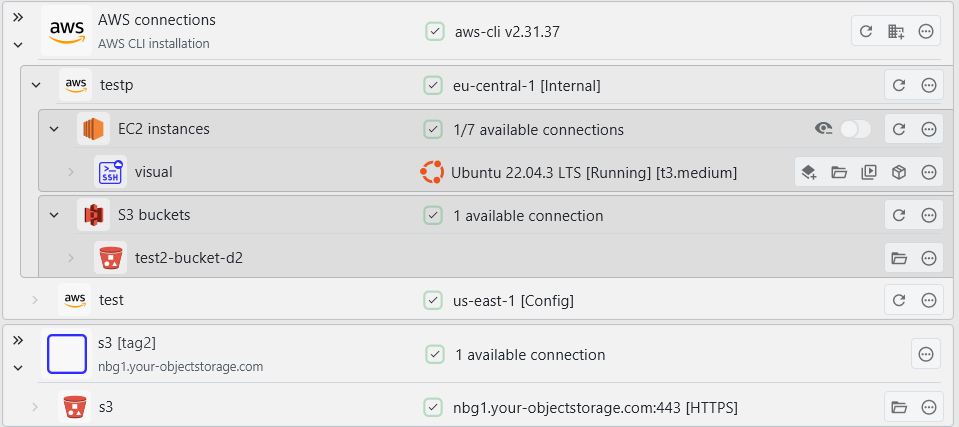
This integration will be available in the Professional plan, but is also available for free for a month after release to iron out any issues first.
SSH keygen
You can now generate new SSH keys from within XPipe. The keys are generated via the installed OpenSSH ssh-keygen CLI tool, so you can be assured that the keys are generated in a cryptographically secure manner. You can generate keys with this button:

This keygen right now supports RSA, ED25519, and ED25519 + FIDO2:
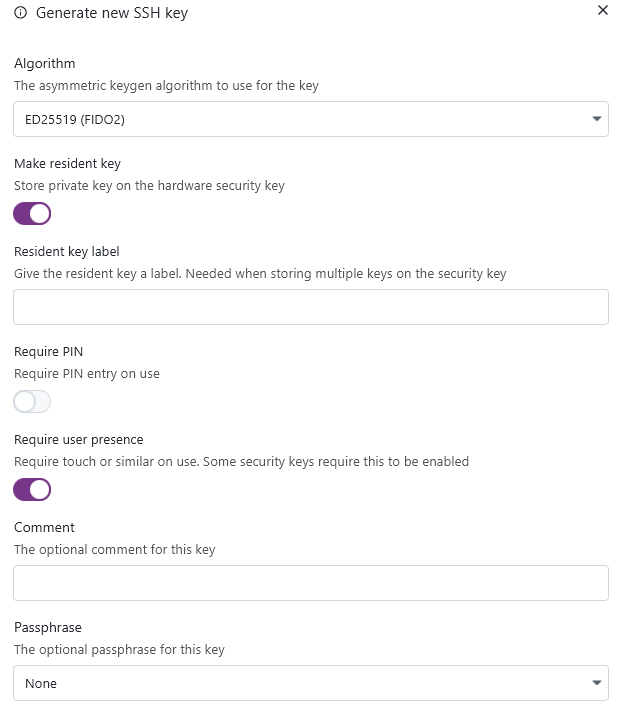
Keys of identities can now also be automatically applied to systems, allowing you to perform a quick key rotation when needed:

The process of changing the authentication configuration of a system is not always one simple step. So the dialog is a comprehensive overview of what is needed to apply a certain identity to a remote system, with various quick-action buttons and notes. This gives you still full manual control of what should be done and an overview of what is required prior to doing so.
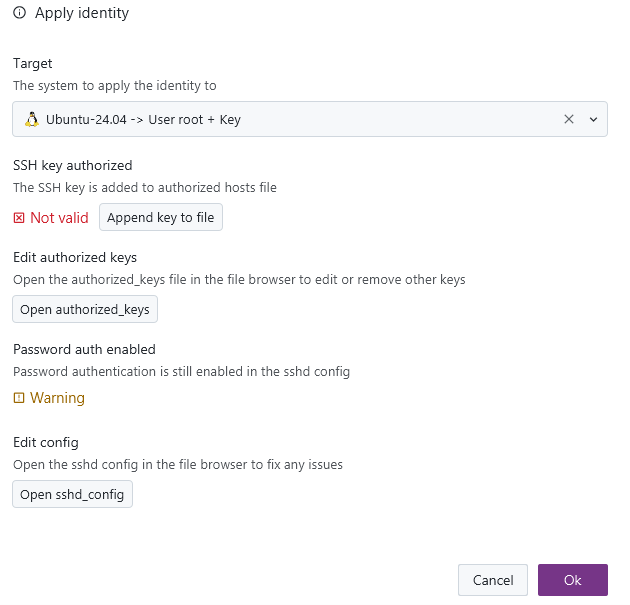
As adding new authorized identities to systems requires the public key, there is now the functionality to generate and store the public key for identities based on the existing private key:
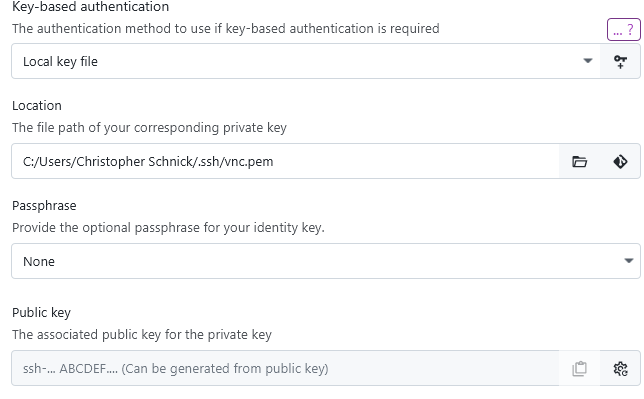
Tags
You can now create and add tags to connection entries. This allows you to have a more structured workflow when filtering individual connections.
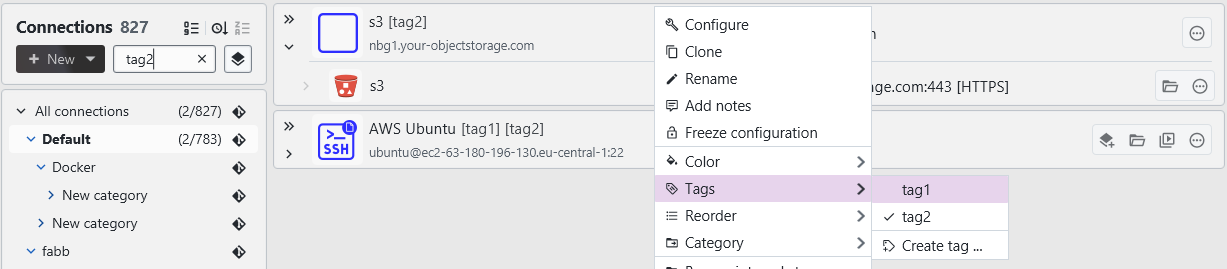
SSH jump servers
The jump server / gateway configuration has been reworked to make the configuration more intuitive. You can now control the jump server behaviour right at the gateway field for a connection. When a gateway is set, XPipe now defaults to using it as a jump server unless the option is explicitly disabled, which is a change from the previous version where it was the other way around.
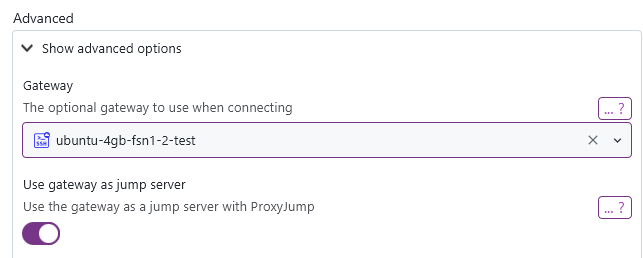
Tailscale
The tailscale integration has been updated with the recent improvements that were implemented for Netbird and AWS. It no longer requires the Tailscale SSH auth and instead gives you the option to use the automatic Tailscale SSH auth or connect normally to an SSH server, which requires password / key authentication. When configuring a tailscale system, you can choose the authentication type.
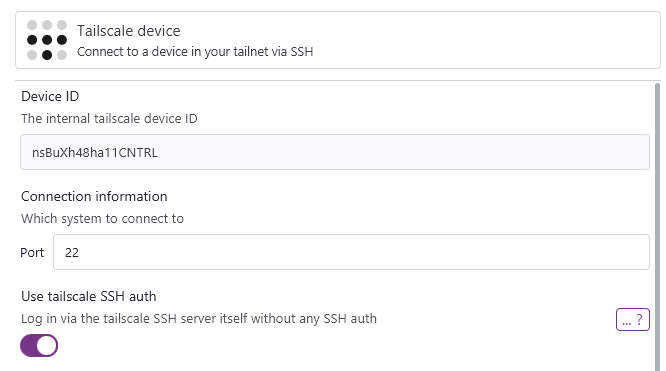
Furthermore, you can now use Tailscale connection entries as the base for other types of connections, e.g. direct RDP / VNC connections.
Split terminals
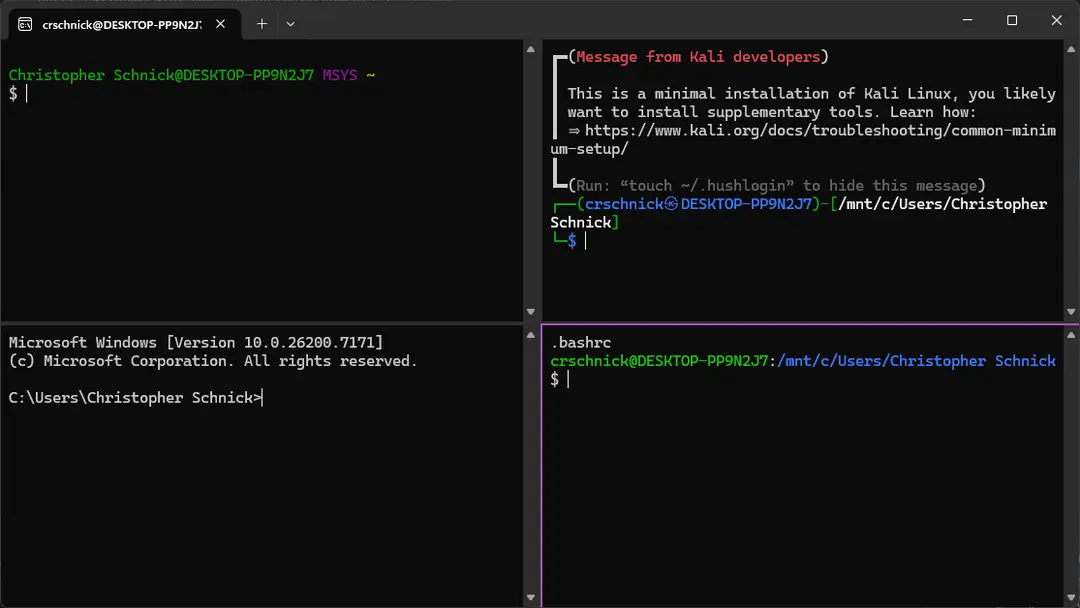
There is now a new batch action to open multiple systems in a split terminal pane instead of individual tabs. This action is only supported for terminals that support this, which currently includes: Windows Terminal, Kitty, and WezTerm. In addition, this is also supported when using any other terminal and a terminal multiplexer like tmux or zellij.

This allows you to also use a feature like broadcast mode of your terminal to type one command into multiple terminal panes at the same time.
Group vaults
In addition to existing team vaults with multiple users, you can now also set up team group vaults:
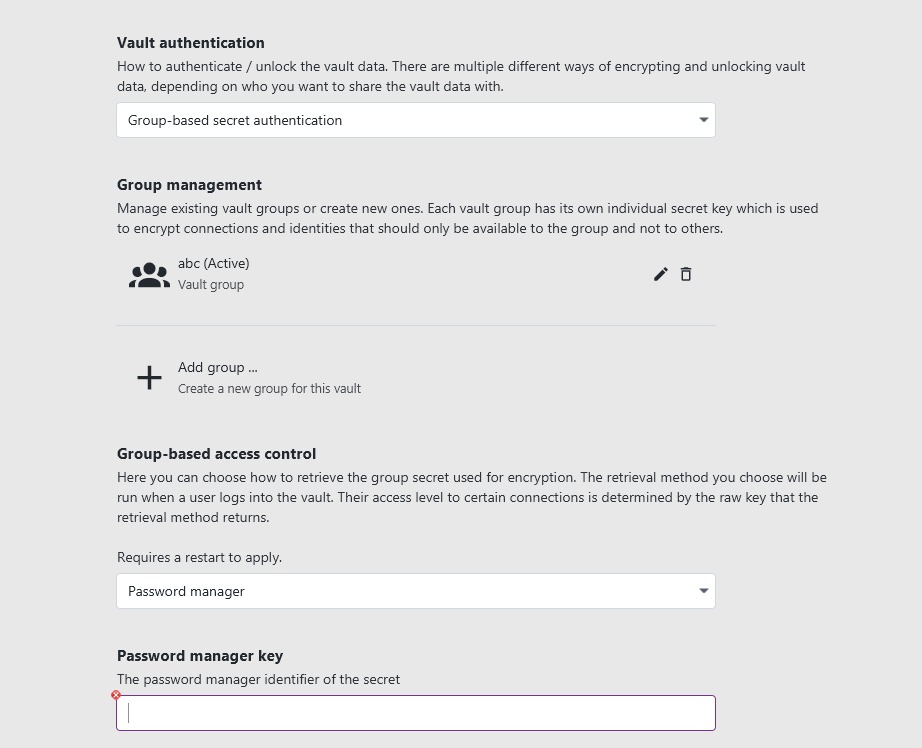
They work basically the same as user vaults, only the authentication/unlock workflow differs. Each group has a shared group secret, which can automatically be retrieved in one of multiple ways like a password manager, a custom command, or a secret file. This gives organization administrators the ability to control access to connections from a central location without users having to supply any passwords themselves. You can flexibly convert existing team vaults into group vaults if needed.
Other
- The network scan now supports adding RDP and VNC systems as well in addition to SSH
- You can use multiple KeePassXC databases at the same time
- Add toggle to control whether a service should tunnel a remote port or not
- Several fixes to be able to run the application in the Android Linux Terminal app without issues
- Add WezTerm support for tabs on Windows
- The entire interface has been reworked to better work with screen readers and other accessibility tools
- Add refresh action in connection context menu to easily refresh the system state
- The vault unlock dialog will now provide more feedback on failed unlocks
- Improve fallback shell startup checks
Fixes
- Fix flatpak application selections not persisting in the settings
- Fix various file browser actions not working properly for symlink entries
- Fix local system proxy configuration not being used for http requests, e.g. for license api requests
- Fix browser navigation bar not showing busy state properly
- Fix other Unix file types like sockets, block devices, and more not being listed in the file browser
- Fix homebrew paths not being set on macOS when using another default shell like fish
- Fix temp file paths to better handle xpipe being launched by multiple users
- Fix race condition causing early startup errors sometimes not to be shown
- Fix app not respecting system display scale in KDE
- Fix zellij tab layout on initial terminal launch not being correct
- Fix browser duplicate renames not working for directories
- Fix latest bitwarden update causing XPipe to ask for the master password every time
- Fix occasional text input delay
- Fix host address for cloud systems resetting to unknown in configuration dialog when minimized
- Fix sftp file system not handling invalid paths properly
- Fix custom icon source directory causing errors when set to a root directory
Downloads
You can find all downloadable artifacts below attached to this release. For installation instructions, see the installation guide.
All artifacts are signed by Christopher Schnick (2E21 05AB FDBA C0EB)
19.6
- Fix Linux executable being linked to a too new GLIBC version, causing it to not run on old Linux systems
- Fix various other issues with the SSH client in Windows 10 LTSC
- Fix scrollbar flicker when scrolling connection list fast
- Fix in-place key not always replacing CRLF with LF
- Fix Warp terminal sessions on Windows not registering exit properly
- Fix fish terminal session not properly applying working directory
Downloads
You can find all downloadable artifacts below attached to this release. For installation instructions, see the installation guide.
All artifacts are signed by Christopher Schnick (2E21 05AB FDBA C0EB)
19.5
- Fix file browser transfer size being displayed as twice the actual size for directory transfers
- Fix SSH PKCS11Provider option breaking ssh on Windows 10 LTSC (again)
- Fix various broken documentation links
- Fix potential stack overflow when transferring directory with 100+ layers of nested directories
- Fix MSYS2 shell environment name formatting
- Fix category selection always changing when editing connection configurations
- Fix Remmina window overlapping taskbar in fullscreen
- Show connection name of SSH askpass prompt dialog
- Improve interface for custom SSH connections with multiple hosts to always show target
- Improve category config dialog description for sync option of special categories
Downloads
You can find all downloadable artifacts below attached to this release. For installation instructions, see the installation guide.
All artifacts are signed by Christopher Schnick (2E21 05AB FDBA C0EB)
19.4
- Fix URLs not opening in browser on current Debian sid and potentially other Linux systems
- Fix file browser defaulting to SFTP for connections with no saved state, e.g. when they were synced the first time via git
- Fix password field sometimes throwing errors when capslock was active
- Fix connection filter string match count sometimes being wrong
- Fix connection filter always switching category even if it was not necessary
- Fix errors in SFTP session when right-clicking certain files
- Improve Korean translations (Thanks to @nillpoe)
Downloads
You can find all downloadable artifacts below attached to this release. For installation instructions, see the installation guide.
All artifacts are signed by Christopher Schnick (2E21 05AB FDBA C0EB)
Contributors

Assets 37
19.3.1
- Fix SSH failing with bad configuration error when a custom IdentityFile option was used as additional SSH options
Downloads
You can find all downloadable artifacts below attached to this release. For installation instructions, see the installation guide.
All artifacts are signed by Christopher Schnick (2E21 05AB FDBA C0EB)
19.3
- Fix SSH failing with bad configuration error when a connection had custom SSH options configured
- Fix file browser symlinks to directories not being treated as directories in some cases
- Improve yes/no toggle for category configuration to be less confusing in its neutral state
- Add automatic fallback to Remmina RDP integration to use FreeRDP for RemoteApps when FreeRDP is installed as well
Downloads
You can find all downloadable artifacts below attached to this release. For installation instructions, see the installation guide.
All artifacts are signed by Christopher Schnick (2E21 05AB FDBA C0EB)