ProSnippets Symbology
Language:              C#
Subject:               Symbology
Contributor:           ArcGIS Pro SDK Team <[email protected]>
Organization:          Esri, http://www.esri.com
Date:                  11/7/2025
ArcGIS Pro:            3.6
Visual Studio:         2022
Create a line symbol with the markers placed at a 45 degree angle.
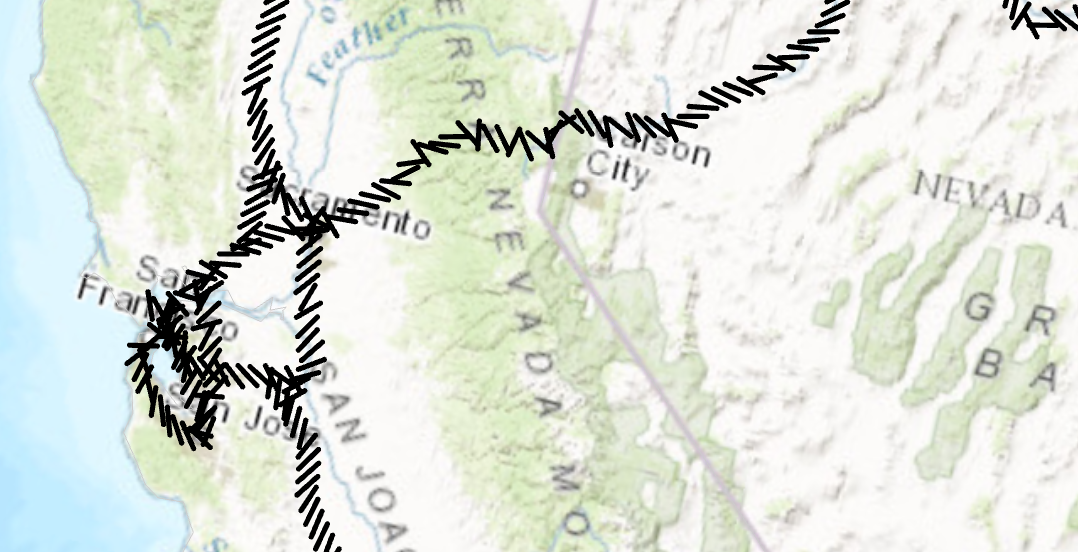
//Create a line symbol with the markers placed at a 45 degree angle.
  //Create a marker from the "|" character.  This is the marker that will be used to render the line layer.
  //Note: Run withing QueuedTask
  var lineMarker = SymbolFactory.Instance.ConstructMarker(124, "Agency FB", "Regular", 12);

  //Default line symbol which will be modified
  CIMLineSymbol lineSymbolWithMarkersAtAngle = SymbolFactory.Instance.ConstructLineSymbol(ColorFactory.Instance.BlackRGB, 2, SimpleLineStyle.Solid);

  //Modifying the marker to align with line
  //First define "markerplacement"
  CIMMarkerPlacementAlongLineSameSize markerPlacement = new CIMMarkerPlacementAlongLineSameSize()
  {
    AngleToLine = true,
    PlacementTemplate = new double[] { 5 }
  };
  //assign the markerplacement to the marker
  lineMarker.MarkerPlacement = markerPlacement;
  //angle the marker if needed
  lineMarker.Rotation = 45;

  //assign the marker as a layer to the line symbol
lineSymbolWithMarkersAtAngle.SymbolLayers[0] = lineMarker;Create a line symbol with a dash and two markers.
This line symbol comprises three symbol layers listed below:
- A solid stroke that has dashes.
- A circle marker.
- A square marker.
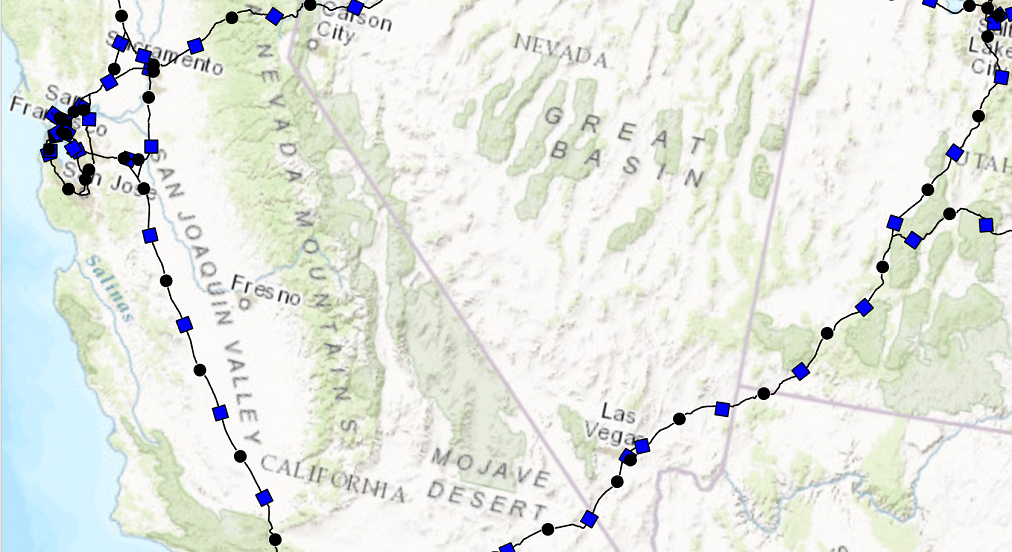
//Create a line symbol with a dash and two markers.
  //Note: Run withing QueuedTask
  CIMLineSymbol dash2MarkersLine = new CIMLineSymbol();
  var mySymbolLyrs = new CIMSymbolLayer[]
        {
              new CIMSolidStroke()
              {
                  Color = ColorFactory.Instance.BlackRGB,
                  Enable = true,
                  ColorLocked = true,
                  CapStyle = LineCapStyle.Round,
                  JoinStyle = LineJoinStyle.Round,
                  LineStyle3D = Simple3DLineStyle.Strip,
                  MiterLimit = 10,
                  Width = 1,
                  CloseCaps3D = false,
                  Effects = new CIMGeometricEffect[]
                  {
                      new CIMGeometricEffectDashes()
                      {
                          CustomEndingOffset = 0,
                          DashTemplate = new double[] {20, 10, 20, 10},
                          LineDashEnding = LineDashEnding.HalfPattern,
                          OffsetAlongLine = 0,
                          ControlPointEnding = LineDashEnding.NoConstraint
                      },
                      new CIMGeometricEffectOffset()
                      {
                          Method = GeometricEffectOffsetMethod.Bevelled,
                          Offset = 0,
                          Option = GeometricEffectOffsetOption.Fast
                      }
                  },
              },
              CreateCircleMarkerPerSpecs(),
              CreateSquareMarkerPerSpecs()
    };
  dash2MarkersLine.SymbolLayers = mySymbolLyrs;

  static CIMMarker CreateCircleMarkerPerSpecs()
  {
    var circleMarker = SymbolFactory.Instance.ConstructMarker(ColorFactory.Instance.BlackRGB, 5, SimpleMarkerStyle.Circle) as CIMVectorMarker;
    //Modifying the marker to align with line
    //First define "markerplacement"
    CIMMarkerPlacementAlongLineSameSize markerPlacement = new CIMMarkerPlacementAlongLineSameSize()
    {
      AngleToLine = true,
      Offset = 0,
      Endings = PlacementEndings.Custom,
      OffsetAlongLine = 15,
      PlacementTemplate = new double[] { 60 }
    };
    //assign the markerplacement to the marker
    circleMarker.MarkerPlacement = markerPlacement;
    return circleMarker;
  }
  static CIMMarker CreateSquareMarkerPerSpecs()
  {
    var squareMarker = SymbolFactory.Instance.ConstructMarker(ColorFactory.Instance.BlueRGB, 5, SimpleMarkerStyle.Square) as CIMVectorMarker;
    CIMMarkerPlacementAlongLineSameSize markerPlacement2 = new CIMMarkerPlacementAlongLineSameSize()
    {
      AngleToLine = true,
      Endings = PlacementEndings.Custom,
      OffsetAlongLine = 45,
      PlacementTemplate = new double[] { 60 },
    };
    squareMarker.MarkerPlacement = markerPlacement2;
    return squareMarker;
}Create a line symbol with a dash and two markers.
In this pattern of creating this symbol, a CIMVectorMarker object is created as a new CIMSymbolLayer.
The circle and square markers created by ContructMarker method is then assigned to the MarkerGraphics property of the CIMVectorMarker.
When using this method, the CIMVectorMarker's Frame property needs to be set to the CIMMarker object's Frame.
Similarly, the CIMVectorMarker's Size property needs to be set to the CIMMarker object's size.
This line symbol comprises three symbol layers listed below:
- A solid stroke that has dashes.
- A circle marker.
- A square marker.
// Create a line symbol with a dash and two markers.
  //default line symbol that will get modified.
  //Note: Run withing QueuedTask
  CIMLineSymbol dash2MarkersLine = new CIMLineSymbol();
  //circle marker to be used in our line symbol as a layer
  var circleMarker = SymbolFactory.Instance.ConstructMarker(ColorFactory.Instance.BlackRGB, 5, SimpleMarkerStyle.Circle) as CIMVectorMarker;
  //circle marker to be used in our line symbol as a layer
  var squareMarker = SymbolFactory.Instance.ConstructMarker(ColorFactory.Instance.BlueRGB, 5, SimpleMarkerStyle.Square) as CIMVectorMarker;
  //Create the array of layers that make the new line symbol
  CIMSymbolLayer[] mySymbolLyrs =
      {
              new CIMSolidStroke() //dash line
              {
                  Color = ColorFactory.Instance.BlackRGB,
                  Enable = true,
                  ColorLocked = true,
                  CapStyle = LineCapStyle.Round,
                  JoinStyle = LineJoinStyle.Round,
                  LineStyle3D = Simple3DLineStyle.Strip,
                  MiterLimit = 10,
                  Width = 1,
                  CloseCaps3D = false,
                  Effects = new CIMGeometricEffect[]
                  {
                      new CIMGeometricEffectDashes()
                      {
                          CustomEndingOffset = 0,
                          DashTemplate = new double[] {20, 10, 20, 10},
                          LineDashEnding = LineDashEnding.HalfPattern,
                          OffsetAlongLine = 0,
                          ControlPointEnding = LineDashEnding.NoConstraint
                      },
                      new CIMGeometricEffectOffset()
                      {
                          Method = GeometricEffectOffsetMethod.Bevelled,
                          Offset = 0,
                          Option = GeometricEffectOffsetOption.Fast
                      }
                  }
              },
              new CIMVectorMarker() //circle marker
              {
                  MarkerGraphics = circleMarker.MarkerGraphics,
                  Frame = circleMarker.Frame, //need to match the CIMVector marker's frame to the circleMarker's frame.
                  Size = circleMarker.Size,    //need to match the CIMVector marker's size to the circleMarker's size.
                 MarkerPlacement = new CIMMarkerPlacementAlongLineSameSize()
                 {
                     AngleToLine = true,
                     Offset = 0,
                     Endings = PlacementEndings.Custom,
                     OffsetAlongLine = 15,
                     PlacementTemplate = new double[] {60},
                 }

              },
              new CIMVectorMarker() //square marker
              {
                 MarkerGraphics = squareMarker.MarkerGraphics,
                 Frame = squareMarker.Frame, //need to match the CIMVector marker's frame to the squareMarker frame.
                 Size = squareMarker.Size, //need to match the CIMVector marker's size to the squareMarker size.
                 MarkerPlacement = new CIMMarkerPlacementAlongLineSameSize()
                 {
                     AngleToLine = true,
                     Endings = PlacementEndings.Custom,
                     OffsetAlongLine = 45,
                     PlacementTemplate = new double[] {60},
                 }
              }
    };
dash2MarkersLine.SymbolLayers = mySymbolLyrs;Create a mesh symbol that can be applied to a multi-patch feature layer.
A mesh symbol is a CIMMeshSymbol object. Define an array of CIMSymbolLayers which contains a CIMMaterialSymbol layer with the specified properties such as Color, etc.
Assign this array of CIMSymbolLayers to the CIMMeshSymbol.
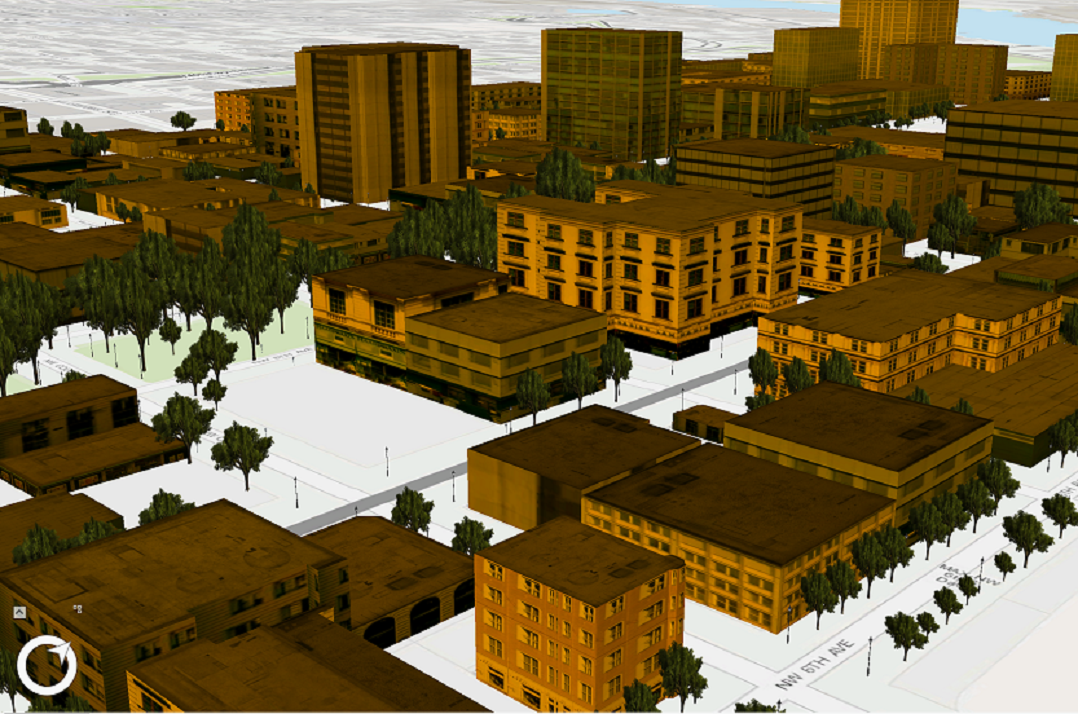
//Note: Run withing QueuedTask
  CIMSymbolLayer[] materialSymbolLayer =
        {
              new CIMMaterialSymbolLayer()
              {
                  Color = ColorFactory.Instance.CreateRGBColor(230,152,0),
                  MaterialMode = MaterialMode.Multiply
              }
         };
  var meshMaterialFillSymbol = new CIMMeshSymbol()
  {
    SymbolLayers = materialSymbolLayer
};Creates Mesh procedural symbol with various textures.
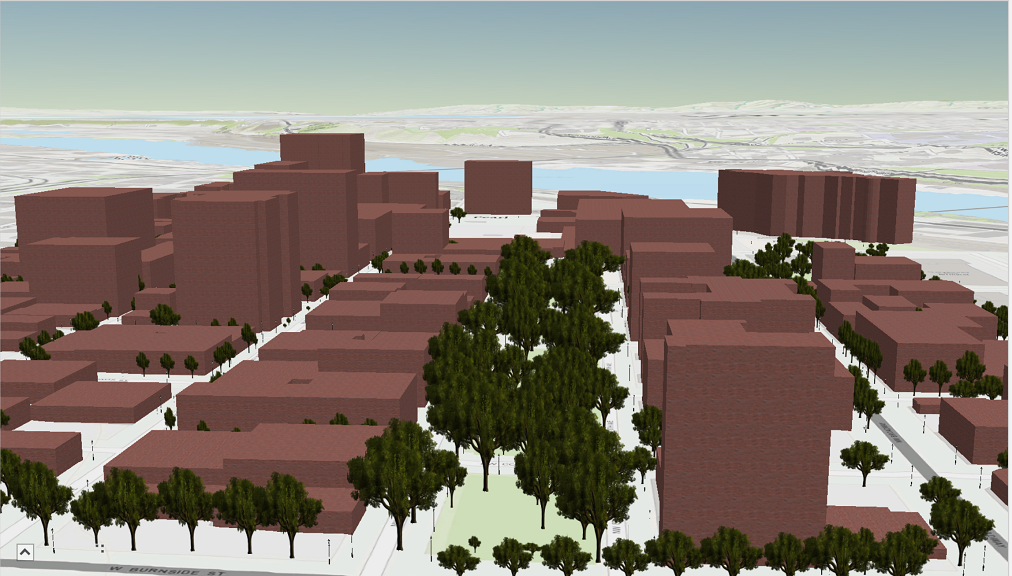
//Note: Run withing QueuedTask
  string _rulePkgPath = @"C:\Data\RulePackages\MultipatchTextures.rpk";
  CIMSymbolLayer[] proceduralSymbolLyr =
          {
              new CIMProceduralSymbolLayer()
              {
                  PrimitiveName = "Textures",
                  RulePackage = _rulePkgPath,
                  RulePackageName = "Textures",
              }
          };
  var meshProceduralTextureSymbol = new CIMMeshSymbol()
  {
    SymbolLayers = proceduralSymbolLyr
};Creates a point symbol with custom fill and outline
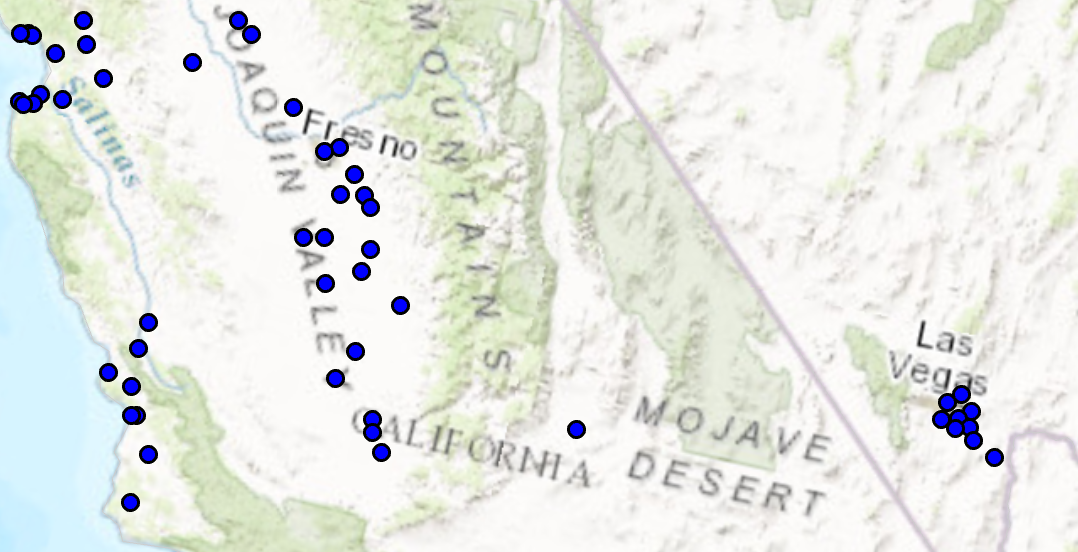
//Note: Run withing QueuedTask
  var circlePtCustomFileOutlineSymbol = SymbolFactory.Instance.ConstructPointSymbol(ColorFactory.Instance.BlueRGB, 6, SimpleMarkerStyle.Circle);
  //Modifying this point symbol with the attributes we want.
  //getting the marker that is used to render the symbol
  var marker = circlePtCustomFileOutlineSymbol.SymbolLayers[0] as CIMVectorMarker;
  //Getting the polygon symbol layers components in the marker
  var polySymbol = marker.MarkerGraphics[0].Symbol as CIMPolygonSymbol;
  //modifying the polygon's outline and width per requirements
  polySymbol.SymbolLayers[0] = SymbolFactory.Instance.ConstructStroke(ColorFactory.Instance.BlackRGB, 2, SimpleLineStyle.Solid); //This is the outline
  polySymbol.SymbolLayers[1] = SymbolFactory.Instance.ConstructSolidFill(ColorFactory.Instance.GreenRGB); //This is the fill
  //To apply the symbol to a point feature layer
  //var renderer = pointLayer.GetRenderer() as CIMSimpleRenderer;
  //renderer.Symbol = circlePtCustomFileOutlineSymbol.MakeSymbolReference();
//pointLayer.SetRenderer(renderer);Create a point symbol from a character in a font file
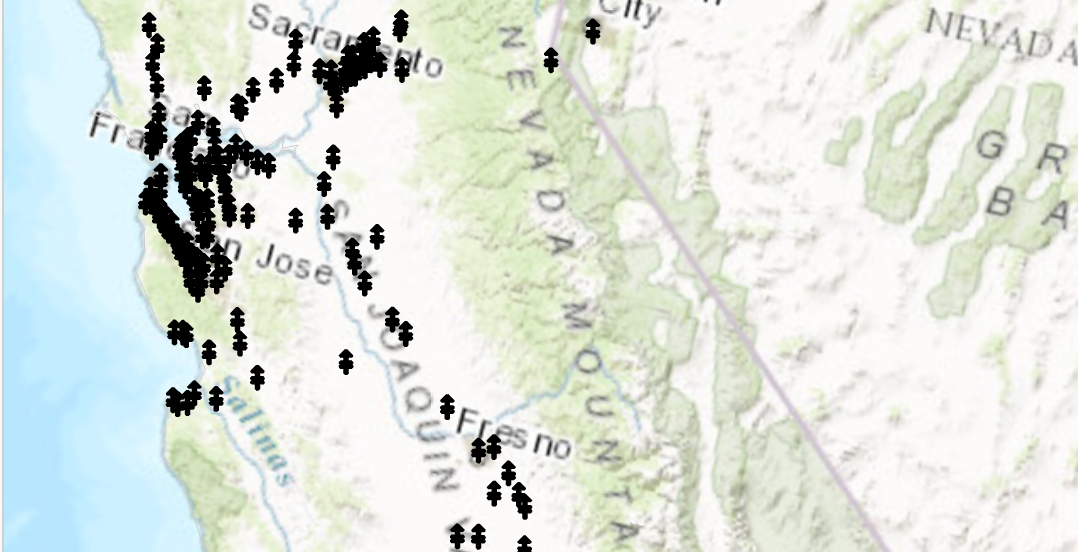
//creating the marker from the Font selected
  //Note: Run withing QueuedTask
  var cimMarker = SymbolFactory.Instance.ConstructMarker(47, "Wingdings 3", "Regular", 12);
  CIMPointSymbol fontPointSymbol = SymbolFactory.Instance.ConstructPointSymbol(cimMarker);
  //To apply the symbol to a point feature layer
  //var renderer = pointLayer.GetRenderer() as CIMSimpleRenderer;
  //renderer.Symbol = fontPointSymbol.MakeSymbolReference();
//pointLayer.SetRenderer(renderer);Create a polygon symbol with a diagonal cross hatch fill.
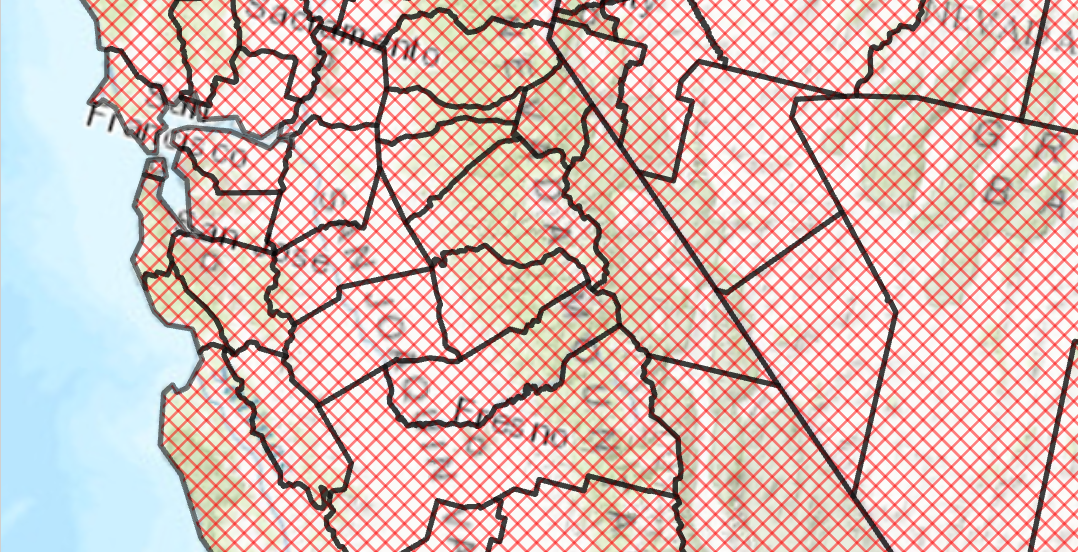
var trans = 50.0;//semi transparent
  CIMStroke outline = SymbolFactory.Instance.ConstructStroke(CIMColor.CreateRGBColor(0, 0, 0, trans), 2.0, SimpleLineStyle.Solid);

  //Stroke for the fill
  var solid = SymbolFactory.Instance.ConstructStroke(CIMColor.CreateRGBColor(255, 0, 0, trans), 1.0, SimpleLineStyle.Solid);

  //Mimic cross hatch
  CIMFill[] diagonalCross =
            {
              new CIMHatchFill() {
                  Enable = true,
                  Rotation = 45.0,
                  Separation = 5.0,
                  LineSymbol = new CIMLineSymbol() { SymbolLayers = new CIMSymbolLayer[1] { solid } }
              },
              new CIMHatchFill() {
                  Enable = true,
                  Rotation = -45.0,
                  Separation = 5.0,
                  LineSymbol = new CIMLineSymbol() { SymbolLayers = new CIMSymbolLayer[1] { solid } }
              }
    };
  List<CIMSymbolLayer> symbolLayers =
    [
      outline, .. diagonalCross
    ];
  //This is the polygon symbol with a diagonal cross hatch fill
  CIMPolygonSymbol diagonalCrossHatchFillSymbol = new()
  {
    SymbolLayers = [.. symbolLayers]
  };
  //To apply the symbol to a polygon feature layer
  //var renderer = theLayer.GetRenderer() as CIMSimpleRenderer;
  //renderer.Symbol = diagonalCrossHatchFillSymbol.MakeSymbolReference();
//theLayer.SetRenderer(renderer);Create a polygon symbol using the ConstructHatchFill method .
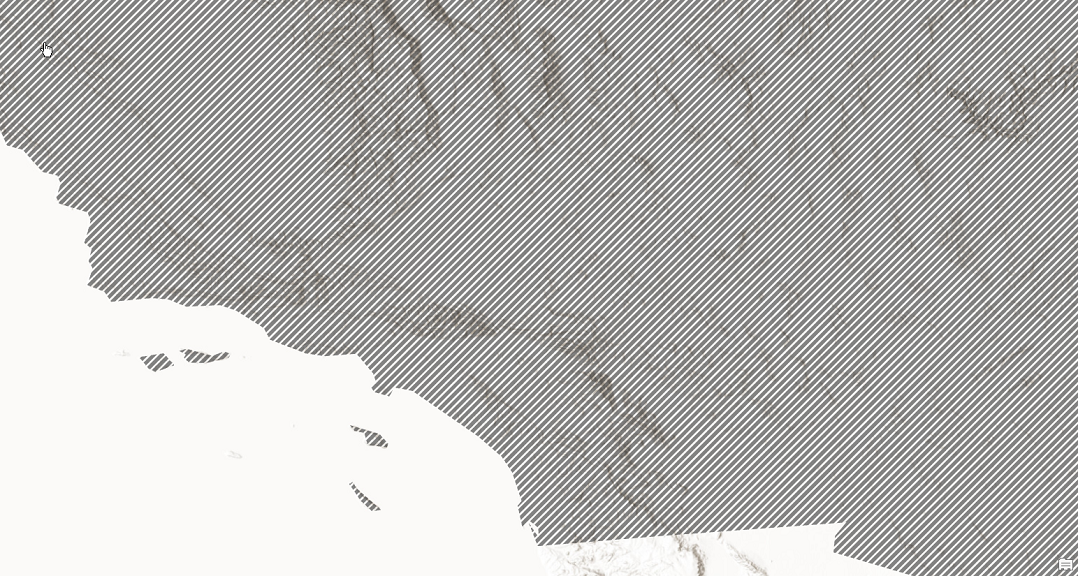
CIMStroke lineStroke = SymbolFactory.Instance.ConstructStroke(CIMColor.CreateRGBColor(51, 51, 51, 60), 4, SimpleLineStyle.Solid);
  //gradient
  var hatchFill = SymbolFactory.Instance.ConstructHatchFill(lineStroke, 45, 6, 0);

  List<CIMSymbolLayer> symbolLayers = new()
  {
    hatchFill
  };
  //This is the polygon symbol with a diagonal cross hatch fill
  CIMPolygonSymbol crossHatchPolygonSymbol = new CIMPolygonSymbol() { SymbolLayers = symbolLayers.ToArray() };
  //To apply the symbol to a polygon feature layer
  //var renderer = theLayer.GetRenderer() as CIMSimpleRenderer;
  //renderer.Symbol = crossHatchPolygonSymbol.MakeSymbolReference();
//theLayer.SetRenderer(renderer);Create a polygon symbol with a dash dot fill.
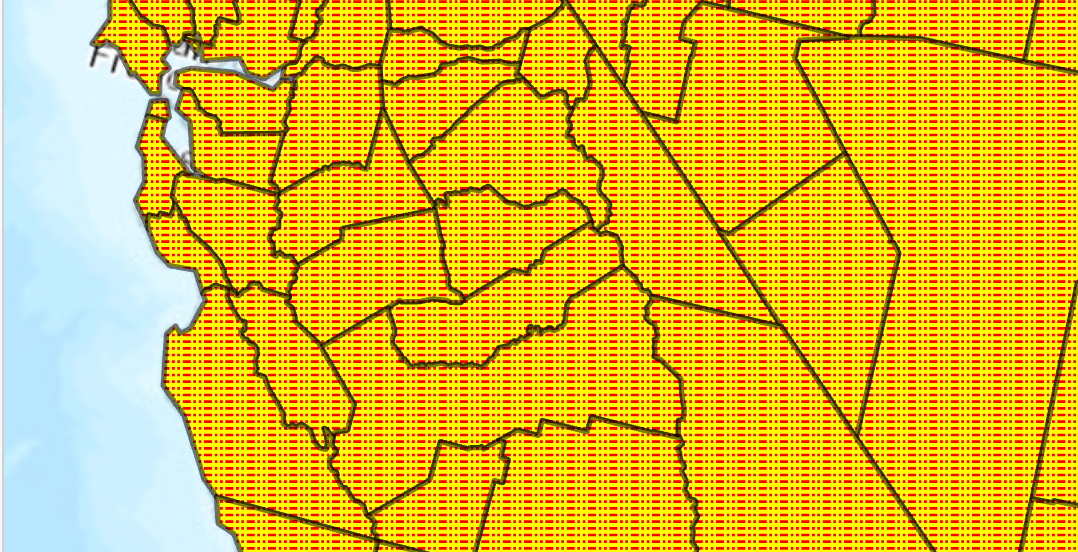
//Note: Run withing QueuedTask
  var trans = 50.0;//semi transparent
  CIMStroke outline = SymbolFactory.Instance.ConstructStroke(CIMColor.CreateRGBColor(0, 0, 0, trans), 2.0, SimpleLineStyle.Solid);

  //Stroke for the fill
  var dashDot = SymbolFactory.Instance.ConstructStroke(ColorFactory.Instance.RedRGB, 1.0, SimpleLineStyle.DashDotDot);
  //Mimic cross hatch
  CIMFill[] solidColorHatch =
        {

           new CIMHatchFill()
          {
              Enable = true,
              Rotation = 0.0,
              Separation = 2.5,
              LineSymbol = new CIMLineSymbol(){SymbolLayers = new CIMSymbolLayer[1] {dashDot } }
          },
           new CIMSolidFill()
          {
              Enable = true,
              Color = ColorFactory.Instance.CreateRGBColor(255, 255, 0)
          },
};
  List<CIMSymbolLayer> symbolLayers = [outline, .. solidColorHatch];
  //This is the polygon symbol with a dash dot fill
  CIMPolygonSymbol dashDotFillPolygon = new CIMPolygonSymbol() { SymbolLayers = symbolLayers.ToArray() };
  //To apply the symbol to a polygon feature layer
  //var renderer = theLayer.GetRenderer() as CIMSimpleRenderer;
  //renderer.Symbol = dashDotFillPolygon.MakeSymbolReference();
//theLayer.SetRenderer(renderer);Create a polygon symbol with a gradient color fill.
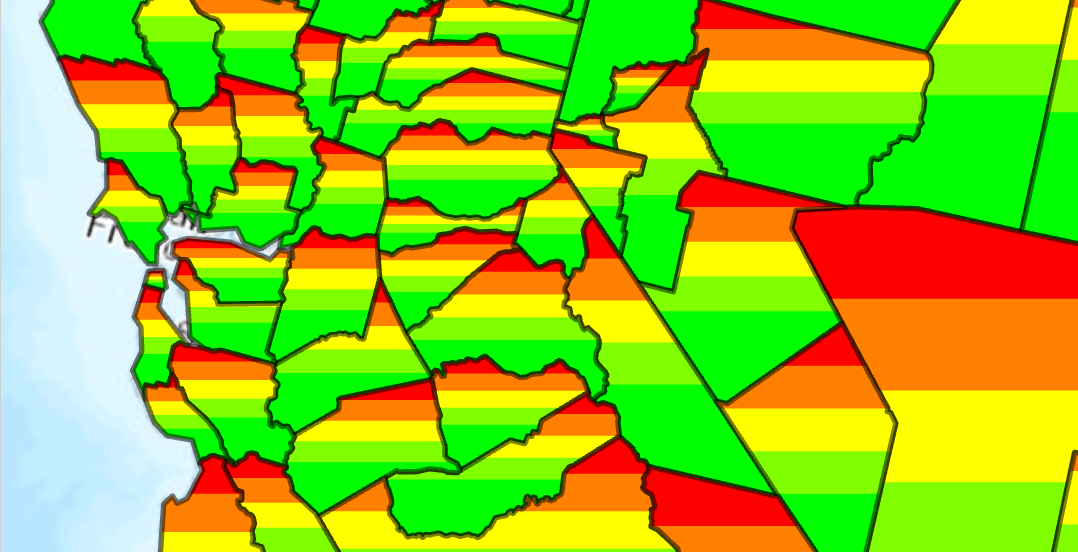
- Create a solid colored stroke with 50% transparency
- Create a fill using gradient colors red through green
- Apply both the stroke and fill as a symbol layer array to the new PolygonSymbol
//Note: Run withing QueuedTask
  var trans = 50.0;//semi transparent
  CIMStroke outline = SymbolFactory.Instance.ConstructStroke(CIMColor.CreateRGBColor(0, 0, 0, trans), 2.0, SimpleLineStyle.Solid);
  //Mimic cross hatch
  CIMFill solidColorHatch =
         new CIMGradientFill()
         {
           ColorRamp = ColorFactory.Instance.ConstructColorRamp(ColorRampAlgorithm.LinearContinuous,
                                ColorFactory.Instance.RedRGB, ColorFactory.Instance.GreenRGB)
         };
  List<CIMSymbolLayer> symbolLayers = new List<CIMSymbolLayer>
    {
              outline,
              solidColorHatch
    };

  CIMPolygonSymbol gradientColorFillPolygon = new CIMPolygonSymbol() { SymbolLayers = symbolLayers.ToArray() };
  //To apply the symbol to a polygon feature layer
  //var renderer = theLayer.GetRenderer() as CIMSimpleRenderer;
  //renderer.Symbol = gradientColorFillPolygon.MakeSymbolReference();
//theLayer.SetRenderer(renderer);Create a polygon symbol using the ConstructGradientFill method. Constructs a gradient fill between two colors passed to the method.
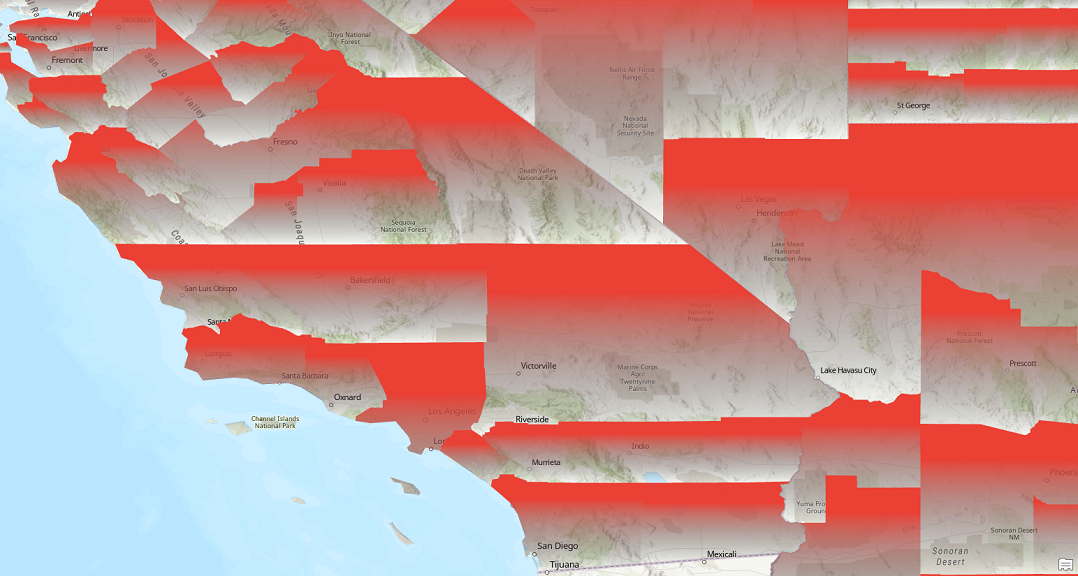
//Note: Run withing QueuedTask
  //gradient fill between 2 colors
  var gradientFill = SymbolFactory.Instance.ConstructGradientFill(CIMColor.CreateRGBColor(235, 64, 52), CIMColor.NoColor(), GradientFillMethod.Linear);
  List<CIMSymbolLayer> symbolLayers = new List<CIMSymbolLayer>
    {
              gradientFill
    };
  CIMPolygonSymbol gradientFillTwoColors = new CIMPolygonSymbol() { SymbolLayers = symbolLayers.ToArray() };
  //To apply the symbol to a polygon feature layer
  //var renderer = theLayer.GetRenderer() as CIMSimpleRenderer;
  //renderer.Symbol = gradientFillTwoColors.MakeSymbolReference();
//theLayer.SetRenderer(renderer);Create a polygon symbol using the ConstructGradientFill method. Constructs a gradient fill using the specified color ramp.
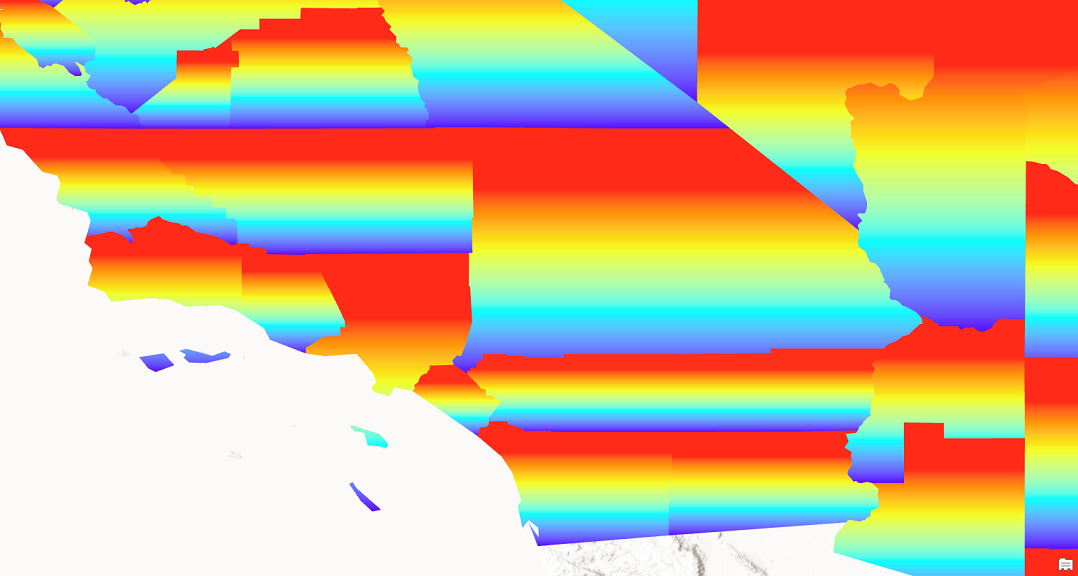
//Note: Run withing QueuedTask
  //outine
  CIMStroke outline = SymbolFactory.Instance.ConstructStroke(CIMColor.CreateRGBColor(49, 49, 49), 2.0, SimpleLineStyle.Solid);

  //gradient fill using a color ramp
  var gradientFill = SymbolFactory.Instance.ConstructGradientFill(GetColorRamp(), GradientFillMethod.Linear);

  List<CIMSymbolLayer> symbolLayers = new List<CIMSymbolLayer>
    {
              outline,
              gradientFill
    };
  CIMPolygonSymbol gradientColorRampSymbol = new CIMPolygonSymbol() { SymbolLayers = symbolLayers.ToArray() };
  //To apply the symbol to a polygon feature layer
  //var renderer = theLayer.GetRenderer() as CIMSimpleRenderer;
  //renderer.Symbol = gradientColorRampSymbol.MakeSymbolReference();
  //theLayer.SetRenderer(renderer);

  //Helper method to get a color ramp from the "ArcGIS Colors" style.
  static CIMColorRamp GetColorRamp()
  {
    //Get a ColorRamp
    StyleProjectItem style =
            Project.Current.GetItems<StyleProjectItem>().FirstOrDefault(s => s.Name == "ArcGIS Colors");
    var colorRampList = style.SearchColorRamps("Heat Map 4 - Semitransparent");

    CIMColorRamp colorRamp = colorRampList[0].ColorRamp;
    return colorRamp;
}Constructs a picture fill with the specified parameters.
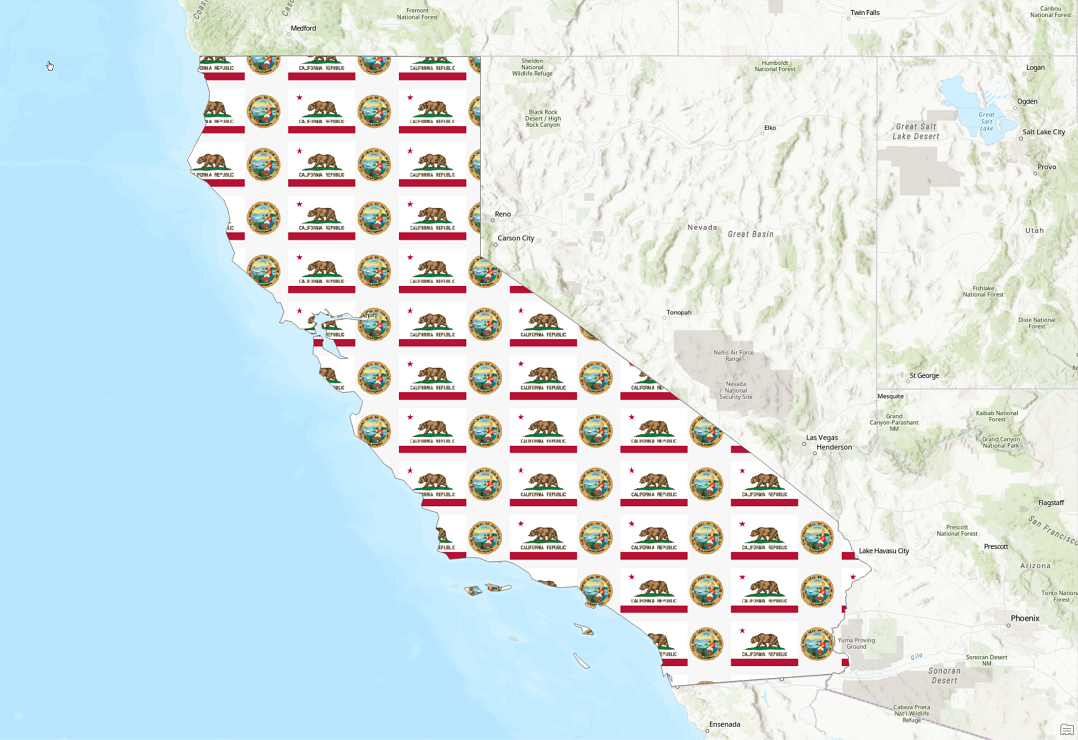
//Note: Run withing QueuedTask
  CIMStroke outline = SymbolFactory.Instance.ConstructStroke(CIMColor.CreateRGBColor(110, 110, 110), 2.0, SimpleLineStyle.Solid);
  //picture
  var imgPath = Path.Combine(Path.GetDirectoryName(Assembly.GetExecutingAssembly().Location), @"Images\CaliforniaEmblem.png");
  var pictureFill = SymbolFactory.Instance.ConstructPictureFill(imgPath, 64);

  List<CIMSymbolLayer> symbolLayers = new()
  {
    outline,
    pictureFill
  };
  CIMPolygonSymbol pictureFillPolygonSymbol = new CIMPolygonSymbol() { SymbolLayers = symbolLayers.ToArray() };
  //To apply the symbol to a polygon feature layer
  //var renderer = theLayer.GetRenderer() as CIMSimpleRenderer;
  //renderer.Symbol = pictureFillPolygonSymbol.MakeSymbolReference();
//theLayer.SetRenderer(renderer);Constructs a water fill of specific color, waterbody size and wave strength. This fill can be used on polygon feature classes in a Scene view only.

//Note: Run withing QueuedTask

  CIMStroke outline = SymbolFactory.Instance.ConstructStroke(CIMColor.CreateRGBColor(49, 49, 49, 50.0), 2.0, SimpleLineStyle.Solid);
  var waterFill = SymbolFactory.Instance.ConstructWaterFill(CIMColor.CreateRGBColor(3, 223, 252), WaterbodySize.Large, WaveStrength.Rippled);
  List<CIMSymbolLayer> symbolLayers = new List<CIMSymbolLayer>
    {
              outline,
              waterFill
    };
  CIMPolygonSymbol waterFillPolygonSymbol = new CIMPolygonSymbol() { SymbolLayers = symbolLayers.ToArray() };
  //To apply the symbol to a polygon feature layer
  //var renderer = theLayer.GetRenderer() as CIMSimpleRenderer;
  //renderer.Symbol = waterFillPolygonSymbol.MakeSymbolReference();
//theLayer.SetRenderer(renderer);Constructs a polygon symbol in the specified color representing a pen and ink ripple water fill. See https://www.esri.com/arcgis-blog/products/arcgis-pro/mapping/please-steal-this-pen-and-ink-style/
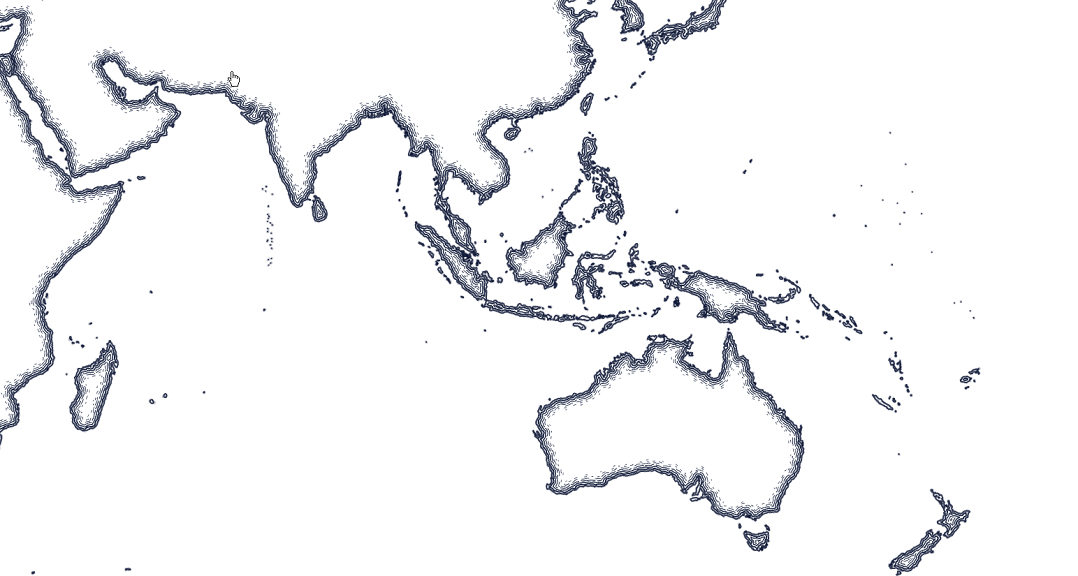
//Note: Run withing QueuedTask
  //Ripple pen and ink
  var penInkRipple = SymbolFactory.Instance.ConstructPolygonSymbolWithPenInkRipple(CIMColor.CreateRGBColor(13, 24, 54));
  CIMPolygonSymbol penInkRipplePolygonSymbol = penInkRipple;
  //To apply the symbol to a polygon feature layer
  //var renderer = theLayer.GetRenderer() as CIMSimpleRenderer;
  //renderer.Symbol = penInkRipplePolygonSymbol.MakeSymbolReference();
//theLayer.SetRenderer(renderer);Constructs a polygon symbol in the specified color representing a pen and ink stipple effect. See https://www.esri.com/arcgis-blog/products/arcgis-pro/mapping/please-steal-this-pen-and-ink-style/
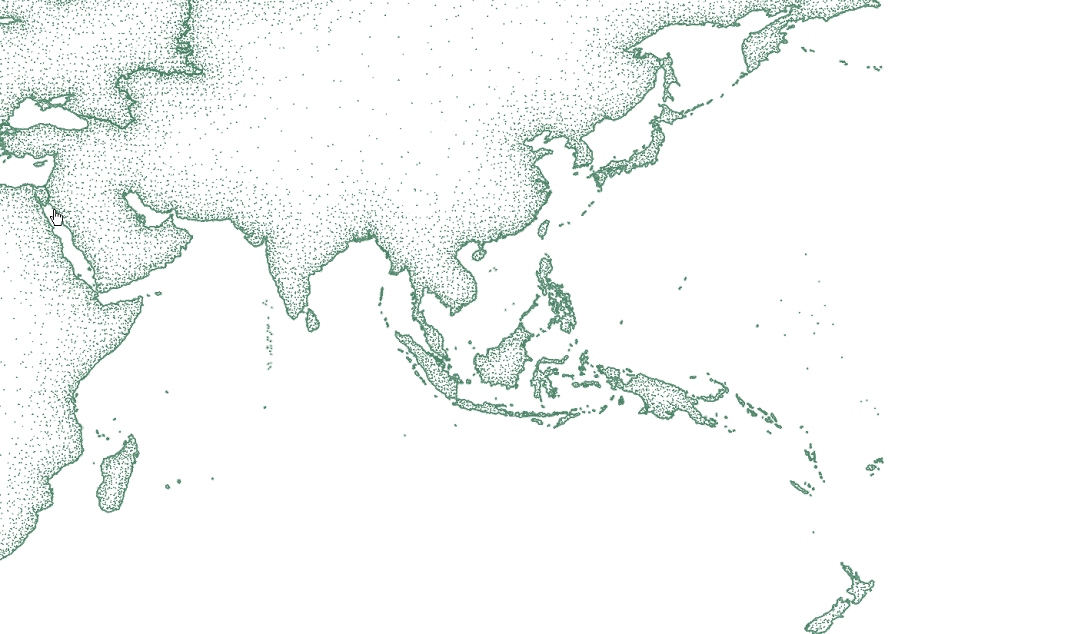
//Note: Run withing QueuedTask
  //Stipple pen and ink
  var penInkRipple = SymbolFactory.Instance.ConstructPolygonSymbolWithPenInkStipple(CIMColor.CreateRGBColor(78, 133, 105), true);
  CIMPolygonSymbol penInkStipple = penInkRipple;
  //To apply the symbol to a polygon feature layer
  //var renderer = theLayer.GetRenderer() as CIMSimpleRenderer;
  //renderer.Symbol = penInkStipple.MakeSymbolReference();
//theLayer.SetRenderer(renderer);Constructs a polygon symbol in the specified color representing a pen and ink cross hatch effect. See https://www.esri.com/arcgis-blog/products/arcgis-pro/mapping/please-steal-this-pen-and-ink-style/
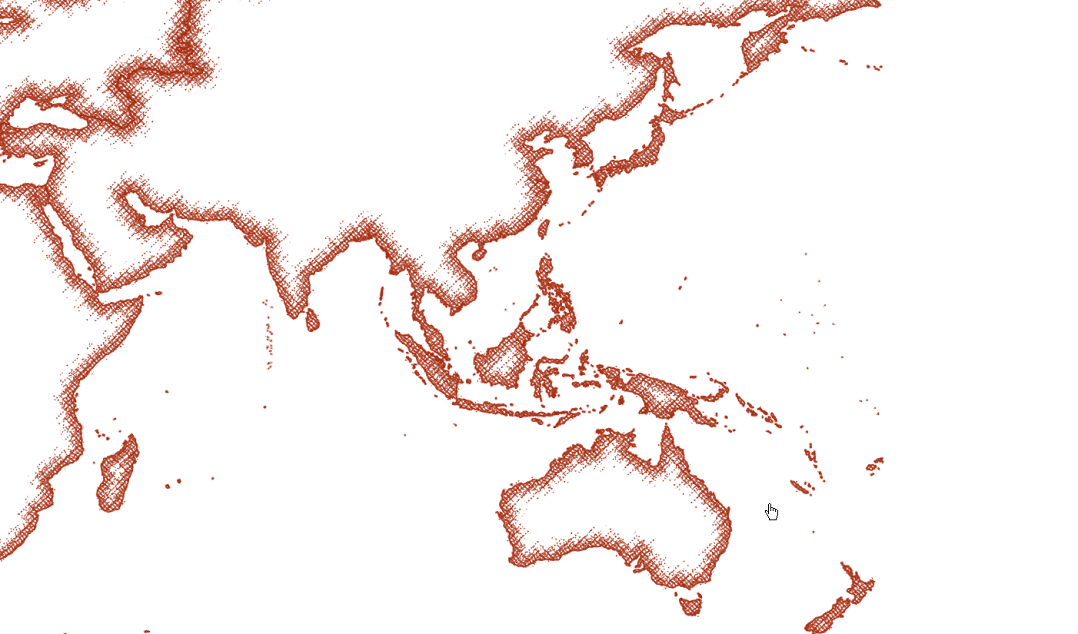
//Note: Run withing QueuedTask
  //Cross Hatch pen and ink
  var penkInkCrossHatch = SymbolFactory.Instance.ConstructPolygonSymbolWithPenInkCrossHatch(CIMColor.CreateRGBColor(168, 49, 22), true);
  CIMPolygonSymbol penInkCrossHatch = penkInkCrossHatch;
  //To apply the symbol to a polygon feature layer
  //var renderer = theLayer.GetRenderer() as CIMSimpleRenderer;
  //renderer.Symbol = penInkCrossHatch.MakeSymbolReference();
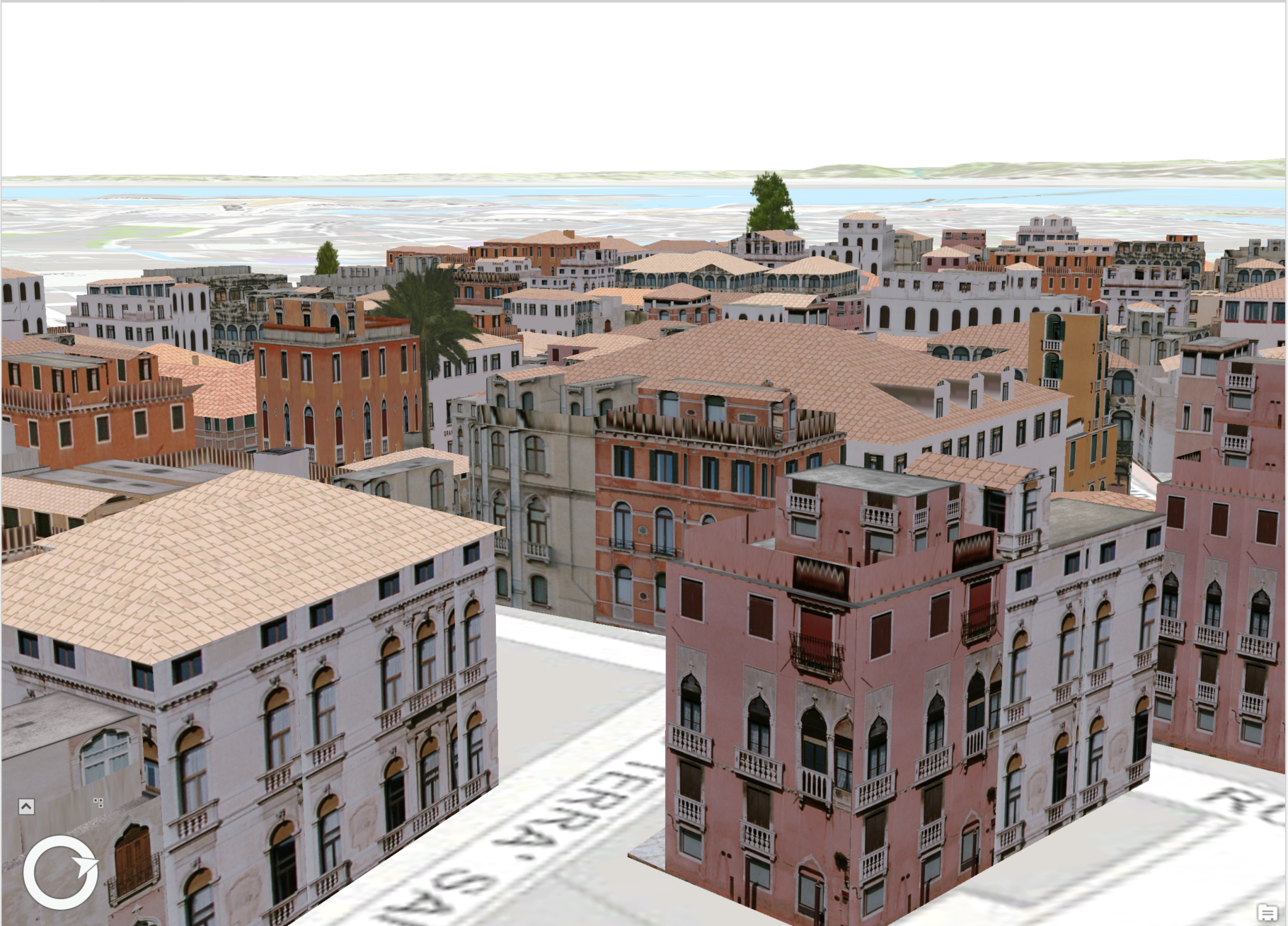
//theLayer.SetRenderer(renderer);Create a procedural symbol that can be applied to a polygon building footprint layer
//Note: Run withing QueuedTask
  string _rulePkgPath = @"C:\Data\RulePackages\Venice_2014.rpk";
  //Polygon symbol to hold the procedural layer
  var proceduralSymbol = SymbolFactory.Instance.ConstructPolygonSymbol();

  //Array of layers to hold a procedural symbol layer
  CIMSymbolLayer[] proceduralSymbolLyr =
        {
            new CIMProceduralSymbolLayer()
            {
                PrimitiveName = "Venice Rule package 2014",
                RulePackage = _rulePkgPath,
                RulePackageName = "Venice_2014",
            }
  };
  proceduralSymbol.SymbolLayers = proceduralSymbolLyr;
  //To apply the symbol to a polygon feature layer
  //var renderer = theLayer.GetRenderer() as CIMSimpleRenderer;
  //renderer.Symbol = proceduralSymbol.MakeSymbolReference();
//theLayer.SetRenderer(renderer); 